Turn on suggestions
Auto-suggest helps you quickly narrow down your search results by suggesting possible matches as you type.
- Canon Community
- Discussions & Help
- Camera
- Camera Software
- Converting Hif to Jpeg on computer
Options
- Subscribe to RSS Feed
- Mark Topic as New
- Mark Topic as Read
- Float this Topic for Current User
- Bookmark
- Subscribe
- Mute
- Printer Friendly Page
Converting Hif to Jpeg on computer

Options
- Mark as New
- Bookmark
- Subscribe
- Mute
- Subscribe to RSS Feed
- Permalink
- Report Inappropriate Content
10-21-2023 04:59 PM
I somehow today saved about 300 photos in HIF. I've never done that before. would anyone know how to convert HIF to Jpeg on a computer. Very frustrated
17 REPLIES 17


Options
- Mark as New
- Bookmark
- Subscribe
- Mute
- Subscribe to RSS Feed
- Permalink
- Report Inappropriate Content
10-21-2023 05:07 PM
Do you mean HEIC or HEIF?
Are you using a Macintosh? If so, you can use Finder Quick Actions to perform the conversion:
- Select all the HEIC or HEIF you wish to convert
- Right-click or Control-click the selected items
- Choose Quick Actions > Convert Image
- In the Conversion options, choose JPEG
--
Ricky
Camera: EOS R5 II, RF 50mm f/1.2L, RF 135mm f/1.8L
Lighting: Profoto Lights & Modifiers
Ricky
Camera: EOS R5 II, RF 50mm f/1.2L, RF 135mm f/1.8L
Lighting: Profoto Lights & Modifiers


Options
- Mark as New
- Bookmark
- Subscribe
- Mute
- Subscribe to RSS Feed
- Permalink
- Report Inappropriate Content
10-21-2023 05:07 PM
Welcome to the forum!
So that the Community can help you better, we will need to know what model Canon equipment you are using and which operating system. Error messages? Any other details you'd like to give will only help the Community better understand your issue. If this is a time-sensitive matter, click HERE search our knowledge base or find additional support options HERE
Thank you!

Options
- Mark as New
- Bookmark
- Subscribe
- Mute
- Subscribe to RSS Feed
- Permalink
- Report Inappropriate Content
10-21-2023 05:09 PM - edited 10-21-2023 05:13 PM
The Canon DPP software will do the conversion if they were produced by a Canon camera. DPP is free to download from the Canon support page for your camera if your camera is a Canon.
The Apple Photos.app included with macOS will do the conversion.
If your camera also saved a raw file, Canon DPP will convert the raw file to JPEG.
ImageMagick might do the conversion depending upon which libraries were included when it was built.
Some versions of gimp free software will do the conversion.
Some Canon cameras will do the conversion. It is in the playback menus of the camera.
Options
- Mark as New
- Bookmark
- Subscribe
- Mute
- Subscribe to RSS Feed
- Permalink
- Report Inappropriate Content
10-21-2023 05:41 PM
I usually work in RAW and then convert to jpeg, depending on what the image is. I can't get DPP4 to convert for me. I've been trying that. I also tried to upload an image here and it wouldn't take it.
Options
- Mark as New
- Bookmark
- Subscribe
- Mute
- Subscribe to RSS Feed
- Permalink
- Report Inappropriate Content
04-11-2024 12:24 PM
Did you ever find a solution for this? im having the same issue and i dont think i have the knowledge to fix it

Options
- Mark as New
- Bookmark
- Subscribe
- Mute
- Subscribe to RSS Feed
- Permalink
- Report Inappropriate Content
04-11-2024 12:26 PM
You need to answer the same questions we posed the OP.
Did you try any of the solutions already presented?

Options
- Mark as New
- Bookmark
- Subscribe
- Mute
- Subscribe to RSS Feed
- Permalink
- Report Inappropriate Content
04-11-2024 08:36 PM - edited 04-11-2024 08:40 PM
@PancreasThief wrote:Did you ever find a solution for this? im having the same issue and i dont think i have the knowledge to fix it
The first thing you need to do is go into the "Shooting 2" menu and disable "HDR Shooting - HDR PQ". Shooting 2 is where it is in all of the R manuals I have, so I'm confident you will find it there even though you didn't mention which R you own. This will prevent the HIF files from being created in the first place. Next you need to download/install DPP 4 and get acquainted with the "Batch Process..." command in the File pulldown. You will have to have your HIF files loaded and selected in DPP. I've used other converters and DPP, albeit slower, does the best job.
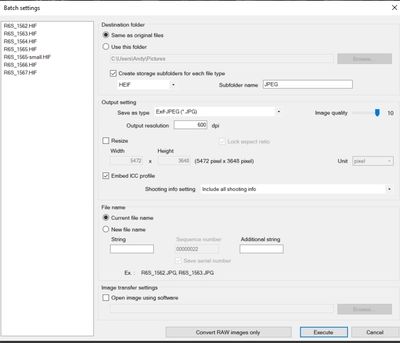
Depending on how many HIF files you have, it may take some time. When I use HDR PQ, I don't save to HIF in camera but convert to HIF in DPP after editing my Raw files. So my conversion is from Raw. The screen shot was from another post about HIF to JPG that I posted.
Newton
Options
- Mark as New
- Bookmark
- Subscribe
- Mute
- Subscribe to RSS Feed
- Permalink
- Report Inappropriate Content
03-18-2025 12:07 AM
I've used this method (Batch save and Convert) to convert HDR photos to JPG, but they all end up much lighter than the original, both viewed in DPP. The exported JPG looks the same in DPP, ACDSee and Windows 11 Photo viewer. I have tried selecting the option to "Embed color profile" and not embedded it. Both results are the same.
To get the resulting JPG to look anything like the original on the same HDR monitor, I have to edit the JPG and reduce the brightness -30eV points.
I cannot find a way to fix this in DPP.
I can also not edit the HDR photo. All the brightness and colour settings are greyed out on the "Tool palette". I have DPP 4.19
Can anyone help please?
Options
- Mark as New
- Bookmark
- Subscribe
- Mute
- Subscribe to RSS Feed
- Permalink
- Report Inappropriate Content
03-18-2025 02:26 AM
Further to the comment above, the conversion applies some sharpening as well.
There is no control over these items (that I can find). The same changes appear when using the in-camera HIF-> JPG conversion.
I have a Canon R7.


Announcements
07/22/2026: New firmware updates are available.
EOS R6 Mark III - Version 1.1.0
05/13/2026: New firmware updates are available.
EOS R5 Mark II - Version 1.3.0
EOS R6 Mark II - Version 1.7.0
04/28/2026: Service Notice: Caution Concerning use of Lithium Batteries
03/17/2026: New firmware updates are available.
SELPHY CP1500 - Version 1.0.7.0
02/23/2026: New firmware update is available for EOS C50- Version 1.0.3.1
01/23/2026: New firmware update is available for RF 24-105mm F4 IS USM- Version 2.0.7
01/20/2026: New firmware updates are available.
10/21/2025: Service Notice: To Users of the Compact Digital Camera PowerShot V1
10/15/2025: New firmware updates are available.
Speedlite EL-5 - Version 1.2.0
Speedlite EL-1 - Version 1.1.0
Speedlite Transmitter ST-E10 - Version 1.2.0
07/28/2025: Notice of Free Repair Service for the Mirrorless Camera EOS R50 (Black)
05/21/2025: New firmware update available for EOS C500 Mark II - Version 1.1.5.1
Related Content
- EOS Utility 3 live view in Camera Software
- EOS Canon R6 mkIII Image write failure in EOS DSLR & Mirrorless Cameras
- Thoughts on DPP Version 4.21.11.0 in Camera Software
- HDRPQ How to Convert to Jpeg? R5M2 in EOS DSLR & Mirrorless Cameras
- Viewing external video using the PowerShot SX720 HS in Point & Shoot Digital Cameras

Ⓒ 2026
Canon U.S.A Inc. All Rights Reserved. Reproduction in whole or part without permission is prohibited.
