Turn on suggestions
Auto-suggest helps you quickly narrow down your search results by suggesting possible matches as you type.
- Canon Community
- Discussions & Help
- Camera
- Camera Software
- Re: Convert and save in DPP only goes to 20%
Options
- Subscribe to RSS Feed
- Mark Topic as New
- Mark Topic as Read
- Float this Topic for Current User
- Bookmark
- Subscribe
- Mute
- Printer Friendly Page
Convert and save in DPP only goes to 20%

Options
- Mark as New
- Bookmark
- Subscribe
- Mute
- Subscribe to RSS Feed
- Permalink
- Report Inappropriate Content
05-21-2021 06:53 PM
Just wondering if I am the only one. If I process a raw in DPP from my R, the bar only goes to 20%. It does look OK. If I do the same thing with raws from my 90D, the bar goes to 100% as would be expected. NO errors and using the latest version.
2 REPLIES 2


Options
- Mark as New
- Bookmark
- Subscribe
- Mute
- Subscribe to RSS Feed
- Permalink
- Report Inappropriate Content
05-22-2021 04:07 AM - edited 05-22-2021 04:23 AM
@rlt53090 wrote:Just wondering if I am the only one. If I process a raw in DPP from my R, the bar only goes to 20%. It does look OK. If I do the same thing with raws from my 90D, the bar goes to 100% as would be expected. NO errors and using the latest version.
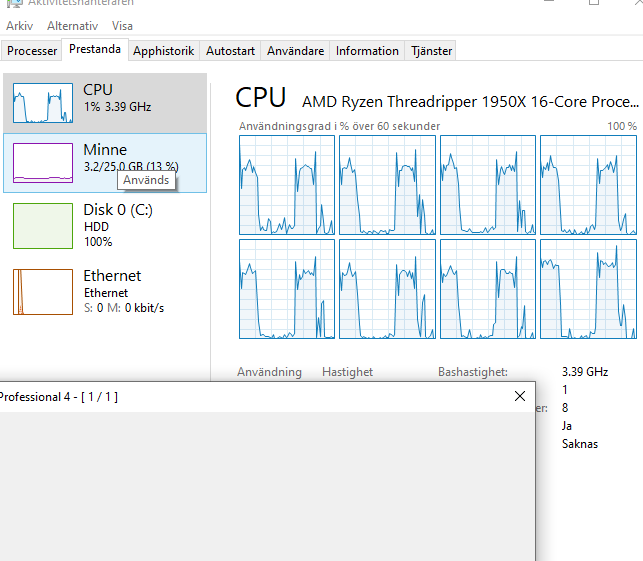
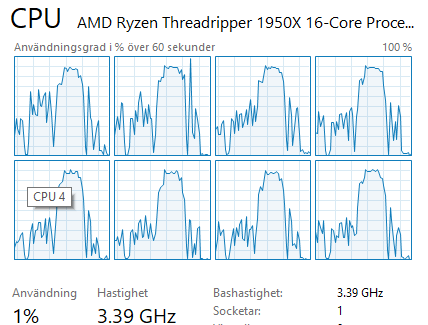
Have you checked if your GPU is taking over instead? My other raw converter puts as much as possible to the GPU instead of CPU.
I tried DPP4 in Virtual box (only 8 threads and no GPU) .First one EOS R. Second one 90D. Got 70% with R and 90% with 90D.

Options
- Mark as New
- Bookmark
- Subscribe
- Mute
- Subscribe to RSS Feed
- Permalink
- Report Inappropriate Content
05-22-2021 06:24 AM
I have noticed that behavior in previous versions of DPP with 1DX III files but the current version shows 100% with the files from all of my different bodies including the 1DX III. As long as it is completing the operation, I wouldn't be concerned.
And nothing is more useless than a PC displaying percent of file completion, it is like the frequent updates from the failed abortion also known as Windows 10 where the first 80% of the update takes 5 minutes and the next 20% takes 25 minutes. Percentage of time complete would be a useful metric.
DPP could be a much more useful software package with just a few improvements and having an option to NOT display that useless percentage complete splash screen is one of them. When I am editing a bunch of RAW files, I really don't need to have a splash screen in the way of working on the next one while DPP is providing a useless message that takes up a large place on the screen and moving it out of the way is just another wasted step.
Rodger
EOS 1DX M3, 1DX M2, 1DX, 5DS R, M6 Mark II, 1D M2, EOS 650 (film), many lenses, XF400 video


Announcements
07/22/2026: New firmware updates are available.
EOS R6 Mark III - Version 1.1.0
05/13/2026: New firmware updates are available.
EOS R5 Mark II - Version 1.3.0
EOS R6 Mark II - Version 1.7.0
04/28/2026: Service Notice: Caution Concerning use of Lithium Batteries
03/17/2026: New firmware updates are available.
SELPHY CP1500 - Version 1.0.7.0
02/23/2026: New firmware update is available for EOS C50- Version 1.0.3.1
01/23/2026: New firmware update is available for RF 24-105mm F4 IS USM- Version 2.0.7
01/20/2026: New firmware updates are available.
10/21/2025: Service Notice: To Users of the Compact Digital Camera PowerShot V1
10/15/2025: New firmware updates are available.
Speedlite EL-5 - Version 1.2.0
Speedlite EL-1 - Version 1.1.0
Speedlite Transmitter ST-E10 - Version 1.2.0
07/28/2025: Notice of Free Repair Service for the Mirrorless Camera EOS R50 (Black)
05/21/2025: New firmware update available for EOS C500 Mark II - Version 1.1.5.1
Related Content
- R1 & CLOG 2 Rec 709 Input LUT: Which to use and where to find it? in EOS DSLR & Mirrorless Cameras
- Convert and Save on DPP 4.21.11 and 4.19.x does not work on Mac M2 with Sonoma in Camera Software
- Solutions for files saved by Canon DPP and problems loading them into other software in Camera Software
- No Vignetting Fix for Powershot V1 in CR3/Raw? in Point & Shoot Digital Cameras
- EOS R50 CR3 and HIF file types incompatible with my old Mac in EOS DSLR & Mirrorless Cameras

Ⓒ 2026
Canon U.S.A Inc. All Rights Reserved. Reproduction in whole or part without permission is prohibited.
