Turn on suggestions
Auto-suggest helps you quickly narrow down your search results by suggesting possible matches as you type.
- Canon Community
- Discussions & Help
- Camera
- Camera Software
- Connect with Canon Camera Connect without WiFi
Options
- Subscribe to RSS Feed
- Mark Topic as New
- Mark Topic as Read
- Float this Topic for Current User
- Bookmark
- Subscribe
- Mute
- Printer Friendly Page

Options
- Mark as New
- Bookmark
- Subscribe
- Mute
- Subscribe to RSS Feed
- Permalink
- Report Inappropriate Content
08-01-2025 10:20 AM
Using a 90D
I am unable to get a usable connection with the Canon Camera Connect app. I'm in an area with poor Wi-Fi and going to a place with no Wi-Fi.
I connect my camera to the app but when I try to either download pictures or use the app to remote control the camera it says it's shifting to Wi-Fi for better connection (better than what? Bluetooth?). It fails every time. Again Wi-Fi is not good here. I'm certain Bluetooth is better.
Have tried disabling Wi-Fi connection on the camera to force a Bluetooth connection. Every time it says I have to enable Wi-Fi to proceed. I do and it falls. I tried turning on off Wi-Fi on my phone. The same thing happens.
I've been able to manage a strong enough Wi-Fi connection to make this post. But I'm going to a place where even that won't be an option. I need to be able to use the remote function. Can somebody please help me connect my phone to my camera WITHOUT WiFi!
Thanks
Solved! Go to Solution.
1 ACCEPTED SOLUTION
Accepted Solutions


Options
- Mark as New
- Bookmark
- Subscribe
- Mute
- Subscribe to RSS Feed
- Permalink
- Report Inappropriate Content
08-01-2025 11:10 AM - edited 08-01-2025 11:15 AM
Hi @ddt,
I'm not sure you understand the technology. The camera is the host, and broadcasts its own Wi-Fi network that your mobile device can connect to. As John pointed out, It does not rely on any external sources of Wi-Fi, Cellular or Bluetooth.
You must have Wi-Fi enabled on the camera in order for your mobile device to connect to it. While the Canon Connect app does offer the flexibility for your camera and mobile device to be connected to the same Wi-Fi network (example) at your house, this is simply another option.
See my screenshots below this is my camera's Wi-Fi broadcasting it's own network.
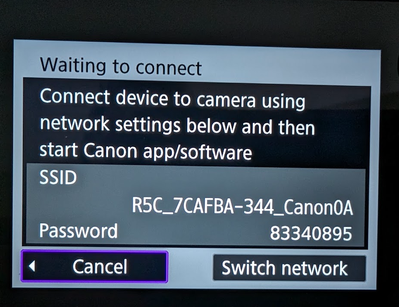
In this shot I will select the camera's Wi-Fi broadcast, enter the password and connect my mobile device directly to the camera.
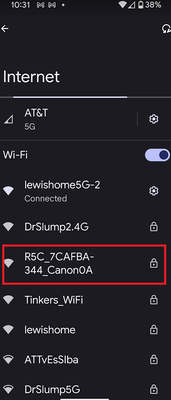
Your 90D operates the same way 😉
~Rick
Bay Area - CA
~R5 C (1.1.3.1), ~RF Trinity, ~RF 100 Macro, ~RF 100~400, ~RF 100~500, ~RF 200-800, ~RF 1.4x TC, BG-R10, 430EX III-RT ~DxO PhotoLab Elite ~DaVinci Resolve Studio ~ImageClass MF644Cdw MF656Cdw ~Pixel 10 ~CarePaks Are Worth It
12 REPLIES 12

Options
- Mark as New
- Bookmark
- Subscribe
- Mute
- Subscribe to RSS Feed
- Permalink
- Report Inappropriate Content
08-01-2025 10:32 AM
@ddt wrote:
Using a 90D
I am unable to get a usable connection with the Canon Camera Connect app. I'm in an area with poor Wi-Fi and going to a place with no Wi-Fi.
I connect my camera to the app but when I try to either download pictures or use the app to remote control the camera it says it's shifting to Wi-Fi for better connection (better than what? Bluetooth?). It fails every time. Again Wi-Fi is not good here. I'm certain Bluetooth is better.
Have tried disabling Wi-Fi connection on the camera to force a Bluetooth connection. Every time it says I have to enable Wi-Fi to proceed. I do and it falls. I tried turning on off Wi-Fi on my phone. The same thing happens.
I've been able to manage a strong enough Wi-Fi connection to make this post. But I'm going to a place where even that won't be an option. I need to be able to use the remote function. Can somebody please help me connect my phone to my camera WITHOUT WiFi!
Thanks
The Camera Connect app uses the camera Wi-Fi. I have used the app in areas that don't even have cell service.
Video Overview of the Canon Camera Connect App
John Hoffman
Conway, NH
R6 Mark III, M200 (converted to infrared), RF lenses, Pixma PRO-100, Pixma TR8620a, Lr Classic
Conway, NH
R6 Mark III, M200 (converted to infrared), RF lenses, Pixma PRO-100, Pixma TR8620a, Lr Classic
Options
- Mark as New
- Bookmark
- Subscribe
- Mute
- Subscribe to RSS Feed
- Permalink
- Report Inappropriate Content
08-01-2025 10:38 AM
To be clear:
The phone and camera are able to pair via Bluetooth just fine. But the app just doesn't work without robust Wi-Fi.
Options
- Mark as New
- Bookmark
- Subscribe
- Mute
- Subscribe to RSS Feed
- Permalink
- Report Inappropriate Content
08-01-2025 10:42 AM
Give Canon support a call at 1-800-OK-CANON.
John Hoffman
Conway, NH
R6 Mark III, M200 (converted to infrared), RF lenses, Pixma PRO-100, Pixma TR8620a, Lr Classic
Conway, NH
R6 Mark III, M200 (converted to infrared), RF lenses, Pixma PRO-100, Pixma TR8620a, Lr Classic
Options
- Mark as New
- Bookmark
- Subscribe
- Mute
- Subscribe to RSS Feed
- Permalink
- Report Inappropriate Content
08-01-2025 11:10 AM - edited 08-01-2025 11:15 AM
Hi @ddt,
I'm not sure you understand the technology. The camera is the host, and broadcasts its own Wi-Fi network that your mobile device can connect to. As John pointed out, It does not rely on any external sources of Wi-Fi, Cellular or Bluetooth.
You must have Wi-Fi enabled on the camera in order for your mobile device to connect to it. While the Canon Connect app does offer the flexibility for your camera and mobile device to be connected to the same Wi-Fi network (example) at your house, this is simply another option.
See my screenshots below this is my camera's Wi-Fi broadcasting it's own network.
In this shot I will select the camera's Wi-Fi broadcast, enter the password and connect my mobile device directly to the camera.
Your 90D operates the same way 😉
~Rick
Bay Area - CA
~R5 C (1.1.3.1), ~RF Trinity, ~RF 100 Macro, ~RF 100~400, ~RF 100~500, ~RF 200-800, ~RF 1.4x TC, BG-R10, 430EX III-RT ~DxO PhotoLab Elite ~DaVinci Resolve Studio ~ImageClass MF644Cdw MF656Cdw ~Pixel 10 ~CarePaks Are Worth It

Options
- Mark as New
- Bookmark
- Subscribe
- Mute
- Subscribe to RSS Feed
- Permalink
- Report Inappropriate Content
08-01-2025 01:19 PM
Do you have the latest version of Canon Connect installed on your phone? If none of the above works, try deleting the app and all that’s in the catch from your phone then download it again.

Options
- Mark as New
- Bookmark
- Subscribe
- Mute
- Subscribe to RSS Feed
- Permalink
- Report Inappropriate Content
08-01-2025 06:37 PM
If you have a VPN up and running your camera may not be able to connect to your phone.
Options
- Mark as New
- Bookmark
- Subscribe
- Mute
- Subscribe to RSS Feed
- Permalink
- Report Inappropriate Content
08-01-2025 09:29 PM
Thank you all. This has been hugely helpful.
Options
- Mark as New
- Bookmark
- Subscribe
- Mute
- Subscribe to RSS Feed
- Permalink
- Report Inappropriate Content
06-07-2026 02:48 PM
Hello, very nice reply. Good details.
However I do understand the details. I have been using camera connect for a couple of years. Connected via bluetooth, then wifi without issues. SUDDENLY (like last night) the connection hangs at the wifi connection and eventually times out. When I check the phone (android) wifi settings, it says is connected via Wifi, but the password line is blank. I've never checked this before, but I haven't needed to since it always connected. I have both an RP, and an R6m3. Both worked last time I tried (with in the last month). Wifi on phone connects to home and other networks still. I have unpaired devices from phone, un-installed/re-installed camera connect. And reset wireless setting on both cameras. Then repaired both cameras. Bluetooth pairs fine, but when I attempt to access images or remote control cameras, they both hang one the "Switching to a faster WiFi.." screen with the 3rd light flashing until it times out, all while the phone's wifi indicates that it is connected via wifi to the camera.


Options
- Mark as New
- Bookmark
- Subscribe
- Mute
- Subscribe to RSS Feed
- Permalink
- Report Inappropriate Content
06-07-2026 03:04 PM
Any number of things can cause the handshake to fail.
Your phone must be logged into your Canon Account. When your phone connects to your camera via bluetooth, after it tries to establish the WiFi connection, if your device gives you an error message about not having Internet access, you have to bypass that, since you know your camera doesn't provide your phone with Internet access - all you're doing is transferring images. Once you've bypassed that message, your device and camera should stay connected. If they don't, you'll need to contact support when they're open: weekdays from 9am to 6pm (ET) at 800-OK-CANON (800-652-2666).


Announcements
07/22/2026: New firmware updates are available.
EOS R6 Mark III - Version 1.1.0
05/13/2026: New firmware updates are available.
EOS R5 Mark II - Version 1.3.0
EOS R6 Mark II - Version 1.7.0
04/28/2026: Service Notice: Caution Concerning use of Lithium Batteries
03/17/2026: New firmware updates are available.
SELPHY CP1500 - Version 1.0.7.0
02/23/2026: New firmware update is available for EOS C50- Version 1.0.3.1
01/23/2026: New firmware update is available for RF 24-105mm F4 IS USM- Version 2.0.7
01/20/2026: New firmware updates are available.
10/21/2025: Service Notice: To Users of the Compact Digital Camera PowerShot V1
10/15/2025: New firmware updates are available.
Speedlite EL-5 - Version 1.2.0
Speedlite EL-1 - Version 1.1.0
Speedlite Transmitter ST-E10 - Version 1.2.0
07/28/2025: Notice of Free Repair Service for the Mirrorless Camera EOS R50 (Black)
05/21/2025: New firmware update available for EOS C500 Mark II - Version 1.1.5.1
Related Content
- EOS R50 Failed Bluetooth Connection in EOS DSLR & Mirrorless Cameras
- Where to download Canon Camera Connect v3 for Windows 11 in Camera Software
- Best way to transfer/back up photo and video files to external SSD in EOS DSLR & Mirrorless Cameras
- Cannot batch-select / select all photos by date in Camera Connect App (IXUS 255 HS & iPhone 12) in Camera Software
- R6 Mark II WiFi Connectivity Issues when pushing to SFTP in EOS DSLR & Mirrorless Cameras

Ⓒ 2026
Canon U.S.A Inc. All Rights Reserved. Reproduction in whole or part without permission is prohibited.
