Turn on suggestions
Auto-suggest helps you quickly narrow down your search results by suggesting possible matches as you type.
- Canon Community
- Discussions & Help
- Camera
- Camera Software
- Canon Connect won’t let me sign in.
Options
- Subscribe to RSS Feed
- Mark Topic as New
- Mark Topic as Read
- Float this Topic for Current User
- Bookmark
- Subscribe
- Mute
- Printer Friendly Page

Options
- Mark as New
- Bookmark
- Subscribe
- Mute
- Subscribe to RSS Feed
- Permalink
- Report Inappropriate Content
04-06-2025 07:12 PM
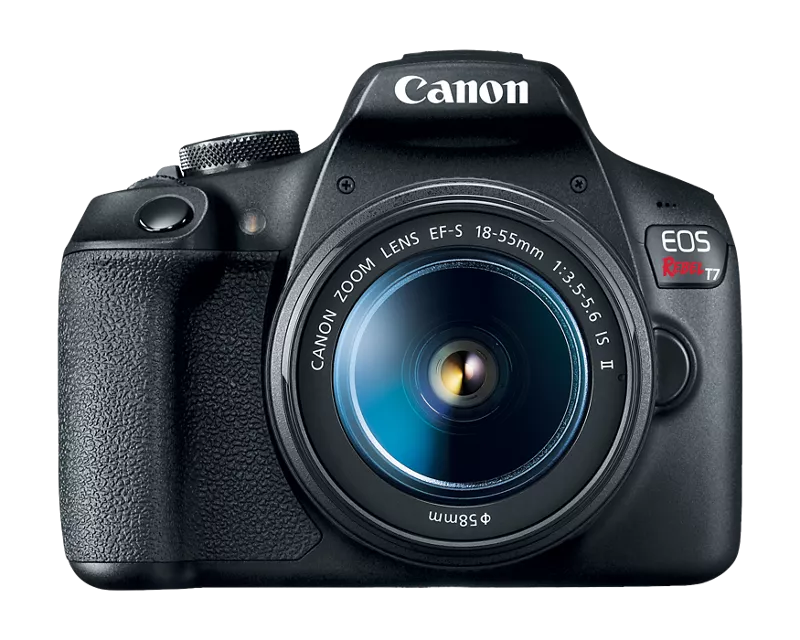
So recently I just got my Canon Rebel T7. It was great, I set it up with the canon camera connect app and it worked perfectly for me for about 3 months. Then recently it just signed me out. I thought no big deal but when I went to sign in it keeps giving me the same error code. I even tried downloading a different canon app and I still got the error code 403. It happens when I get directed to the myid.canon website. Can anyone help me with this? EOS Rebel T7 EF-S 18-55mm IS II Kit

Solved! Go to Solution.
1 ACCEPTED SOLUTION
Accepted Solutions


Options
- Mark as New
- Bookmark
- Subscribe
- Mute
- Subscribe to RSS Feed
- Permalink
- Report Inappropriate Content
04-06-2025 10:17 PM
Are you perhaps connecting your iPhone to a VPN? If so, try connecting without the VPN and see if that makes a difference.
--
Ricky
Camera: EOS R5 II, RF 50mm f/1.2L, RF 135mm f/1.8L
Lighting: Profoto Lights & Modifiers
Ricky
Camera: EOS R5 II, RF 50mm f/1.2L, RF 135mm f/1.8L
Lighting: Profoto Lights & Modifiers
17 REPLIES 17

Options
- Mark as New
- Bookmark
- Subscribe
- Mute
- Subscribe to RSS Feed
- Permalink
- Report Inappropriate Content
04-06-2025 08:59 PM - edited 04-06-2025 09:04 PM
Greetings,
I just checked on my CC App and account. Log in from my browser and in the App were both successful. The App then allowed me to register my existing camera to my Canon ID with a tap. Not sure what Canon ID is going to be used for yet, but I've had my account since around the end of last year.
If you're not able to log into your Canada ID using a browser, reset your password. Once you're able to log in there, you shouldn't have any problem logging in to it on the Canon Connect App.
~Rick
Bay Area - CA
~R5 C (1.1.3.1), ~RF Trinity, ~RF 100 Macro, ~RF 100~400, ~RF 100~500, ~RF 200-800, ~RF 1.4x TC, BG-R10, 430EX III-RT ~DxO PhotoLab Elite ~DaVinci Resolve Studio ~ImageClass MF644Cdw MF656Cdw ~Pixel 10 ~CarePaks Are Worth It
Options
- Mark as New
- Bookmark
- Subscribe
- Mute
- Subscribe to RSS Feed
- Permalink
- Report Inappropriate Content
04-06-2025 10:17 PM
Are you perhaps connecting your iPhone to a VPN? If so, try connecting without the VPN and see if that makes a difference.
--
Ricky
Camera: EOS R5 II, RF 50mm f/1.2L, RF 135mm f/1.8L
Lighting: Profoto Lights & Modifiers
Ricky
Camera: EOS R5 II, RF 50mm f/1.2L, RF 135mm f/1.8L
Lighting: Profoto Lights & Modifiers
Options
- Mark as New
- Bookmark
- Subscribe
- Mute
- Subscribe to RSS Feed
- Permalink
- Report Inappropriate Content
04-06-2025 10:27 PM
RS-EOS.. Ricky...
Oh happy day!!!!! Glad to see you!
~Rick
Bay Area - CA
~R5 C (1.1.3.1), ~RF Trinity, ~RF 100 Macro, ~RF 100~400, ~RF 100~500, ~RF 200-800, ~RF 1.4x TC, BG-R10, 430EX III-RT ~DxO PhotoLab Elite ~DaVinci Resolve Studio ~ImageClass MF644Cdw MF656Cdw ~Pixel 10 ~CarePaks Are Worth It
Options
- Mark as New
- Bookmark
- Subscribe
- Mute
- Subscribe to RSS Feed
- Permalink
- Report Inappropriate Content
04-07-2025 06:26 AM
Thank You! I was actually using a VPN and I didn’t even realize that would mess with the app.
Options
- Mark as New
- Bookmark
- Subscribe
- Mute
- Subscribe to RSS Feed
- Permalink
- Report Inappropriate Content
04-26-2025 02:07 PM
I had the same problem. Note that this is a NEW issue for Canon Connect. I have used the app for years with a VPN. And only now it does not work. Worse, it logs you out. So if the VPN is on when you start the app, you are blocked. Then you have to turn off the VPN and re-log in.
This is an unfortunatete change and I hope Canon can either explain why they are blocking the app on a VPN or fix it. How do I complain directly to Canon?
Options
- Mark as New
- Bookmark
- Subscribe
- Mute
- Subscribe to RSS Feed
- Permalink
- Report Inappropriate Content
04-27-2025 08:35 AM
Same problem here. Have used the canon apps since June 2023 to send photos to my mobile device while on assignment. Last time I used Canon connect successfully ( with no sign in requirement was March 8. Now, on another assignment-- discovered yesterday that canon connect requires login(!!!!).
Login to Canon Connect doesn't work when the phone is connected to either of the R5's WiFi.
Login to Canon Connect doesn't work on regular ( non camera WiFi) it produces a 403 error the first time and the logon hangs every subsequent time.
The only time any login works for myid.canon is by:
1) typing in myid.canon
2) selecting email id and entering the password
then the sign on to myid.canon works. Yes, the VPN is off each time I attempt login. Unfortunately this is useless since it doesn't work from either of the R5's. This means the hundreds of photos I take each day are on the R5's, I can't transfer them to the mobile device. Had I known about this change in advance, I would have ordered a data cable and tested out that alternative before going on assignment. Canon knows who has installed canon connect-- you would think they would send out an email to all those users informing them of this change that requires login. I love the canon equipment I use so faithfully. I need a solution to this problem with Canon Connect. Looking forward to comments and feedback. Thank you for your patience and support!


Options
- Mark as New
- Bookmark
- Subscribe
- Mute
- Subscribe to RSS Feed
- Permalink
- Report Inappropriate Content
04-27-2025 09:01 AM
Hello.
We understand how frustrating change can be, especially when it impacts your workflow. Our parent company, Canon, Inc., in Japan, has decided that the best way to ensure all users receive adequate support and timely app updates is to know how many users are actively using the Camera Connect app and what products they use. You can read the announcement HERE.
Options
- Mark as New
- Bookmark
- Subscribe
- Mute
- Subscribe to RSS Feed
- Permalink
- Report Inappropriate Content
04-28-2025 02:53 AM
Thank you Canon Moderator Stephen for sharing the link to the announcement. I've read again-- I read yesterday too.
Where is the 403 error in Camera Connect documented-- beyond the discussions within this community forum?

Options
- Mark as New
- Bookmark
- Subscribe
- Mute
- Subscribe to RSS Feed
- Permalink
- Report Inappropriate Content
04-28-2025 03:27 AM
This is the reason why I keep the old version:
"Q: Can Camera Connect be used without an internet connection?
A: Once signed in, you can use it offline within the validity period of the sign-in without being asked to sign in again"
Is that period one week, one month, one year or one decade?

Announcements
07/22/2026: New firmware updates are available.
EOS R6 Mark III - Version 1.1.0
05/13/2026: New firmware updates are available.
EOS R5 Mark II - Version 1.3.0
EOS R6 Mark II - Version 1.7.0
04/28/2026: Service Notice: Caution Concerning use of Lithium Batteries
03/17/2026: New firmware updates are available.
SELPHY CP1500 - Version 1.0.7.0
02/23/2026: New firmware update is available for EOS C50- Version 1.0.3.1
01/23/2026: New firmware update is available for RF 24-105mm F4 IS USM- Version 2.0.7
01/20/2026: New firmware updates are available.
10/21/2025: Service Notice: To Users of the Compact Digital Camera PowerShot V1
10/15/2025: New firmware updates are available.
Speedlite EL-5 - Version 1.2.0
Speedlite EL-1 - Version 1.1.0
Speedlite Transmitter ST-E10 - Version 1.2.0
07/28/2025: Notice of Free Repair Service for the Mirrorless Camera EOS R50 (Black)
05/21/2025: New firmware update available for EOS C500 Mark II - Version 1.1.5.1
Related Content
- Canon Connect no longer working in Camera Software
- Just bought Canon R100- questions about using bluetooth to transfer images to smartphone in EOS DSLR & Mirrorless Cameras
- PowerShot SX620 HS Zoom and other functions limited via Canon Connect in Point & Shoot Digital Cameras
- Server error link image.canon with lightroom. in Camera Software
- EOS R5 Mark II sent in for repair and came back unrepaired in EOS DSLR & Mirrorless Cameras

Ⓒ 2026
Canon U.S.A Inc. All Rights Reserved. Reproduction in whole or part without permission is prohibited.
