Turn on suggestions
Auto-suggest helps you quickly narrow down your search results by suggesting possible matches as you type.
- Canon Community
- Discussions & Help
- Camera
- Camera Software
- CameraWindow DC 8.10.11b for Mac OS X Impossible t...
Options
- Subscribe to RSS Feed
- Mark Topic as New
- Mark Topic as Read
- Float this Topic for Current User
- Bookmark
- Subscribe
- Mute
- Printer Friendly Page

Options
- Mark as New
- Bookmark
- Subscribe
- Mute
- Subscribe to RSS Feed
- Permalink
- Report Inappropriate Content
06-09-2023
09:27 PM
- last edited on
06-10-2023
08:38 AM
by
 Danny
Danny
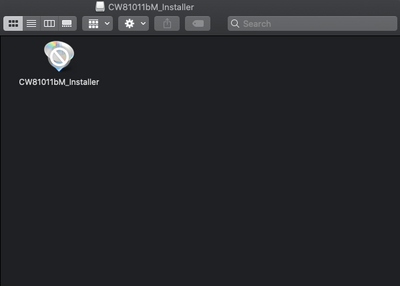
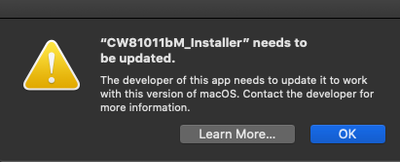
I own a PowerShot A3500 IS. One feature it has is using Wi-Fi to send images from the camera to a computer. To have the ability to do so, you need to first download CameraWindow DC onto your computer. The issue is, both places I can download the software from - the physical CD and the canon.com website - offer a version of the software incompatible with any 64-bit Mac computer. I have macOS Catalina v10.15 which is from 2019. The CameraWindow DC app's most recently updated version is supported by macOS High Sierra v10.13, which was 2017. This is apparently outdated enough for Mac to completely prohibit downloading the software. The attached images show the error.
Contents of the download (note the little strikethrough over the decal):
When you try to open the installer:
I would love to use the Wi-Fi picture-sharing feature that my little 2014 PowerShot offers. I used it during a trip when I was little and want to save the pictures easily. I recognize this forum is nearly completely dead, so any response to this at all is a miracle! Regardless, it would be amazing if any members or staff could offer advice to either access the CameraWindow DC software or find a workaround that gets to the goal of sending images straight from my camera to my Mac. Thanks for reading!!
Solved! Go to Solution.
1 ACCEPTED SOLUTION
Accepted Solutions


Options
- Mark as New
- Bookmark
- Subscribe
- Mute
- Subscribe to RSS Feed
- Permalink
- Report Inappropriate Content
06-09-2023 10:11 PM
Unless Canon updates the software to be 64-bit (and then bonus points for building a Universal app for both Intel and Apple Silicon), this software is a dead end.
I know it wouldn't be the same, but if your Mac has a built-in SD card reader, or you purchase a SD card reader, that would be the best bet for getting images to your Mac.
--
Ricky
Camera: EOS R5 II, RF 50mm f/1.2L, RF 135mm f/1.8L
Lighting: Profoto Lights & Modifiers
Ricky
Camera: EOS R5 II, RF 50mm f/1.2L, RF 135mm f/1.8L
Lighting: Profoto Lights & Modifiers
1 REPLY 1
Options
- Mark as New
- Bookmark
- Subscribe
- Mute
- Subscribe to RSS Feed
- Permalink
- Report Inappropriate Content
06-09-2023 10:11 PM
Unless Canon updates the software to be 64-bit (and then bonus points for building a Universal app for both Intel and Apple Silicon), this software is a dead end.
I know it wouldn't be the same, but if your Mac has a built-in SD card reader, or you purchase a SD card reader, that would be the best bet for getting images to your Mac.
--
Ricky
Camera: EOS R5 II, RF 50mm f/1.2L, RF 135mm f/1.8L
Lighting: Profoto Lights & Modifiers
Ricky
Camera: EOS R5 II, RF 50mm f/1.2L, RF 135mm f/1.8L
Lighting: Profoto Lights & Modifiers


Announcements
07/22/2026: New firmware updates are available.
EOS R6 Mark III - Version 1.1.0
05/13/2026: New firmware updates are available.
EOS R5 Mark II - Version 1.3.0
EOS R6 Mark II - Version 1.7.0
04/28/2026: Service Notice: Caution Concerning use of Lithium Batteries
03/17/2026: New firmware updates are available.
SELPHY CP1500 - Version 1.0.7.0
02/23/2026: New firmware update is available for EOS C50- Version 1.0.3.1
01/23/2026: New firmware update is available for RF 24-105mm F4 IS USM- Version 2.0.7
01/20/2026: New firmware updates are available.
10/21/2025: Service Notice: To Users of the Compact Digital Camera PowerShot V1
10/15/2025: New firmware updates are available.
Speedlite EL-5 - Version 1.2.0
Speedlite EL-1 - Version 1.1.0
Speedlite Transmitter ST-E10 - Version 1.2.0
07/28/2025: Notice of Free Repair Service for the Mirrorless Camera EOS R50 (Black)
05/21/2025: New firmware update available for EOS C500 Mark II - Version 1.1.5.1
Related Content
- PowerShot ELPH 320 HS won't turn on because lens wont retract in Point & Shoot Digital Cameras
- Canon CameraWindow DC-8 Not Detecting PowerShot SX60 HS & SX720 HS on Windows 10/11 – Compatibility in Camera Software
- CameraWindow does not open in Windows 11 in Camera Software
- Canon powershot sx 740 restock?? in Point & Shoot Digital Cameras
- How do I know which EOS I need for a Powershot G9 X for a Mac Airbook? in Point & Shoot Digital Cameras

Ⓒ 2026
Canon U.S.A Inc. All Rights Reserved. Reproduction in whole or part without permission is prohibited.
