Turn on suggestions
Auto-suggest helps you quickly narrow down your search results by suggesting possible matches as you type.
- Canon Community
- Discussions & Help
- Camera
- Speedlite Flashes
- Re: external flash not working on eos rebel t7
Options
- Subscribe to RSS Feed
- Mark Topic as New
- Mark Topic as Read
- Float this Topic for Current User
- Bookmark
- Subscribe
- Mute
- Printer Friendly Page

Options
- Mark as New
- Bookmark
- Subscribe
- Mute
- Subscribe to RSS Feed
- Permalink
- Report Inappropriate Content
02-23-2024
01:15 PM
- last edited on
02-23-2024
01:40 PM
by
 Danny
Danny
Hi I recently got this camera (canon rebel t7) and it came with a flash in the kit set to connect to the camera but it's not working with it. When I press the test option on the external flash it works but when I go into flash control on the camera it says, "Menu not available. Flash is off or unsupported, or an accessory is attached". Also when I change from manual to any other mode the flash works fine just not in manual it seems. Please help 😭
Solved! Go to Solution.
1 ACCEPTED SOLUTION
Accepted Solutions


Options
- Mark as New
- Bookmark
- Subscribe
- Mute
- Subscribe to RSS Feed
- Permalink
- Report Inappropriate Content
02-23-2024 02:24 PM - edited 02-23-2024 02:26 PM
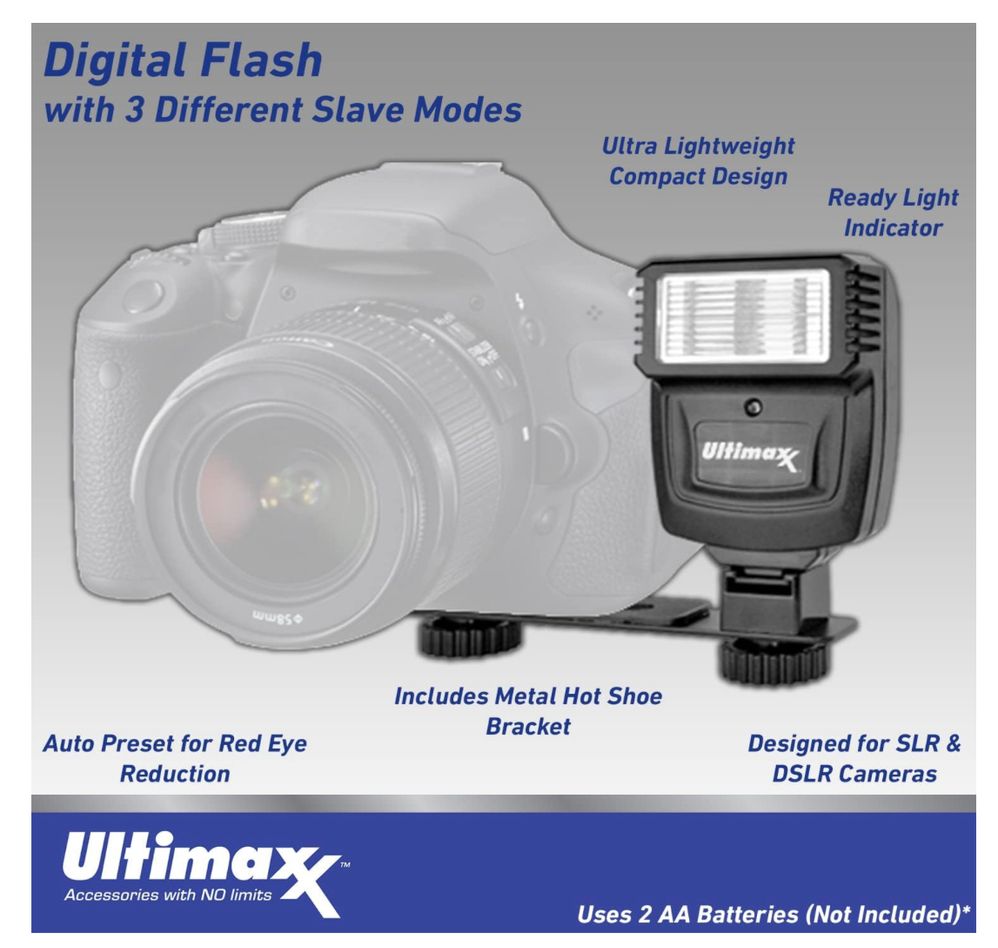
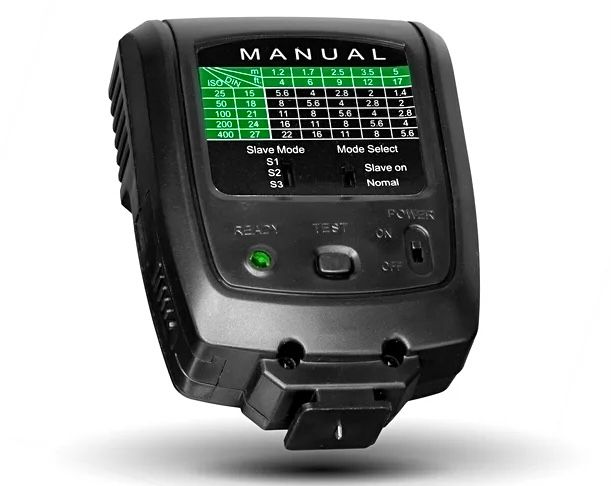
The Ultimax "universal digital slave flash" is not really compatible with Canon Cameras. It will slide into the hotshoe but that is about as far as the compatibility goes.
That Ultimax is really designed to be used as a slave flash for cameras that don’t have a hot shoe. The built in flash on the camera is then used to trigger the slave flash. The error message you are getting ("Menu not available. Flash is off or unsupported, or an accessory is attached") is because the flash is not compatible with Canon’s menu system.
Most Canon T7 cameras don’t have a Center pin in the hotshoe, and only Canon ETTL flash units will work, although some 3rd party ETTL flash units will also work. Canon has changed production and some newer T7 cameras now include a Center pin.
If your T7 has a center pin you could use the Ultimax in the hotshoe, but with a Guide Number of 14m, it is not anymore powerful than the T7 built-in flash, so there really is no point to using it.
Mike Sowsun
5 REPLIES 5

Options
- Mark as New
- Bookmark
- Subscribe
- Mute
- Subscribe to RSS Feed
- Permalink
- Report Inappropriate Content
02-23-2024 01:21 PM
Welcome to the forums.
In order to better assist you, we need to know what manufacturer and the exact model number on the strobe that you have. If you do not have a Canon brand strobe, then it is the responsibility of the manufacturer of your strobe to guarantee compatibility with Canon gear.
Did you purchase a bundle? It is possible the strobe is not compatible, too.
--------------------------------------------------------
"Enjoying photography since 1972."
"Enjoying photography since 1972."
Options
- Mark as New
- Bookmark
- Subscribe
- Mute
- Subscribe to RSS Feed
- Permalink
- Report Inappropriate Content
02-23-2024 01:39 PM
Hi the brand is Ultimax "universal digital slave flash" and on the box it says its compatible with canon dslr cameras.
Options
- Mark as New
- Bookmark
- Subscribe
- Mute
- Subscribe to RSS Feed
- Permalink
- Report Inappropriate Content
02-23-2024 02:24 PM - edited 02-23-2024 02:26 PM
The Ultimax "universal digital slave flash" is not really compatible with Canon Cameras. It will slide into the hotshoe but that is about as far as the compatibility goes.
That Ultimax is really designed to be used as a slave flash for cameras that don’t have a hot shoe. The built in flash on the camera is then used to trigger the slave flash. The error message you are getting ("Menu not available. Flash is off or unsupported, or an accessory is attached") is because the flash is not compatible with Canon’s menu system.
Most Canon T7 cameras don’t have a Center pin in the hotshoe, and only Canon ETTL flash units will work, although some 3rd party ETTL flash units will also work. Canon has changed production and some newer T7 cameras now include a Center pin.
If your T7 has a center pin you could use the Ultimax in the hotshoe, but with a Guide Number of 14m, it is not anymore powerful than the T7 built-in flash, so there really is no point to using it.
Mike Sowsun
Options
- Mark as New
- Bookmark
- Subscribe
- Mute
- Subscribe to RSS Feed
- Permalink
- Report Inappropriate Content
02-23-2024 02:36 PM
Okay thank you so much for your help!

Options
- Mark as New
- Bookmark
- Subscribe
- Mute
- Subscribe to RSS Feed
- Permalink
- Report Inappropriate Content
02-23-2024 10:41 PM - edited 02-23-2024 10:42 PM
This flash appears to be included in numerous camera "kit" packages sold on Amazon, Wal-Mart, and the like designed to make it look to the uninformed like they are getting a wonderful bunch of stuff for a great price. Sorry you went for it. You get a collection, including the Ultimax, that isn't worth much, or has no real usefulness.

Announcements
07/22/2026: New firmware updates are available.
EOS R6 Mark III - Version 1.1.0
05/13/2026: New firmware updates are available.
EOS R5 Mark II - Version 1.3.0
EOS R6 Mark II - Version 1.7.0
04/28/2026: Service Notice: Caution Concerning use of Lithium Batteries
03/17/2026: New firmware updates are available.
SELPHY CP1500 - Version 1.0.7.0
02/23/2026: New firmware update is available for EOS C50- Version 1.0.3.1
01/23/2026: New firmware update is available for RF 24-105mm F4 IS USM- Version 2.0.7
01/20/2026: New firmware updates are available.
10/21/2025: Service Notice: To Users of the Compact Digital Camera PowerShot V1
10/15/2025: New firmware updates are available.
Speedlite EL-5 - Version 1.2.0
Speedlite EL-1 - Version 1.1.0
Speedlite Transmitter ST-E10 - Version 1.2.0
07/28/2025: Notice of Free Repair Service for the Mirrorless Camera EOS R50 (Black)
05/21/2025: New firmware update available for EOS C500 Mark II - Version 1.1.5.1
Related Content
- EOS Rebel G Shutter Button not Working in EOS DSLR & Mirrorless Cameras
- EOS Rebel XTi still usable with broken pin in card slot? in EOS DSLR & Mirrorless Cameras
- EOS R5 Ml II hot after idle in the backpack in EOS DSLR & Mirrorless Cameras
- EF 75-300mm f/4-5.6 III won't work with EOS Rebel T7, other lenses OK in EF & RF Lenses
- Having trouble uploading photos from my EOS Rebel T2i to new Macbook :( in EOS DSLR & Mirrorless Cameras

Ⓒ 2026
Canon U.S.A Inc. All Rights Reserved. Reproduction in whole or part without permission is prohibited.
