Turn on suggestions
Auto-suggest helps you quickly narrow down your search results by suggesting possible matches as you type.
- Canon Community
- Discussions & Help
- Camera
- Speedlite Flashes
- Re: EL-5 Speedlite Link Drops Out
Options
- Subscribe to RSS Feed
- Mark Topic as New
- Mark Topic as Read
- Float this Topic for Current User
- Bookmark
- Subscribe
- Mute
- Printer Friendly Page
EL-5 Speedlite Link Drops Out

Options
- Mark as New
- Bookmark
- Subscribe
- Mute
- Subscribe to RSS Feed
- Permalink
- Report Inappropriate Content
09-19-2024 11:44 AM
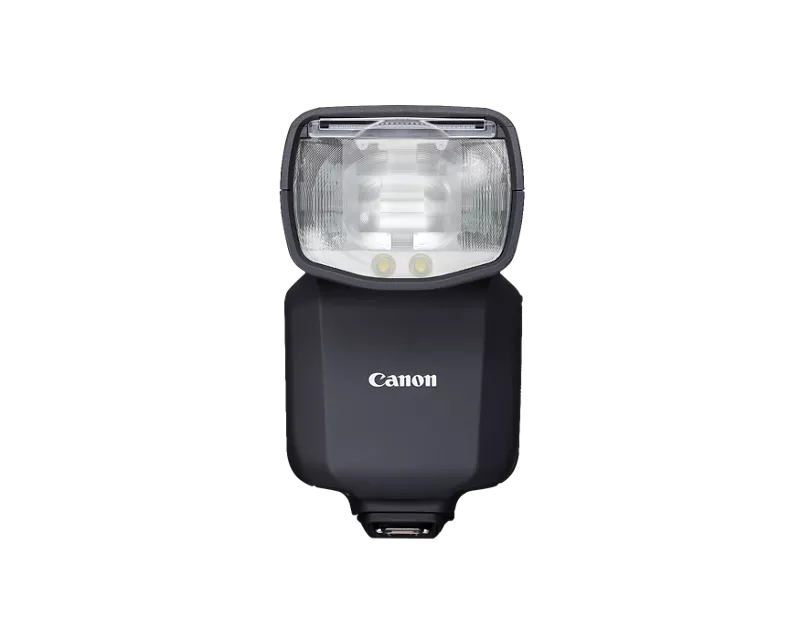
I have an EL-10 that I use as a sender unit on top of my R6II to connect to two EL-5 Speedlites off camera. The link to the EL-5 keeps dropping out. It is random. It might a a few seconds, it might be 10 minutes. It might be EL-5#1 or EL-5#2. To re-establish the link, I have to power down and power back up. This does not work during a client shoot.
I have tried using an EL-5 as the sender with an EL-5 as receiver and the EL-10 as receiver. The EL-5 still drops link and the EL-10 has not been noticed to drop link. Canon has recommended I send them in for warranty service. Before I go to the trouble, I am wondering if anyone else has had this same problem and, if so, did you get it fixed short of repairs? It seems to me that it is a system issue since I have it with two EL-5 units. If it was only one unit, it might be a defective unit, but not likely two.
I am a bit concerned as I read this being prevalent with other flashes like the 600EX-RT and no solution has been shared publicly.
18 REPLIES 18
Options
- Mark as New
- Bookmark
- Subscribe
- Mute
- Subscribe to RSS Feed
- Permalink
- Report Inappropriate Content
01-12-2025 04:45 PM
This is a known issue with the Canon flash wireless radio system (RT system). See the many posts in this forum and elsewhere about the wireless flash link dropping issue. It appears to affect all Canon wireless flashes and triggers that use the Canon RT wireless system from older, now retired units, to their most recently introduced flashes and triggers. They are not suitable for the wireless environments in which they would be commonly used. Canon has been slow to acknowledge this issue, and it is unknown whether they are working on a solution that would improve the wireless connectivity of the system.
Options
- Mark as New
- Bookmark
- Subscribe
- Mute
- Subscribe to RSS Feed
- Permalink
- Report Inappropriate Content
01-30-2025 03:58 AM
I solved my 600EX II-RT problems and posted a help thread. The bottom line is the sleep mode disables the connection and the only recovery is to power cycle all the devices (the flashes, the camera). So what I did on my EOS R5ii was to change the sleep mode from its default of 3 minutes to 30 minutes. As long as I do something within 30 minutes (which prevents it from sleeping), the connection is maintained.
Options
- Mark as New
- Bookmark
- Subscribe
- Mute
- Subscribe to RSS Feed
- Permalink
- Report Inappropriate Content
01-30-2025 10:36 AM
Thanks. Unfortunately, that does not solve the EL-5 and EL-1 issues as they are related to the RT system hardware. Canon is no help and does not seem to care about a solution. I wish it was as simple as a sleep mode setting.
Options
- Mark as New
- Bookmark
- Subscribe
- Mute
- Subscribe to RSS Feed
- Permalink
- Report Inappropriate Content
01-30-2025 01:00 PM
Some users on this forum have already suggested this solution for the 600EX-II-RT dropped link issue. Unfortunately, for the vast majority of users, this does not work, Furthermore, many tests have shown that electromagnetic (radio) interference in the 2.4GHz band is the culprit. Even Canon suggest this as a cause but has yet to do anything about it. Long ago I turned off all the power saving functions in my camera equipment including in my Canon RT flash system. The problem persists. This is not a solution for the vast majority of users.
Options
- Mark as New
- Bookmark
- Subscribe
- Mute
- Subscribe to RSS Feed
- Permalink
- Report Inappropriate Content
02-02-2026 02:20 PM
UPDATE: The October firmware update to 1.20 seems to have corrected the link issues. At least at my house and studio, it has yet to fail. It took two years but at least they issued the firmware update.
Options
- Mark as New
- Bookmark
- Subscribe
- Mute
- Subscribe to RSS Feed
- Permalink
- Report Inappropriate Content
02-02-2026 02:34 PM
To what update are you referring? What units need to be updated?
Thanks!
Options
- Mark as New
- Bookmark
- Subscribe
- Mute
- Subscribe to RSS Feed
- Permalink
- Report Inappropriate Content
02-21-2026 02:36 PM
I would advise performing a firmware update on your Canon EL-5 to get it to Ver 1.2.0. This firmware update was released 10/14/2025
In my use case using multiple EL-5 units as remotes, with a firmware-updated EL-5 or firmware-updated ST-E10 as a controller, I am no longer plagued by the dreaded "link-drop"
Options
- Mark as New
- Bookmark
- Subscribe
- Mute
- Subscribe to RSS Feed
- Permalink
- Report Inappropriate Content
02-24-2026 07:00 PM
As far as I know this problem has not been resolved. You are experiencing the same issues reported by many Canon flash system users. The complaints have been largely ignored. The system is not robust enough to work reliably in today's crowded Wi-Fi/wireless environment. The EL-5 and EL-10 units use the same radio system the earlier 600EX-RTs used, so it suffers the same issues.
If you read through the reports in this forum, you will see that the problems you are seeing affect both old and new Canon flash units. You can send your units in to Canon service to see what they have to say, but I'll bet you dollars to donuts they will tell you there were no issues found.
Keep us posted on what you do.
Good luck!
Options
- Mark as New
- Bookmark
- Subscribe
- Mute
- Subscribe to RSS Feed
- Permalink
- Report Inappropriate Content
02-28-2026 07:13 PM
Hello, I use this setup - One Speedlite EL-1 on camera (R5 MarkII) and one EL-1 and one EL-5 off-camera. I group them together via wireless. They “link” up right away. I now have one sender and two receivers. Within a few seconds the “link” used to drop. I just upgraded to Firmware 1.1.0 on the EL-1’s and 1.2.0 on the EL-5’s and the connection has stabilized and hasn’t dropped since. I’ll keep this post updated as I continue to test.
I sent in a Canon support request and I got a response suggesting to use the “Scan” on the Sender and set the Channel to the strongest as shown on the resulting graphical analysis. I never got the graph to show on the EL-1. I think the channels get set automatically to the best available amongst all the flashes.

- « Previous
-
- 1
- 2
- Next »
- « Previous
-
- 1
- 2
- Next »

Announcements
07/22/2026: New firmware updates are available.
EOS R6 Mark III - Version 1.1.0
05/13/2026: New firmware updates are available.
EOS R5 Mark II - Version 1.3.0
EOS R6 Mark II - Version 1.7.0
04/28/2026: Service Notice: Caution Concerning use of Lithium Batteries
03/17/2026: New firmware updates are available.
SELPHY CP1500 - Version 1.0.7.0
02/23/2026: New firmware update is available for EOS C50- Version 1.0.3.1
01/23/2026: New firmware update is available for RF 24-105mm F4 IS USM- Version 2.0.7
01/20/2026: New firmware updates are available.
10/21/2025: Service Notice: To Users of the Compact Digital Camera PowerShot V1
10/15/2025: New firmware updates are available.
Speedlite EL-5 - Version 1.2.0
Speedlite EL-1 - Version 1.1.0
Speedlite Transmitter ST-E10 - Version 1.2.0
07/28/2025: Notice of Free Repair Service for the Mirrorless Camera EOS R50 (Black)
05/21/2025: New firmware update available for EOS C500 Mark II - Version 1.1.5.1
Related Content
- EOS 90D + EOS Utility 3 — Connection lost during long intervalometer session (~12–15 hrs) in Camera Software
- Canon EL-5 Not Linking in Radio Receiver Mode (Channel & ID Match) in Speedlite Flashes
- 600ex-rt not linking or dropping link in Speedlite Flashes
- tips for Canon 600EX II-RT wireless connection (and probably other Canon speedlites) in Speedlite Flashes
- EOS R100 settings for external PHOTOOLEX LCD flash in Speedlite Flashes

Ⓒ 2026
Canon U.S.A Inc. All Rights Reserved. Reproduction in whole or part without permission is prohibited.
