Turn on suggestions
Auto-suggest helps you quickly narrow down your search results by suggesting possible matches as you type.
- Canon Community
- Discussions & Help
- Camera
- Speedlite Flashes
- 600ex ETTL not illuminating subject but TTL mode d...
Options
- Subscribe to RSS Feed
- Mark Topic as New
- Mark Topic as Read
- Float this Topic for Current User
- Bookmark
- Subscribe
- Mute
- Printer Friendly Page

Options
- Mark as New
- Bookmark
- Subscribe
- Mute
- Subscribe to RSS Feed
- Permalink
- Report Inappropriate Content
06-14-2018 06:21 AM
TTL works perfect with Canon Mark iii...illuminates everything. Super bright
When I turn to ETTL nothing I do works. No exposure settings change the outcome. Images are super dark.
Things I have done.
1. reset speedlight
2. adjusted cameras exposure settings
3. made sure the flash firing is set to ENABLED
Please help...
Also I know there is already a thread similar to this where ETTL was not illuminating the subject however nothing in there helped and does not address the issue where the speedlite works in TTL just fine.
I am assuming the issue has something to do with the main flash not firing.
The Speedlite is brand new out of the box.
Solved! Go to Solution.
1 ACCEPTED SOLUTION
Accepted Solutions


Options
- Mark as New
- Bookmark
- Subscribe
- Mute
- Subscribe to RSS Feed
- Permalink
- Report Inappropriate Content
06-14-2018 08:47 AM - edited 06-14-2018 09:57 PM
Are you able to select both ETTL and TTL? You should not be able to select TTL mode. ETTL is for digital exposures and TTL (or ATTL) is for film exposure. (your flash has backwards compatibility for film cameras) TTL should be grayed out and not selectable.
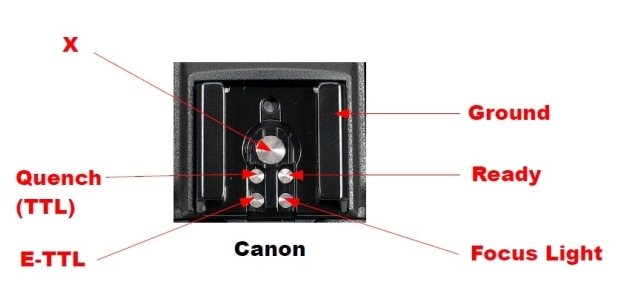
It sounds like you having a contact issues and the camera and flash are not communicating properly. When this happens, the flash may not sense the ETTL connection and is reverts to TTL mode because it thinks it is attached to a film camera.
Try inspecting or cleaning both the camera and flash connections.
A momentary communication error could also cause a Custom Function setting problem. Try clearing the flash custom functions to see if ETTL functionality returns.
Mike Sowsun
1 REPLY 1
Options
- Mark as New
- Bookmark
- Subscribe
- Mute
- Subscribe to RSS Feed
- Permalink
- Report Inappropriate Content
06-14-2018 08:47 AM - edited 06-14-2018 09:57 PM
Are you able to select both ETTL and TTL? You should not be able to select TTL mode. ETTL is for digital exposures and TTL (or ATTL) is for film exposure. (your flash has backwards compatibility for film cameras) TTL should be grayed out and not selectable.
It sounds like you having a contact issues and the camera and flash are not communicating properly. When this happens, the flash may not sense the ETTL connection and is reverts to TTL mode because it thinks it is attached to a film camera.
Try inspecting or cleaning both the camera and flash connections.
A momentary communication error could also cause a Custom Function setting problem. Try clearing the flash custom functions to see if ETTL functionality returns.
Mike Sowsun


Announcements
05/13/2026: New firmware updates are available.
EOS R5 Mark II - Version 1.3.0
EOS R6 Mark II - Version 1.7.0
04/28/2026: Service Notice: Caution Concerning use of Lithium Batteries
03/17/2026: New firmware updates are available.
SELPHY CP1500 - Version 1.0.7.0
02/23/2026: New firmware update is available for EOS C50- Version 1.0.3.1
01/23/2026: New firmware update is available for RF 24-105mm F4 IS USM- Version 2.0.7
01/20/2026: New firmware updates are available.
12/22/2025: New firmware update is available for EOS R6 Mark III- Version 1.0.2
10/21/2025: Service Notice: To Users of the Compact Digital Camera PowerShot V1
10/15/2025: New firmware updates are available.
Speedlite EL-5 - Version 1.2.0
Speedlite EL-1 - Version 1.1.0
Speedlite Transmitter ST-E10 - Version 1.2.0
07/28/2025: Notice of Free Repair Service for the Mirrorless Camera EOS R50 (Black)
05/21/2025: New firmware update available for EOS C500 Mark II - Version 1.1.5.1
Related Content
- 5D Mark III selected AF points not illuminating red in EOS DSLR & Mirrorless Cameras
- EOS 6D Mk II focus point illumination question in EOS DSLR & Mirrorless Cameras
- 600EX-RT not illuminating subject in Speedlite Flashes
- EOS M50 - Not applying Peripheral Illumination corrections in Camera in EOS DSLR & Mirrorless Cameras
- Mixed Internal peripheral illumination/chromatic aberration correction in EOS DSLR & Mirrorless Cameras

Ⓒ 2026
Canon U.S.A Inc. All Rights Reserved. Reproduction in whole or part without permission is prohibited.
