08-09-2019 10:22 PM
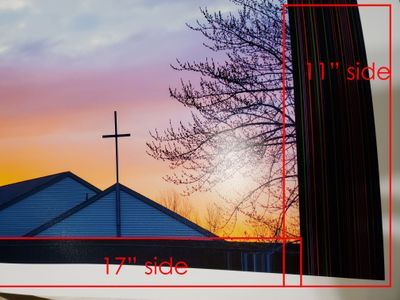
I've been printing with my Pro-100 for a while now and every now and then there will be prints that distorted once in a while but more recently it has been recurring a lot and I'm blowing through my ink doing reprints. The print below is an 11x17 print from a PSD file. This is particularly interesting because it appears across the whole width and also a partial portion. See the mark-ups. I've tried wired or wireless connections and both regular and XPS drivers and it doesn't solve anything. I run a Windows 7 PC, 32GB RAM, and Photoshop CC. I use Print Studio Pro for printing.

08-14-2019 01:50 PM
Hi rduke,
Please contact our support group at 1-800-OK-CANON (1-800-652-2666), Monday - Friday, 8:00 AM - 8:00 PM EST.
We look forward to hearing from you.
12/18/2025: New firmware updates are available.
11/20/2025: New firmware updates are available.
EOS R5 Mark II - Version 1.2.0
PowerShot G7 X Mark III - Version 1.4.0
PowerShot SX740 HS - Version 1.0.2
10/15/2025: New firmware updates are available.
Speedlite EL-5 - Version 1.2.0
Speedlite EL-1 - Version 1.1.0
Speedlite Transmitter ST-E10 - Version 1.2.0
7/17/2025: New firmware updates are available.
02/20/2025: New firmware updates are available.
RF70-200mm F2.8 L IS USM Z - Version 1.0.6
RF24-105mm F2.8 L IS USM Z - Version 1.0.9
RF100-300mm F2.8 L IS USM - Version 1.0.8
Canon U.S.A Inc. All Rights Reserved. Reproduction in whole or part without permission is prohibited.