Turn on suggestions
Auto-suggest helps you quickly narrow down your search results by suggesting possible matches as you type.
- Canon Community
- Discussions & Help
- Printer
- Professional Photo Printers
- Pixma Pro 9500 mkII ejecting print part way throug...
Options
- Subscribe to RSS Feed
- Mark Topic as New
- Mark Topic as Read
- Float this Topic for Current User
- Bookmark
- Subscribe
- Mute
- Printer Friendly Page
Pixma Pro 9500 mkII ejecting print part way through

Options
- Mark as New
- Bookmark
- Subscribe
- Mute
- Subscribe to RSS Feed
- Permalink
- Report Inappropriate Content
11-25-2017 02:18 PM - edited 11-25-2017 02:19 PM
I have a 2008 printer and am using genuine Canon inks, Fotospeed papers, using a USB connection and Windows 7. Sometimes it prints beautifully, sometimes it ejects the print part way through for no obvious reason. It can be after a cm or 2, half way through, or almost at the end of the print. Expensive and very annoying. It seems to be happening with increasing frequency, perhaps every 3rd or 4th print which is unsustainable. Any ideas very welcome. Thanks.
4 REPLIES 4

Options
- Mark as New
- Bookmark
- Subscribe
- Mute
- Subscribe to RSS Feed
- Permalink
- Report Inappropriate Content
11-28-2017 03:35 PM
Hi Sascal,
Let's start by reinstalling the printer driver.
Click HERE.
Scroll down to ""Optional Drivers."
Click "Select" next to "Pro9500 Mark II series Printer Driver."
Press "Download."
Open and run the file.
Follow the onscreen instructions to complete the installation.
This didn't answer your question or issue? Please call or email us at one of the methods on the Contact Us page for further assistance.
Did this answer your question? Please click the Accept as Solution button so that others may find the answer as well.
Options
- Mark as New
- Bookmark
- Subscribe
- Mute
- Subscribe to RSS Feed
- Permalink
- Report Inappropriate Content
11-28-2017 04:22 PM
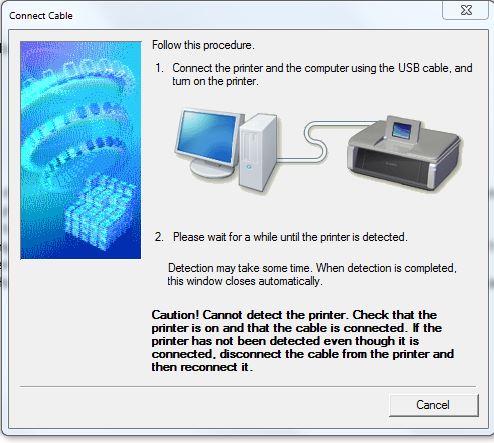
It's not detecting the printer - I've tried several times.
Options
- Mark as New
- Bookmark
- Subscribe
- Mute
- Subscribe to RSS Feed
- Permalink
- Report Inappropriate Content
12-01-2017 03:49 PM
Hi Sascal,
If the printer is not detected during installation:
- Disconnect the USB cable from both ends and reconnect.
- Plug the USB cable into a different port.
- If using a hub, connect the cable directly to the computer.
- Turn the printer off for 1-2 minutesand restart.
This didn't answer your question or issue? Please call or email us at one of the methods on the Contact Us page for further assistance.
Did this answer your question? Please click the Accept as Solution button so that others may find the answer as well.
Options
- Mark as New
- Bookmark
- Subscribe
- Mute
- Subscribe to RSS Feed
- Permalink
- Report Inappropriate Content
12-03-2017 01:00 PM
Still no joy I'm afraid.


Announcements
07/22/2026: New firmware updates are available.
EOS R6 Mark III - Version 1.1.0
05/13/2026: New firmware updates are available.
EOS R5 Mark II - Version 1.3.0
EOS R6 Mark II - Version 1.7.0
04/28/2026: Service Notice: Caution Concerning use of Lithium Batteries
03/17/2026: New firmware updates are available.
SELPHY CP1500 - Version 1.0.7.0
02/23/2026: New firmware update is available for EOS C50- Version 1.0.3.1
01/23/2026: New firmware update is available for RF 24-105mm F4 IS USM- Version 2.0.7
01/20/2026: New firmware updates are available.
10/21/2025: Service Notice: To Users of the Compact Digital Camera PowerShot V1
10/15/2025: New firmware updates are available.
Speedlite EL-5 - Version 1.2.0
Speedlite EL-1 - Version 1.1.0
Speedlite Transmitter ST-E10 - Version 1.2.0
07/28/2025: Notice of Free Repair Service for the Mirrorless Camera EOS R50 (Black)
05/21/2025: New firmware update available for EOS C500 Mark II - Version 1.1.5.1
Related Content
- pixma TR 8622A - Touch Screen Frozen After Firmware Update in Desktop Inkjet Printers
- PRINTING ON MY CANON PRO-200 PHOTO PRINTER in Professional Photo Printers
- Paper Jam even with no actual Paper Jam in Office Printers
- PIXMA G7020 got error message 6004 after ink flush in Desktop Inkjet Printers
- Pro 1100 image not centered in Professional Photo Printers

Ⓒ 2026
Canon U.S.A Inc. All Rights Reserved. Reproduction in whole or part without permission is prohibited.
