Turn on suggestions
Auto-suggest helps you quickly narrow down your search results by suggesting possible matches as you type.
- Canon Community
- Discussions & Help
- Printer
- Professional Photo Printers
- Re: Pixma Pro-100 Prints Purple Instead of Blue - ...
Options
- Subscribe to RSS Feed
- Mark Topic as New
- Mark Topic as Read
- Float this Topic for Current User
- Bookmark
- Subscribe
- Mute
- Printer Friendly Page
Pixma Pro-100 Prints Purple Instead of Blue - Help!

Options
- Mark as New
- Bookmark
- Subscribe
- Mute
- Subscribe to RSS Feed
- Permalink
- Report Inappropriate Content
06-05-2022 04:48 PM - edited 06-05-2022 04:53 PM
I was printing fine, until I updated my driver to 16.50.0.0. Now, blue is printing as purple. I am printing from Lightroom Classic, and I've checked the printer settings, have the correct ICC, and paper type, etc. I ran a nozzle cleaning and the print test look good. Any suggestions? I have tried both my Kirkland cheap paper and my Canon Pro Luster (with same ICC), and get the same problem.
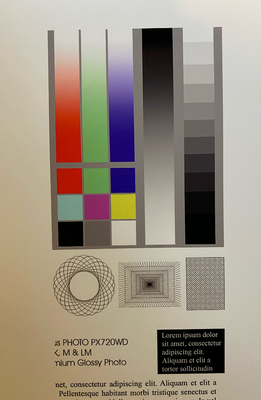
Softproof of test image (note blue)

Print of test image - note purple in the blue lane
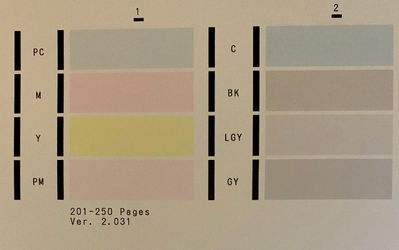
Print test after nozzle check:
Doing this on a iMac running MacOS Monterey 12.3.1 . I am using the Canon USB print driver.
Any suggestions?
Thanks in advance!
2 REPLIES 2


Options
- Mark as New
- Bookmark
- Subscribe
- Mute
- Subscribe to RSS Feed
- Permalink
- Report Inappropriate Content
06-05-2022 04:54 PM
Why did you update your driver, new operating system?
What OS. Which driver did you install?
John Hoffman
Conway, NH
R6 Mark III, M200 (converted to infrared), RF lenses, Pixma PRO-100, Pixma TR8620a, Lr Classic
Conway, NH
R6 Mark III, M200 (converted to infrared), RF lenses, Pixma PRO-100, Pixma TR8620a, Lr Classic
Options
- Mark as New
- Bookmark
- Subscribe
- Mute
- Subscribe to RSS Feed
- Permalink
- Report Inappropriate Content
06-05-2022 05:26 PM - edited 06-05-2022 05:35 PM
I had a network security issue, so I had to change my SSID. When I went through reinstalling the network connection for the printer, I noticed that the printer driver was out of date, so I upgraded to the most recent, 16.50.0.0 from the Canon support site. I am on a iMAC Retina 5K, 27-inch, 2019 running MacOS Monterey 12.3.1
I also tried printing the test file as a jpeg directly from the Preview application, and it produced the same exact purple instead of blue - so not a lightroom configuration issue, I think.

Announcements
07/22/2026: New firmware updates are available.
EOS R6 Mark III - Version 1.1.0
05/13/2026: New firmware updates are available.
EOS R5 Mark II - Version 1.3.0
EOS R6 Mark II - Version 1.7.0
04/28/2026: Service Notice: Caution Concerning use of Lithium Batteries
03/17/2026: New firmware updates are available.
SELPHY CP1500 - Version 1.0.7.0
02/23/2026: New firmware update is available for EOS C50- Version 1.0.3.1
01/23/2026: New firmware update is available for RF 24-105mm F4 IS USM- Version 2.0.7
01/20/2026: New firmware updates are available.
10/21/2025: Service Notice: To Users of the Compact Digital Camera PowerShot V1
10/15/2025: New firmware updates are available.
Speedlite EL-5 - Version 1.2.0
Speedlite EL-1 - Version 1.1.0
Speedlite Transmitter ST-E10 - Version 1.2.0
07/28/2025: Notice of Free Repair Service for the Mirrorless Camera EOS R50 (Black)
05/21/2025: New firmware update available for EOS C500 Mark II - Version 1.1.5.1
Related Content
- Can't print due to imagePROGRAF PRO-2100 thinking I'm out of ink, support code 1730 in Professional Photo Printers
- PIXMA G7020 only prints in red from all ink tanks in Desktop Inkjet Printers
- TR8600 printer, faint printing and missing lines in Desktop Inkjet Printers
- MF 269 dw II recognized by Mac but offline or online but will not print in Office Printers
- PIXMA TS6320 prints blank pages, but test pages and copies are fine in Desktop Inkjet Printers

Ⓒ 2026
Canon U.S.A Inc. All Rights Reserved. Reproduction in whole or part without permission is prohibited.
