Turn on suggestions
Auto-suggest helps you quickly narrow down your search results by suggesting possible matches as you type.
- Canon Community
- Discussions & Help
- Printer
- Professional Photo Printers
- Re: Pixma Pro-100 : Print quality in Printer Featu...
Options
- Subscribe to RSS Feed
- Mark Topic as New
- Mark Topic as Read
- Float this Topic for Current User
- Bookmark
- Subscribe
- Mute
- Printer Friendly Page
Pixma Pro-100 : Print quality in Printer Features on macOS

Options
- Mark as New
- Bookmark
- Subscribe
- Mute
- Subscribe to RSS Feed
- Permalink
- Report Inappropriate Content
02-09-2020 11:51 AM
Hi,
I'm little confused about print quality vs paper type (yes, the documentation from Canon is really, really bad).
For the Canon Matte paper I use the profile ID Canon PRO-100 series MPN2.icc. I know the 2 in the name of the profile is for Level 2 - High quality, but in the printer driver configuration (see Printer Features) I have these five options: Super Fine, Fine, Normal Fine, Normal Fast and Fast.
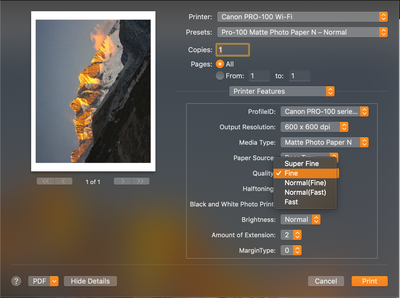
Is level 2 is for Fine or Normal Fine (because I only know 3 levels of quality: 1, 2 and 3)?
Is there a good documentation somewhere about the driver configuration of the Pixma Pro-100 on Mac?
Thanks!
2 REPLIES 2


Options
- Mark as New
- Bookmark
- Subscribe
- Mute
- Subscribe to RSS Feed
- Permalink
- Report Inappropriate Content
02-09-2020 03:41 PM - edited 02-09-2020 03:48 PM
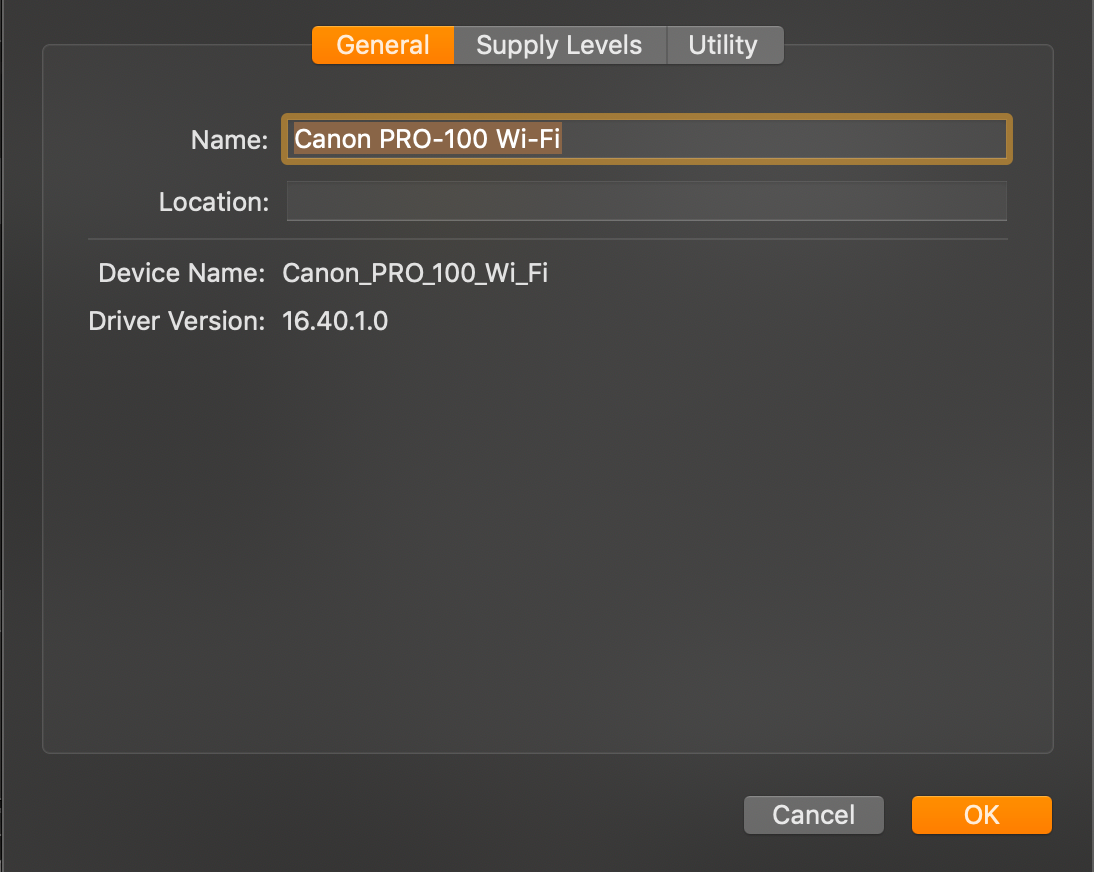
Are you sure you have the real Canon driver installed and not an Apple driver? I have never seen the screen you are posting. My printer is connected via WiFi and my printer name is different.

What software is showing you that printer window?
Have you downloaded the latest driver from the Canon support site?

Go to System Preferences-Printers & Scanners and click the + button. Wait for a while - could be a minute or two - until the Canon IJ Seriies driver appears. Select that.
John Hoffman
Conway, NH
R6 Mark III, M200 (converted to infrared), RF lenses, Pixma PRO-100, Pixma TR8620a, Lr Classic
Conway, NH
R6 Mark III, M200 (converted to infrared), RF lenses, Pixma PRO-100, Pixma TR8620a, Lr Classic
Options
- Mark as New
- Bookmark
- Subscribe
- Mute
- Subscribe to RSS Feed
- Permalink
- Report Inappropriate Content
02-09-2020 03:48 PM
Yes, it is the last driver and it's not the bonjour one. I'm on 10.14 and many things have changed on the print side on macOS. For the name, it's a custom one.


Announcements
07/22/2026: New firmware updates are available.
EOS R6 Mark III - Version 1.1.0
05/13/2026: New firmware updates are available.
EOS R5 Mark II - Version 1.3.0
EOS R6 Mark II - Version 1.7.0
04/28/2026: Service Notice: Caution Concerning use of Lithium Batteries
03/17/2026: New firmware updates are available.
SELPHY CP1500 - Version 1.0.7.0
02/23/2026: New firmware update is available for EOS C50- Version 1.0.3.1
01/23/2026: New firmware update is available for RF 24-105mm F4 IS USM- Version 2.0.7
01/20/2026: New firmware updates are available.
10/21/2025: Service Notice: To Users of the Compact Digital Camera PowerShot V1
10/15/2025: New firmware updates are available.
Speedlite EL-5 - Version 1.2.0
Speedlite EL-1 - Version 1.1.0
Speedlite Transmitter ST-E10 - Version 1.2.0
07/28/2025: Notice of Free Repair Service for the Mirrorless Camera EOS R50 (Black)
05/21/2025: New firmware update available for EOS C500 Mark II - Version 1.1.5.1
Related Content
- imageCLASS MFC743Cdw - No scan, no print, not working and can't reach Canon support after months. in Office Printers
- Latest Photo Printer Software for TR8620 Printer, or 3rd party suggestions in Printer Software & Networking
- PIXMA iX6820 Ink dissolves from Waterslide Decals when underwater in Desktop Inkjet Printers
- PIXMA TR4722 Unsatisfied with print quality in Desktop Inkjet Printers
- My Canon PIXMA TS8320 printer has poor print quality in Desktop Inkjet Printers

Ⓒ 2026
Canon U.S.A Inc. All Rights Reserved. Reproduction in whole or part without permission is prohibited.
