Turn on suggestions
Auto-suggest helps you quickly narrow down your search results by suggesting possible matches as you type.
Options
- Subscribe to RSS Feed
- Mark Topic as New
- Mark Topic as Read
- Float this Topic for Current User
- Bookmark
- Subscribe
- Mute
- Printer Friendly Page
Low yellow

Options
- Mark as New
- Bookmark
- Subscribe
- Mute
- Subscribe to RSS Feed
- Permalink
- Report Inappropriate Content
08-07-2016 09:21 PM
A few months ago I purchased a Pro 100 printer and have printed a variety of 4x6 photos and a couple letter size documents with color. The ink levels on all but one of the tanks show about half full (which I hope is not the normal usage rate). The yellow is very low and the exlamation point alert shows. I don't think anything I printed was heavily yellow. Is it normal for yellow to be used so quickly? Could there be another problem?
BTW: I was away for two months so the printer was not used. The alert came up the first time I used it when I got home.
5 REPLIES 5


Options
- Mark as New
- Bookmark
- Subscribe
- Mute
- Subscribe to RSS Feed
- Permalink
- Report Inappropriate Content
08-08-2016 06:53 AM
Inks are used at different rates. I don't think there is anything wrong.
John Hoffman
Conway, NH
R6 Mark III, M200 (converted to infrared), RF lenses, Pixma PRO-100, Pixma TR8620a, Lr Classic
Conway, NH
R6 Mark III, M200 (converted to infrared), RF lenses, Pixma PRO-100, Pixma TR8620a, Lr Classic
Options
- Mark as New
- Bookmark
- Subscribe
- Mute
- Subscribe to RSS Feed
- Permalink
- Report Inappropriate Content
08-24-2016 08:27 PM
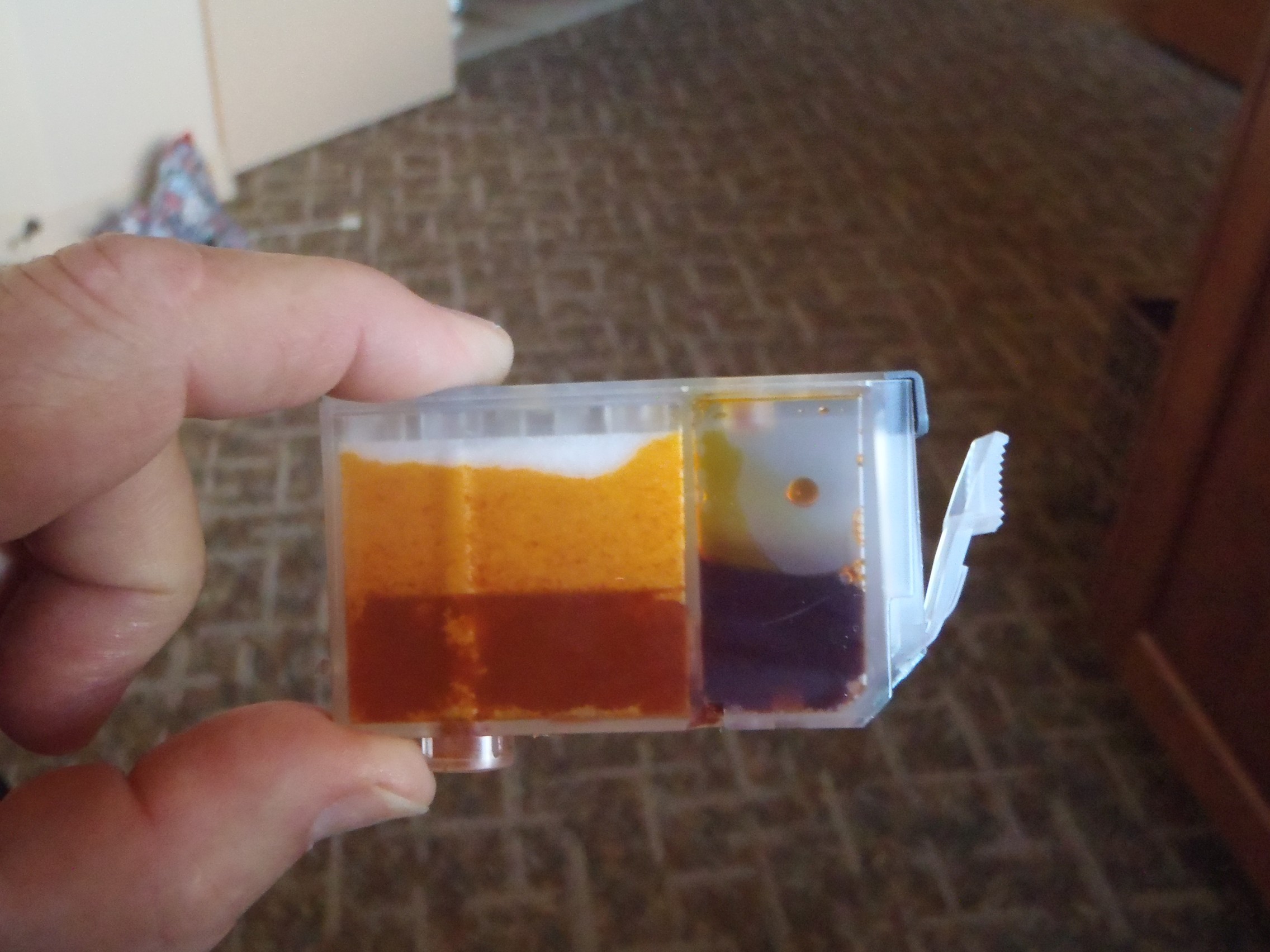
The ink level indicator now show the yellow ink is empty. Attached is a photo of the ink cartridge.
Is this what constitutes empty? The ink levels for the other colors show a little more than half full and the ink levels in the ink side (not sponge side) are about 3/4 full.
Options
- Mark as New
- Bookmark
- Subscribe
- Mute
- Subscribe to RSS Feed
- Permalink
- Report Inappropriate Content
08-24-2016 08:44 PM
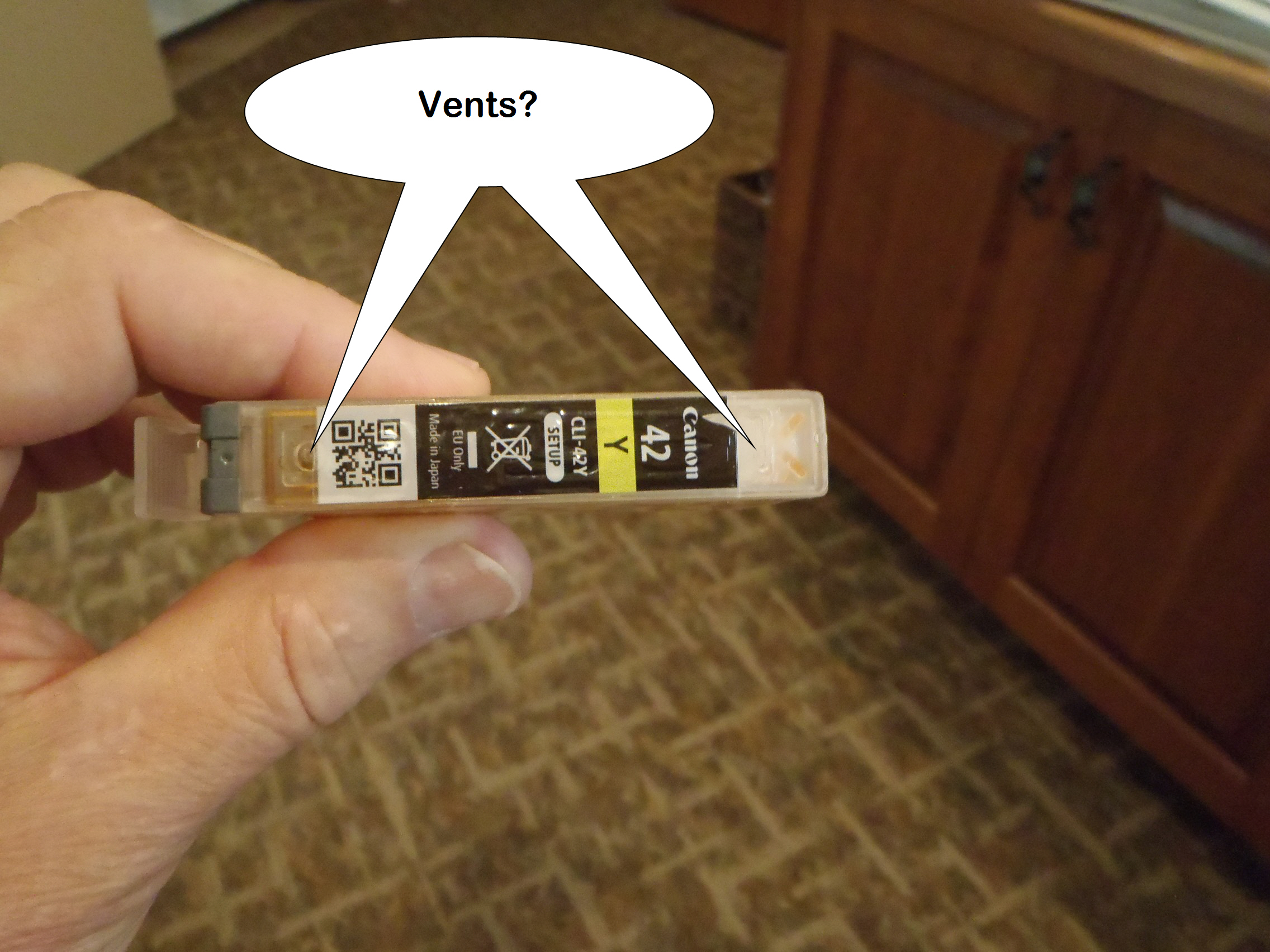
That's not an almost empty cartridge. Is the top peel off fully removed so the vent us uncovered?
John Hoffman
Conway, NH
R6 Mark III, M200 (converted to infrared), RF lenses, Pixma PRO-100, Pixma TR8620a, Lr Classic
Conway, NH
R6 Mark III, M200 (converted to infrared), RF lenses, Pixma PRO-100, Pixma TR8620a, Lr Classic
Options
- Mark as New
- Bookmark
- Subscribe
- Mute
- Subscribe to RSS Feed
- Permalink
- Report Inappropriate Content
08-25-2016 11:01 AM
The part that tears off when you open the cartridge is completely gone. These places look like the vents and appear to be uncovered.
Options
- Mark as New
- Bookmark
- Subscribe
- Mute
- Subscribe to RSS Feed
- Permalink
- Report Inappropriate Content
08-25-2016 12:29 PM
that's it. Give Canon a call at 1-800-OK-CANON and see if they have an explanation. Could be a defective chip. I've never had it happen with my Pro-100.
John Hoffman
Conway, NH
R6 Mark III, M200 (converted to infrared), RF lenses, Pixma PRO-100, Pixma TR8620a, Lr Classic
Conway, NH
R6 Mark III, M200 (converted to infrared), RF lenses, Pixma PRO-100, Pixma TR8620a, Lr Classic

Announcements
07/22/2026: New firmware updates are available.
EOS R6 Mark III - Version 1.1.0
05/13/2026: New firmware updates are available.
EOS R5 Mark II - Version 1.3.0
EOS R6 Mark II - Version 1.7.0
04/28/2026: Service Notice: Caution Concerning use of Lithium Batteries
03/17/2026: New firmware updates are available.
SELPHY CP1500 - Version 1.0.7.0
02/23/2026: New firmware update is available for EOS C50- Version 1.0.3.1
01/23/2026: New firmware update is available for RF 24-105mm F4 IS USM- Version 2.0.7
01/20/2026: New firmware updates are available.
10/21/2025: Service Notice: To Users of the Compact Digital Camera PowerShot V1
10/15/2025: New firmware updates are available.
Speedlite EL-5 - Version 1.2.0
Speedlite EL-1 - Version 1.1.0
Speedlite Transmitter ST-E10 - Version 1.2.0
07/28/2025: Notice of Free Repair Service for the Mirrorless Camera EOS R50 (Black)
05/21/2025: New firmware update available for EOS C500 Mark II - Version 1.1.5.1
Related Content
- New Canon IX6820 Blinking Yellow in Desktop Inkjet Printers
- PIXMA iP8720 ink cartridge is stuck on right side, white, yellow lights keep alternating flashing in Desktop Inkjet Printers
- PIXMA MG2522 printer flashing yellow 10 times, will not print. in Desktop Inkjet Printers
- Canon Pixma iX6850 faint yellow print appearing around expected print in Desktop Inkjet Printers
- PIXMA MX495 printing pink in Desktop Inkjet Printers

Ⓒ 2026
Canon U.S.A Inc. All Rights Reserved. Reproduction in whole or part without permission is prohibited.
