Turn on suggestions
Auto-suggest helps you quickly narrow down your search results by suggesting possible matches as you type.
- Canon Community
- Discussions & Help
- Printer
- Professional Photo Printers
- Re: Canon Pro-100 leaves marks on 8.5 x 11 prints
Options
- Subscribe to RSS Feed
- Mark Topic as New
- Mark Topic as Read
- Float this Topic for Current User
- Bookmark
- Subscribe
- Mute
- Printer Friendly Page

Options
- Mark as New
- Bookmark
- Subscribe
- Mute
- Subscribe to RSS Feed
- Permalink
- Report Inappropriate Content
08-19-2015 07:51 PM - edited 08-19-2015 07:53 PM
The past few times I've printed on 8.5 x 11 paper the printer leaves marks at the top of the print. They aren't dark marks, they are lack of color. Like something scraped the ink off immediately after it hit the paper. You can see them at the top of this print. I printed the same photo on 5x7 paper and it was perfect.
I've run through the bottom plate and roller cleaning processes, but it made no difference. I have no idea what's causing this.
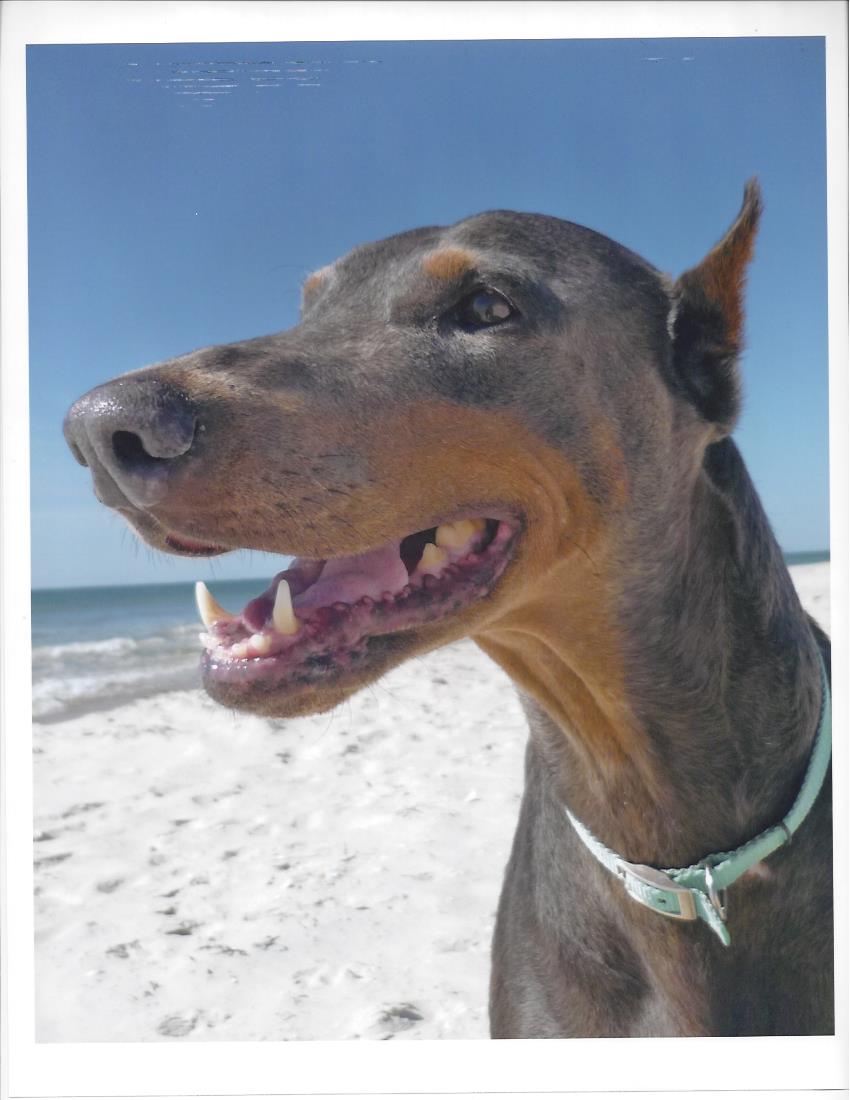
Solved! Go to Solution.
1 ACCEPTED SOLUTION
Accepted Solutions

Options
- Mark as New
- Bookmark
- Subscribe
- Mute
- Subscribe to RSS Feed
- Permalink
- Report Inappropriate Content
08-19-2015 08:27 PM
See last entry
http://community.usa.canon.com/t5/Professional-Photo-Printers/Pixma-Pro-100-Leaving-Smudges-Streaks-...
http://community.usa.canon.com/t5/Professional-Photo-Printers/Pixma-Pro-100-Leaving-Smudges-Streaks-...
John Hoffman
Conway, NH
R6 Mark III, M200 (converted to infrared), RF lenses, Pixma PRO-100, Pixma TR8620a, Lr Classic
Conway, NH
R6 Mark III, M200 (converted to infrared), RF lenses, Pixma PRO-100, Pixma TR8620a, Lr Classic
6 REPLIES 6

Options
- Mark as New
- Bookmark
- Subscribe
- Mute
- Subscribe to RSS Feed
- Permalink
- Report Inappropriate Content
08-19-2015 08:18 PM
Which paper and feed?
John Hoffman
Conway, NH
R6 Mark III, M200 (converted to infrared), RF lenses, Pixma PRO-100, Pixma TR8620a, Lr Classic
Conway, NH
R6 Mark III, M200 (converted to infrared), RF lenses, Pixma PRO-100, Pixma TR8620a, Lr Classic
Options
- Mark as New
- Bookmark
- Subscribe
- Mute
- Subscribe to RSS Feed
- Permalink
- Report Inappropriate Content
08-19-2015 08:21 PM
I'm using Kodak Premium Picture Paper, satin finish, fed in the rear tray.
thanks
Jane
Options
- Mark as New
- Bookmark
- Subscribe
- Mute
- Subscribe to RSS Feed
- Permalink
- Report Inappropriate Content
08-19-2015 08:27 PM
See last entry
http://community.usa.canon.com/t5/Professional-Photo-Printers/Pixma-Pro-100-Leaving-Smudges-Streaks-...
http://community.usa.canon.com/t5/Professional-Photo-Printers/Pixma-Pro-100-Leaving-Smudges-Streaks-...
John Hoffman
Conway, NH
R6 Mark III, M200 (converted to infrared), RF lenses, Pixma PRO-100, Pixma TR8620a, Lr Classic
Conway, NH
R6 Mark III, M200 (converted to infrared), RF lenses, Pixma PRO-100, Pixma TR8620a, Lr Classic
Options
- Mark as New
- Bookmark
- Subscribe
- Mute
- Subscribe to RSS Feed
- Permalink
- Report Inappropriate Content
08-19-2015 11:39 PM
Thank you! I will try checking Print Paper Abrasion and see if that helps.
Options
- Mark as New
- Bookmark
- Subscribe
- Mute
- Subscribe to RSS Feed
- Permalink
- Report Inappropriate Content
08-20-2015 07:46 AM
It worked! Thank you so much.
Options
- Mark as New
- Bookmark
- Subscribe
- Mute
- Subscribe to RSS Feed
- Permalink
- Report Inappropriate Content
08-20-2015 08:41 AM
you're welcom


Announcements
07/22/2026: New firmware updates are available.
EOS R6 Mark III - Version 1.1.0
05/13/2026: New firmware updates are available.
EOS R5 Mark II - Version 1.3.0
EOS R6 Mark II - Version 1.7.0
04/28/2026: Service Notice: Caution Concerning use of Lithium Batteries
03/17/2026: New firmware updates are available.
SELPHY CP1500 - Version 1.0.7.0
02/23/2026: New firmware update is available for EOS C50- Version 1.0.3.1
01/23/2026: New firmware update is available for RF 24-105mm F4 IS USM- Version 2.0.7
01/20/2026: New firmware updates are available.
10/21/2025: Service Notice: To Users of the Compact Digital Camera PowerShot V1
10/15/2025: New firmware updates are available.
Speedlite EL-5 - Version 1.2.0
Speedlite EL-1 - Version 1.1.0
Speedlite Transmitter ST-E10 - Version 1.2.0
07/28/2025: Notice of Free Repair Service for the Mirrorless Camera EOS R50 (Black)
05/21/2025: New firmware update available for EOS C500 Mark II - Version 1.1.5.1
Related Content
- Imageprograf PRO-1100 leaving ink spots on prints? in Professional Photo Printers
- imagePROGRAF PRO-1000 Ink striking in Professional Photo Printers
- ImageClass MF642C/643C/644C printer - Leaving terrible streaks and drops of toner on prints in Office Printers
- Pro-1100 Leaves Sight Vertical Scratch Marks on Back of Prints in Professional Photo Printers
- PIXMA iP8750 4" x 6" prints misaligned in Desktop Inkjet Printers

Ⓒ 2026
Canon U.S.A Inc. All Rights Reserved. Reproduction in whole or part without permission is prohibited.
