Turn on suggestions
Auto-suggest helps you quickly narrow down your search results by suggesting possible matches as you type.
- Canon Community
- Discussions & Help
- Printer
- Professional Photo Printers
- imagePROGRAF PRO-1100 Best paper for manual print ...
Options
- Subscribe to RSS Feed
- Mark Topic as New
- Mark Topic as Read
- Float this Topic for Current User
- Bookmark
- Subscribe
- Mute
- Printer Friendly Page

Options
- Mark as New
- Bookmark
- Subscribe
- Mute
- Subscribe to RSS Feed
- Permalink
- Report Inappropriate Content
01-16-2026
05:39 PM
- last edited on
01-16-2026
11:34 PM
by
 Tiffany
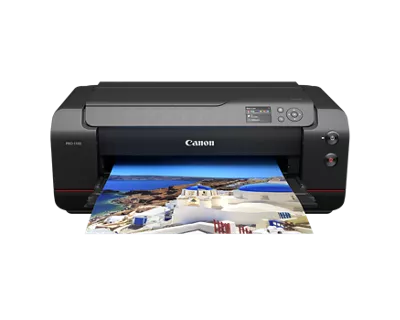
Just got a PRO-1100 and want to do a manual print head alignment. Instructions mention using plain paper, but I have always heard it's best to do alignment with the type paper you normally use. For me, that's professional matte photo paper. Any advice on this? Thanks.
Solved! Go to Solution.
1 ACCEPTED SOLUTION
Accepted Solutions

Options
- Mark as New
- Bookmark
- Subscribe
- Mute
- Subscribe to RSS Feed
- Permalink
- Report Inappropriate Content
01-20-2026 01:30 PM
Hi,
You can use the same paper that you will be using for printing. More information about alignment is HERE if you need it.
Did this answer your question? Please click the Accept as Solution button so that others may find the answer as well.
4 REPLIES 4
Options
- Mark as New
- Bookmark
- Subscribe
- Mute
- Subscribe to RSS Feed
- Permalink
- Report Inappropriate Content
01-20-2026 01:30 PM
Hi,
You can use the same paper that you will be using for printing. More information about alignment is HERE if you need it.
Did this answer your question? Please click the Accept as Solution button so that others may find the answer as well.

Options
- Mark as New
- Bookmark
- Subscribe
- Mute
- Subscribe to RSS Feed
- Permalink
- Report Inappropriate Content
01-20-2026 04:35 PM
Hi,
I join the discussion because I have the same doubt.
I understand that we should use the same paper using for printing but what if we use multiple papers (standard photo paper, fine art paper, glossy, matte, thick, etc.)?
Performing head alignment every time we change paper would waste an incredible amount of paper!

Options
- Mark as New
- Bookmark
- Subscribe
- Mute
- Subscribe to RSS Feed
- Permalink
- Report Inappropriate Content
01-20-2026 05:10 PM
I have followed the instructions, used plain paper, and have no complaints about results thus far on bordered Canon Luster Photo Paper 17x22 and 13x19 glossy 8x10 and 4x6. When the Printer and Professional Print and Layout paper selection is set correctly PP&L adjusts the printer appropriately for the paper type.
I have printed on gloss and luster with excellent results, and anticipate no issues using papers supported in the profile. I have tried well-rated but less expensive 5x7 paper just to try it out using a Canon paper profile and can tell you that I will not be buying it again. Others may have different experiences, but I believe following the directions is adequate, and have no data indicating using any of the supported papers would cause an issue or reasons for repeating the head alignment.
When the printer is idle for over a week I will print an head alignment check sheet to keep the in jets from drying out. It uses very little ink to do so. If you really want to use a lot of ink, let those heads dry out and have to do a system head cleaning.
Options
- Mark as New
- Bookmark
- Subscribe
- Mute
- Subscribe to RSS Feed
- Permalink
- Report Inappropriate Content
01-20-2026 07:21 PM
Thanks Arthur. I checked out the Canon info in your provided a link and found a key phrase that I quote here,
"Because the results of adjustment vary depending on the type of paper used for adjustment, use the same type of paper as you will use for printing."
I tested this out by first doing an Auto-alignment and then a Manual Head Alignment using the Canon Luster paper that came with the PRO-1100. The Manual alignment showed that the previous Auto-alignment could use tweaking. Then I performed a Manual Head Alignment using a non-Canon paper that I usually print on. There was a slight difference in alignment, so I set alignment using this paper.
Of note is that I could not get the Gray channel to align, nor to even improve. Tests on both papers yielded a alignment value of +13 every time (10 is considered aligned). After four manual alignment runs I was about to give up until I decided to try a fifth time. The results of the fifth run was a perfect 10 value. Was this color channel just stuck and finally broke loose? Just thought I would mention this in case anyone else has this experience.

Announcements
01/20/2026: New firmware updates are available.
12/22/2025: New firmware update is available for EOS R6 Mark III- Version 1.0.2
11/20/2025: New firmware updates are available.
EOS R5 Mark II - Version 1.2.0
PowerShot G7 X Mark III - Version 1.4.0
PowerShot SX740 HS - Version 1.0.2
10/21/2025: Service Notice: To Users of the Compact Digital Camera PowerShot V1
10/15/2025: New firmware updates are available.
Speedlite EL-5 - Version 1.2.0
Speedlite EL-1 - Version 1.1.0
Speedlite Transmitter ST-E10 - Version 1.2.0
07/28/2025: Notice of Free Repair Service for the Mirrorless Camera EOS R50 (Black)
7/17/2025: New firmware updates are available.
05/21/2025: New firmware update available for EOS C500 Mark II - Version 1.1.5.1
02/20/2025: New firmware updates are available.
RF70-200mm F2.8 L IS USM Z - Version 1.0.6
RF24-105mm F2.8 L IS USM Z - Version 1.0.9
RF100-300mm F2.8 L IS USM - Version 1.0.8

Ⓒ 2026
Canon U.S.A Inc. All Rights Reserved. Reproduction in whole or part without permission is prohibited.
