Turn on suggestions
Auto-suggest helps you quickly narrow down your search results by suggesting possible matches as you type.
- Canon Community
- Discussions & Help
- Printer
- Production Printing
- imagePROGRAF iPF6000S Won't Print and Errors Out
Options
- Subscribe to RSS Feed
- Mark Topic as New
- Mark Topic as Read
- Float this Topic for Current User
- Bookmark
- Subscribe
- Mute
- Printer Friendly Page

Options
- Mark as New
- Bookmark
- Subscribe
- Mute
- Subscribe to RSS Feed
- Permalink
- Report Inappropriate Content
04-12-2023
03:37 AM
- last edited on
04-12-2023
08:26 AM
by
 Danny
Danny
This is my printer:
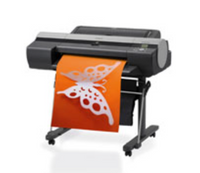
I couldnt find drivers for my macbook pro monterey, and i thought i had succeded with my super-old macbook pro osx 10.6.8
I was able to install the printer. It seems to communicate with the computer. Everything looks great until its about to print, it shows up in the print monitor, displays processing job, then it just disappears, as if it was printed, says printer ready. A little sound comes from the printer but nothing more happens.
When i look into the job info for previous printouts i see this message: cmucStartJobRender: Error
How can i get around this? So frustrating.
Solved! Go to Solution.
1 ACCEPTED SOLUTION
Accepted Solutions

Options
- Mark as New
- Bookmark
- Subscribe
- Mute
- Subscribe to RSS Feed
- Permalink
- Report Inappropriate Content
04-20-2023 03:37 PM
Hi my6000s,
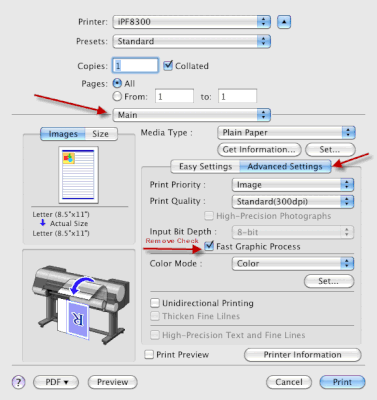
Please open an item to print and follow these steps:
1. Click on File and then Print.
2. Click on Properties or Preferences.
3. Click Main from the drop down menu.
4. Click on Advanced Settings.
5. Uncheck Fast Graphics Process.
3 REPLIES 3
Options
- Mark as New
- Bookmark
- Subscribe
- Mute
- Subscribe to RSS Feed
- Permalink
- Report Inappropriate Content
04-20-2023 03:37 PM
Hi my6000s,
Please open an item to print and follow these steps:
1. Click on File and then Print.
2. Click on Properties or Preferences.
3. Click Main from the drop down menu.
4. Click on Advanced Settings.
5. Uncheck Fast Graphics Process.
Options
- Mark as New
- Bookmark
- Subscribe
- Mute
- Subscribe to RSS Feed
- Permalink
- Report Inappropriate Content
04-21-2023 08:50 AM
Thank you so much for this, really helped!
Curious to know what is the reason this made it so hard to print?
Thanx again!💐
Options
- Mark as New
- Bookmark
- Subscribe
- Mute
- Subscribe to RSS Feed
- Permalink
- Report Inappropriate Content
04-26-2023 04:24 PM
Hi my6000s,
There was an issue with the printing system of 10.6 and the imagePROGRAF's driver. More detail than that was not made available.

Announcements
07/22/2026: New firmware updates are available.
EOS R6 Mark III - Version 1.1.0
05/13/2026: New firmware updates are available.
EOS R5 Mark II - Version 1.3.0
EOS R6 Mark II - Version 1.7.0
04/28/2026: Service Notice: Caution Concerning use of Lithium Batteries
03/17/2026: New firmware updates are available.
SELPHY CP1500 - Version 1.0.7.0
02/23/2026: New firmware update is available for EOS C50- Version 1.0.3.1
01/23/2026: New firmware update is available for RF 24-105mm F4 IS USM- Version 2.0.7
01/20/2026: New firmware updates are available.
10/21/2025: Service Notice: To Users of the Compact Digital Camera PowerShot V1
10/15/2025: New firmware updates are available.
Speedlite EL-5 - Version 1.2.0
Speedlite EL-1 - Version 1.1.0
Speedlite Transmitter ST-E10 - Version 1.2.0
07/28/2025: Notice of Free Repair Service for the Mirrorless Camera EOS R50 (Black)
05/21/2025: New firmware update available for EOS C500 Mark II - Version 1.1.5.1
Related Content
- imagePROGRAF iPF8400 won't load, error code E141-4046 in Production Printing
- imagePROGRAF PRO-1100 error 1772, stating incorrect maintenance cartridge in Professional Photo Printers
- imagePROGRAF PRO-1100 Paper width mismatch error 1062 in Professional Photo Printers
- imagePROGRAF PRO-1100 error 140E in Professional Photo Printers
- Professional Print and Layout, Canon imagePROGRAF PRO-310, Windows 11 not launching anymore? in Printer Software & Networking

Ⓒ 2026
Canon U.S.A Inc. All Rights Reserved. Reproduction in whole or part without permission is prohibited.
