Turn on suggestions
Auto-suggest helps you quickly narrow down your search results by suggesting possible matches as you type.
- Canon Community
- Discussions & Help
- Printer
- Printer Software & Networking
- imageCLASS MF753Cdw Printing from outside of my ne...
Options
- Subscribe to RSS Feed
- Mark Topic as New
- Mark Topic as Read
- Float this Topic for Current User
- Bookmark
- Subscribe
- Mute
- Printer Friendly Page
imageCLASS MF753Cdw Printing from outside of my network

Options
- Mark as New
- Bookmark
- Subscribe
- Mute
- Subscribe to RSS Feed
- Permalink
- Report Inappropriate Content
08-30-2023
04:38 PM
- last edited on
08-31-2023
09:15 AM
by
 Danny
Danny
I know I can send print jobs from my phone outside of my network. Is it possible to do it from a friend's home pc if I load the printer driver on her PC or is it complicated. I already have a static ip on the printer!
This is mainly out of curiosity! TIA
11 REPLIES 11


Options
- Mark as New
- Bookmark
- Subscribe
- Mute
- Subscribe to RSS Feed
- Permalink
- Report Inappropriate Content
08-31-2023 12:40 PM
You can't print from a computer that is not on the same network as the printer! There's no way for the off-network computer to see it.
Options
- Mark as New
- Bookmark
- Subscribe
- Mute
- Subscribe to RSS Feed
- Permalink
- Report Inappropriate Content
08-31-2023 12:50 PM
OK, a little confused then. I have the canon mobile app on my smartphone. When I was at my friend's house, some 30 miles away, I sent a text file over the cell network to my printer. If that works, why can't pc to printer work the same way. The printer has a static ip.
Options
- Mark as New
- Bookmark
- Subscribe
- Mute
- Subscribe to RSS Feed
- Permalink
- Report Inappropriate Content
08-31-2023 01:47 PM - edited 08-31-2023 01:48 PM
Static IP has nothing to do with it.
Does the friend's PC (you don't say what OS it has) have the ability to communicate over the cellular network to the printer? I know some PCs CAN be equipped with a cellular adapter. It'd still have to have a program to do what the cell phone can.
Options
- Mark as New
- Bookmark
- Subscribe
- Mute
- Subscribe to RSS Feed
- Permalink
- Report Inappropriate Content
08-31-2023 02:55 PM
Unfortunately no. I just figured it went from cell-internet-printer than why not internet to printer. There isn't a cell phone attached to the printer.
Options
- Mark as New
- Bookmark
- Subscribe
- Mute
- Subscribe to RSS Feed
- Permalink
- Report Inappropriate Content
08-31-2023 03:36 PM
Cellular doesn't use the Internet. It uses cellular networks. What you COULD do is print to a Wi-Fi-enabled printer from a cell phone that is Wi-Fi equipped, and use Wi-Fi instead of cellular. Wi-Fi is Ethernet, which is what your network is. So the cell phone acts like any other computer on your Ethernet network.
If friend's computer is a portable, she could get within your network's Wi-Fi range and connect to your printer.
Options
- Mark as New
- Bookmark
- Subscribe
- Mute
- Subscribe to RSS Feed
- Permalink
- Report Inappropriate Content
08-31-2023 04:17 PM - edited 08-31-2023 04:18 PM
You're not following. I Did it last week. I was at my friend's house. He sent me a text to my cell phone. I told my cell phone to send it to my printer at home and it did so. without a wifi connection. In fact, Canon supplies the app for it in google play store. On a daily basis I access my nas at home with my cell phone from wherever I am, no different.
Options
- Mark as New
- Bookmark
- Subscribe
- Mute
- Subscribe to RSS Feed
- Permalink
- Report Inappropriate Content
08-31-2023 04:29 PM
When you sent it to your printer the phone was using CELLULAR service. How it gets to the printer within your home Ethernet network, I don't know. WiFi will not connect your phone to your home 30 miles away.
Options
- Mark as New
- Bookmark
- Subscribe
- Mute
- Subscribe to RSS Feed
- Permalink
- Report Inappropriate Content
08-31-2023 05:13 PM
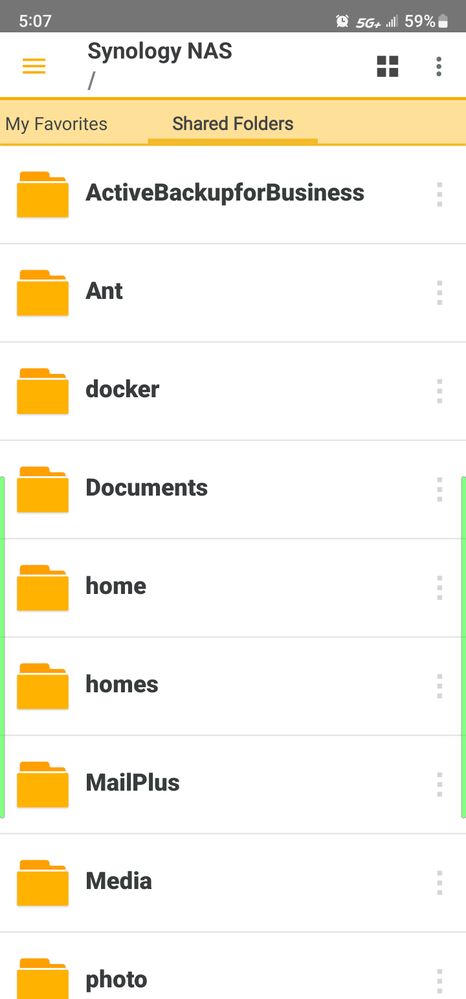
The same way I connect to my Synology nas with my cell phone. Via the static ip address that I assigned to it. The printer has its own static IP. See the photo below. you can see it's connected through cell not wifi. That is the contents of the my nas which is in my house 20 miles away. as you can see from the top bar on my phone it is using 5g cell service, not wifi.
Options
- Mark as New
- Bookmark
- Subscribe
- Mute
- Subscribe to RSS Feed
- Permalink
- Report Inappropriate Content
08-31-2023 07:00 PM
Maybe someone will respond to this who knows what's (not) going on.


Announcements
05/13/2026: New firmware updates are available.
EOS R5 Mark II - Version 1.3.0
EOS R6 Mark II - Version 1.7.0
04/28/2026: Service Notice: Caution Concerning use of Lithium Batteries
03/17/2026: New firmware updates are available.
SELPHY CP1500 - Version 1.0.7.0
02/23/2026: New firmware update is available for EOS C50- Version 1.0.3.1
01/23/2026: New firmware update is available for RF 24-105mm F4 IS USM- Version 2.0.7
01/20/2026: New firmware updates are available.
12/22/2025: New firmware update is available for EOS R6 Mark III- Version 1.0.2
10/21/2025: Service Notice: To Users of the Compact Digital Camera PowerShot V1
10/15/2025: New firmware updates are available.
Speedlite EL-5 - Version 1.2.0
Speedlite EL-1 - Version 1.1.0
Speedlite Transmitter ST-E10 - Version 1.2.0
07/28/2025: Notice of Free Repair Service for the Mirrorless Camera EOS R50 (Black)
05/21/2025: New firmware update available for EOS C500 Mark II - Version 1.1.5.1
Related Content
- imageCLASS MF753Cdw II- Pages printing 6mm too short with thick paper in Office Printers
- Error with Canon MF Port Monitor preventing printing and scanning in Printer Software & Networking
- imageCLASS MF642Cdw not printing - Error 852 in Office Printers
- imageCLASS MF753Cdw Not printing from iPhone suddenly in Office Printers
- imageCLASS MF753Cdw only getting 50% of page counts from Canon Toner 069 cartridges in Office Printers

Ⓒ 2026
Canon U.S.A Inc. All Rights Reserved. Reproduction in whole or part without permission is prohibited.
