Turn on suggestions
Auto-suggest helps you quickly narrow down your search results by suggesting possible matches as you type.
- Canon Community
- Discussions & Help
- Printer
- Printer Software & Networking
- imageCLASS MF731C Looking for advanced menu of opt...
Options
- Subscribe to RSS Feed
- Mark Topic as New
- Mark Topic as Read
- Float this Topic for Current User
- Bookmark
- Subscribe
- Mute
- Printer Friendly Page
imageCLASS MF731C Looking for advanced menu of options

Options
- Mark as New
- Bookmark
- Subscribe
- Mute
- Subscribe to RSS Feed
- Permalink
- Report Inappropriate Content
04-17-2024
05:37 PM
- last edited on
04-17-2024
05:42 PM
by
 StevenMOD
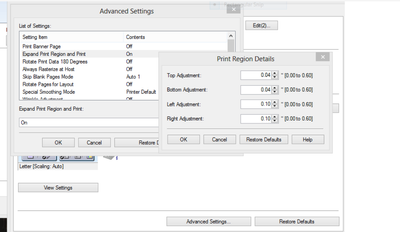
Almost six years ago, I was able to get to this menu and goof with the margins -- something that even Canon Support didn't think was actually possible at the time, btw.
Six years later ... I don't know how I found this menu -- can't find it when trying to manage my printer -- and am not sure whether I need to download some software, or whether it is even still available!
Can anyone lend a hand with ideas of how I got here? 🙂
4 REPLIES 4


Options
- Mark as New
- Bookmark
- Subscribe
- Mute
- Subscribe to RSS Feed
- Permalink
- Report Inappropriate Content
04-17-2024 05:45 PM - edited 04-17-2024 05:47 PM
I don't recognize that menu. Could it be connected to the OS? 🤔

Options
- Mark as New
- Bookmark
- Subscribe
- Mute
- Subscribe to RSS Feed
- Permalink
- Report Inappropriate Content
04-17-2024 06:13 PM
Agree. I'll look for it when I get home tonight but it appears to be in the driver.
~Rick
Bay Area - CA
~R5 C (1.1.3.1), ~RF Trinity, ~RF 100 Macro, ~RF 100~400, ~RF 100~500, ~RF 200-800, ~RF 1.4x TC, BG-R10, 430EX III-RT ~DxO PhotoLab Elite ~DaVinci Resolve Studio ~ImageClass MF644Cdw MF656Cdw ~Pixel 10 ~CarePaks Are Worth It
Options
- Mark as New
- Bookmark
- Subscribe
- Mute
- Subscribe to RSS Feed
- Permalink
- Report Inappropriate Content
04-17-2024 10:52 PM - edited 04-17-2024 10:56 PM
Greetings,
I found it. Print Driver > Finishing Tab > Advanced Settings button
Scroll to Expand Print Region and Print > Click details
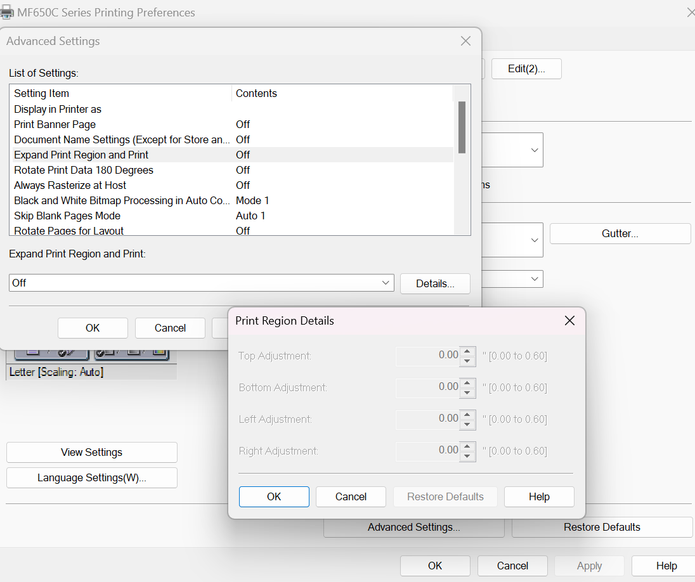
You can also read about it in your user guide:
~Rick
Bay Area - CA
~R5 C (1.1.3.1), ~RF Trinity, ~RF 100 Macro, ~RF 100~400, ~RF 100~500, ~RF 200-800, ~RF 1.4x TC, BG-R10, 430EX III-RT ~DxO PhotoLab Elite ~DaVinci Resolve Studio ~ImageClass MF644Cdw MF656Cdw ~Pixel 10 ~CarePaks Are Worth It
Options
- Mark as New
- Bookmark
- Subscribe
- Mute
- Subscribe to RSS Feed
- Permalink
- Report Inappropriate Content
04-18-2024 12:19 AM - edited 04-18-2024 12:54 AM
Thanks -- how do I get to "Print Driver", though?
When I click on the driver, there's practically nothing there to work with.
... SOLVED! I downloaded a different driver and lo and behold, all the options are back! Windows insisted it had the most up-to-date driver, but ...
Thanks much!

Announcements
07/22/2026: New firmware updates are available.
EOS R6 Mark III - Version 1.1.0
05/13/2026: New firmware updates are available.
EOS R5 Mark II - Version 1.3.0
EOS R6 Mark II - Version 1.7.0
04/28/2026: Service Notice: Caution Concerning use of Lithium Batteries
03/17/2026: New firmware updates are available.
SELPHY CP1500 - Version 1.0.7.0
02/23/2026: New firmware update is available for EOS C50- Version 1.0.3.1
01/23/2026: New firmware update is available for RF 24-105mm F4 IS USM- Version 2.0.7
01/20/2026: New firmware updates are available.
10/21/2025: Service Notice: To Users of the Compact Digital Camera PowerShot V1
10/15/2025: New firmware updates are available.
Speedlite EL-5 - Version 1.2.0
Speedlite EL-1 - Version 1.1.0
Speedlite Transmitter ST-E10 - Version 1.2.0
07/28/2025: Notice of Free Repair Service for the Mirrorless Camera EOS R50 (Black)
05/21/2025: New firmware update available for EOS C500 Mark II - Version 1.1.5.1
Related Content
- imageCLASS MF643Cdw - Duplex Option Missing on macOS Tahoe in Printer Software & Networking
- imageCLASS LBP6030w: Printer is not responding error after wireless setup in Printer Software & Networking
- imageCLASS MF453dw ADF front panel 2 sided option missing in Office Printers
- imageCLASS MF275dw: No double side scanning option in Office Printers
- imageCLASS MF641Cw - Auto correction of color mismatch - no turn off option in Office Printers

Ⓒ 2026
Canon U.S.A Inc. All Rights Reserved. Reproduction in whole or part without permission is prohibited.
