Turn on suggestions
Auto-suggest helps you quickly narrow down your search results by suggesting possible matches as you type.
- Canon Community
- Discussions & Help
- Printer
- Printer Software & Networking
- Re: TS 202 won't connect to MacBook Air running OS...
Options
- Subscribe to RSS Feed
- Mark Topic as New
- Mark Topic as Read
- Float this Topic for Current User
- Bookmark
- Subscribe
- Mute
- Printer Friendly Page
TS 202 won't connect to MacBook Air running OS Monterey 12.6

Options
- Mark as New
- Bookmark
- Subscribe
- Mute
- Subscribe to RSS Feed
- Permalink
- Report Inappropriate Content
02-05-2023 01:56 PM
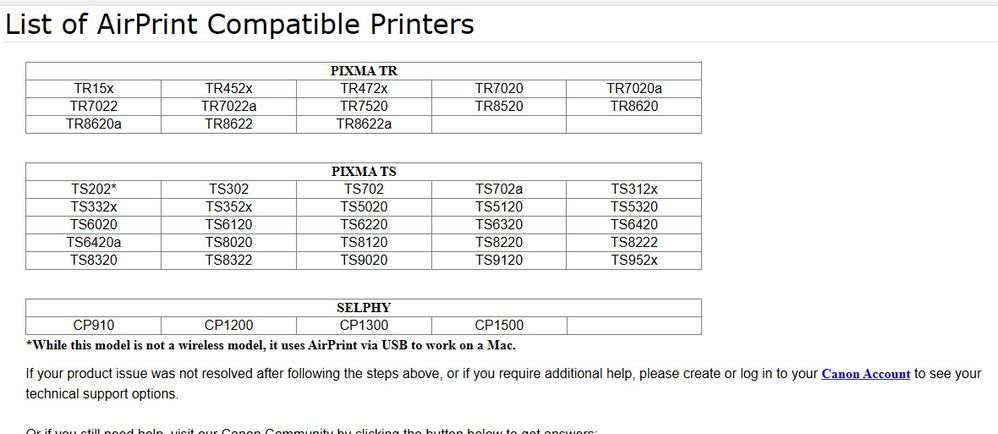
Can not add the printer - with the message Apple does not support this - contact Canon. The printer worked great with my work laptop (DELL) but want this for home use. I've uninstalled and restarted it. There is a list of printers to add but this model is not on the list.
5 REPLIES 5


Options
- Mark as New
- Bookmark
- Subscribe
- Mute
- Subscribe to RSS Feed
- Permalink
- Report Inappropriate Content
02-05-2023 07:49 PM
Looks like Catalina is the last supported macOS.
If you connect via USB looks like it should work as an AirPrint printer.
John Hoffman
Conway, NH
R6 Mark III, M200 (converted to infrared), RF lenses, Pixma PRO-100, Pixma TR8620a, Lr Classic
Conway, NH
R6 Mark III, M200 (converted to infrared), RF lenses, Pixma PRO-100, Pixma TR8620a, Lr Classic
Options
- Mark as New
- Bookmark
- Subscribe
- Mute
- Subscribe to RSS Feed
- Permalink
- Report Inappropriate Content
02-05-2023 09:44 PM
I tried this and the TS 202 is still not listed as an option. Appreciate the help!
Options
- Mark as New
- Bookmark
- Subscribe
- Mute
- Subscribe to RSS Feed
- Permalink
- Report Inappropriate Content
02-05-2023 10:45 PM
Give Canon a call at (866) 261-9362
John Hoffman
Conway, NH
R6 Mark III, M200 (converted to infrared), RF lenses, Pixma PRO-100, Pixma TR8620a, Lr Classic
Conway, NH
R6 Mark III, M200 (converted to infrared), RF lenses, Pixma PRO-100, Pixma TR8620a, Lr Classic
Options
- Mark as New
- Bookmark
- Subscribe
- Mute
- Subscribe to RSS Feed
- Permalink
- Report Inappropriate Content
02-06-2023 10:24 AM
I've called that number multiple times and can not get to an agent for support. The automated system is not recognizing my phone number even though I set up a My Canon account. I guess I need to return this printer since it's been an exercise in frustration starting with the fact that the printer is not sold with a USB cable and when purchased at the big box retailer, they had none in stock. Not your problem, I get it, but Canon has made this ridiculously difficult to set up a printer.


Options
- Mark as New
- Bookmark
- Subscribe
- Mute
- Subscribe to RSS Feed
- Permalink
- Report Inappropriate Content
02-06-2023 11:26 AM
Hi Lorihunter!
If you created your account here https://canon.us/3I2vZvU ensure you are calling from the phone number registered. If the issue continues, try the forget password option. If needed, our friendly support team can help. Give them a call at 1-800-OK-CANON (1-800-652-2666)
We hope this helps!

Announcements
07/22/2026: New firmware updates are available.
EOS R6 Mark III - Version 1.1.0
05/13/2026: New firmware updates are available.
EOS R5 Mark II - Version 1.3.0
EOS R6 Mark II - Version 1.7.0
04/28/2026: Service Notice: Caution Concerning use of Lithium Batteries
03/17/2026: New firmware updates are available.
SELPHY CP1500 - Version 1.0.7.0
02/23/2026: New firmware update is available for EOS C50- Version 1.0.3.1
01/23/2026: New firmware update is available for RF 24-105mm F4 IS USM- Version 2.0.7
01/20/2026: New firmware updates are available.
10/21/2025: Service Notice: To Users of the Compact Digital Camera PowerShot V1
10/15/2025: New firmware updates are available.
Speedlite EL-5 - Version 1.2.0
Speedlite EL-1 - Version 1.1.0
Speedlite Transmitter ST-E10 - Version 1.2.0
07/28/2025: Notice of Free Repair Service for the Mirrorless Camera EOS R50 (Black)
05/21/2025: New firmware update available for EOS C500 Mark II - Version 1.1.5.1
Related Content
- imageprograf pro-2000 only printing small images? in Production Printing
- Seeking PIXMA MX920/MX922 driver for MacBook Air running MacOS Tahoe 26+ in Printer Software & Networking
- HELP! My PIXMA G6020 won't scan in Desktop Inkjet Printers
- Connecting PIXMA MX870 to print from MacBook Pro on Tahoe 26.x in Printer Software & Networking
- imageCLASS MF8580Cdw: Scanner Won't Connect & Won't Print Colors Correctly on Mac in Office Printers

Ⓒ 2026
Canon U.S.A Inc. All Rights Reserved. Reproduction in whole or part without permission is prohibited.
