Turn on suggestions
Auto-suggest helps you quickly narrow down your search results by suggesting possible matches as you type.
- Canon Community
- Discussions & Help
- Printer
- Printer Software & Networking
- PIXMA TS7720 Which apps can be removed?
Options
- Subscribe to RSS Feed
- Mark Topic as New
- Mark Topic as Read
- Float this Topic for Current User
- Bookmark
- Subscribe
- Mute
- Printer Friendly Page


Options
- Mark as New
- Bookmark
- Subscribe
- Mute
- Subscribe to RSS Feed
- Permalink
- Report Inappropriate Content
02-22-2024
10:03 AM
- last edited on
02-22-2024
10:07 AM
by
 Danny
Danny
Is the following software still needed after printer install?
I'm recently retired (one year ago) and for the first time in forever, I needed to print something at home without having the office printer anymore... so I broke down and bought a Canon PIXMA TS 7720. Small but perfect for my limited needs.
It has been over 15 years since I've had a printer installed on my Mac, so I know what I see is something different from back then. The printer connects wireless to the Mac (not sure if that matters for what I am about to ask).
There are two new items in the Mac Finder that are showing up alongside my various drives. I believe the "mms2-mac-102_0_1-ea21_3" was for install only, and I am assuming that it can now be removed, correct?
The other item is "Canon Inkjet Smart Connect". Is this something required if I occasionally just send a PDF wirelessly to the printer?
Asking simply because I like to keep the clutter off of my Mac. The two items are the silver drives in the image below.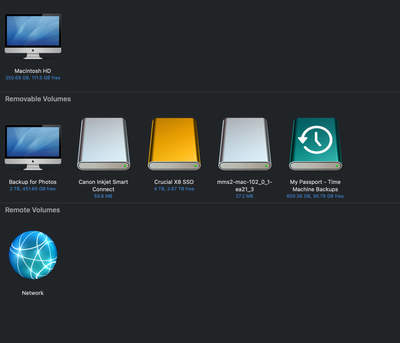
Thanks!
Gary
Lake Michigan Area MI
Digital Cameras: Canon EOS R6 Mk ll, EOS R8, EOS RP, ...and a few other brands
Film Cameras: Mostly Pentax, Kodak, and Zenit... and still heavily used
Solved! Go to Solution.
1 ACCEPTED SOLUTION
Accepted Solutions

Options
- Mark as New
- Bookmark
- Subscribe
- Mute
- Subscribe to RSS Feed
- Permalink
- Report Inappropriate Content
02-22-2024 10:07 AM
Yes, those items are virtual disk images presumably from .dmg files that contain the installation software. You can either single-click on those items, then choose "Eject" from the File menu within Finder. Or, right-click (Control-click) on those items and choose the "Eject <filename>" item. Or, click and drag those icons to the Trash (if you do this, the Trash icon will change to an Eject icon).
--
Ricky
Camera: EOS R5 II, RF 50mm f/1.2L, RF 135mm f/1.8L
Lighting: Profoto Lights & Modifiers
Ricky
Camera: EOS R5 II, RF 50mm f/1.2L, RF 135mm f/1.8L
Lighting: Profoto Lights & Modifiers
2 REPLIES 2
Options
- Mark as New
- Bookmark
- Subscribe
- Mute
- Subscribe to RSS Feed
- Permalink
- Report Inappropriate Content
02-22-2024 10:07 AM
Yes, those items are virtual disk images presumably from .dmg files that contain the installation software. You can either single-click on those items, then choose "Eject" from the File menu within Finder. Or, right-click (Control-click) on those items and choose the "Eject <filename>" item. Or, click and drag those icons to the Trash (if you do this, the Trash icon will change to an Eject icon).
--
Ricky
Camera: EOS R5 II, RF 50mm f/1.2L, RF 135mm f/1.8L
Lighting: Profoto Lights & Modifiers
Ricky
Camera: EOS R5 II, RF 50mm f/1.2L, RF 135mm f/1.8L
Lighting: Profoto Lights & Modifiers
Options
- Mark as New
- Bookmark
- Subscribe
- Mute
- Subscribe to RSS Feed
- Permalink
- Report Inappropriate Content
02-22-2024 10:13 AM
Yessir, I know how to remove them, I just wasn't sure if they were required at this point. Since this is just an entry level printer, install was shockingly clunky and slow, so I didn't want to go through all of that again.
Thanks for the quick reply, Ricky!
Gary
Lake Michigan Area MI
Digital Cameras: Canon EOS R6 Mk ll, EOS R8, EOS RP, ...and a few other brands
Film Cameras: Mostly Pentax, Kodak, and Zenit... and still heavily used

Announcements
07/22/2026: New firmware updates are available.
EOS R6 Mark III - Version 1.1.0
05/13/2026: New firmware updates are available.
EOS R5 Mark II - Version 1.3.0
EOS R6 Mark II - Version 1.7.0
04/28/2026: Service Notice: Caution Concerning use of Lithium Batteries
03/17/2026: New firmware updates are available.
SELPHY CP1500 - Version 1.0.7.0
02/23/2026: New firmware update is available for EOS C50- Version 1.0.3.1
01/23/2026: New firmware update is available for RF 24-105mm F4 IS USM- Version 2.0.7
01/20/2026: New firmware updates are available.
10/21/2025: Service Notice: To Users of the Compact Digital Camera PowerShot V1
10/15/2025: New firmware updates are available.
Speedlite EL-5 - Version 1.2.0
Speedlite EL-1 - Version 1.1.0
Speedlite Transmitter ST-E10 - Version 1.2.0
07/28/2025: Notice of Free Repair Service for the Mirrorless Camera EOS R50 (Black)
05/21/2025: New firmware update available for EOS C500 Mark II - Version 1.1.5.1
Related Content
- TS7720 I cannot print after installing Tahoe OS 26.6on my Mac Book Air in Desktop Inkjet Printers
- Canon PIXMA PRO-200S unable to bypass error code 1062 in Professional Photo Printers
- PIXMA G3272 power issue, maintenance box, ink absorber full in Desktop Inkjet Printers
- PIXMA MG3520 How to remove stuck paper in Desktop Inkjet Printers
- PIXMA Print Plan, new Canon account shows no registered products in Desktop Inkjet Printers

Ⓒ 2026
Canon U.S.A Inc. All Rights Reserved. Reproduction in whole or part without permission is prohibited.
