Turn on suggestions
Auto-suggest helps you quickly narrow down your search results by suggesting possible matches as you type.
- Canon Community
- Discussions & Help
- Printer
- Printer Software & Networking
- Re: MX472 cannot connect to Mac running 10.11.2
Options
- Subscribe to RSS Feed
- Mark Topic as New
- Mark Topic as Read
- Float this Topic for Current User
- Bookmark
- Subscribe
- Mute
- Printer Friendly Page

Options
- Mark as New
- Bookmark
- Subscribe
- Mute
- Subscribe to RSS Feed
- Permalink
- Report Inappropriate Content
02-24-2016 05:08 PM
What was once working I can no longer make work, with no changes in OS or anything else I am aware of. I can get the printer to connect to the Netgear router, and I can even add the printer to my Mac running 10.11.2. It installs the MX472 using the MX472 driver.
But when I go to print, the spooler window says the printer is off line and cannot be found. ????
I have turned off DRX and ipV6 as instructed. No cigar.
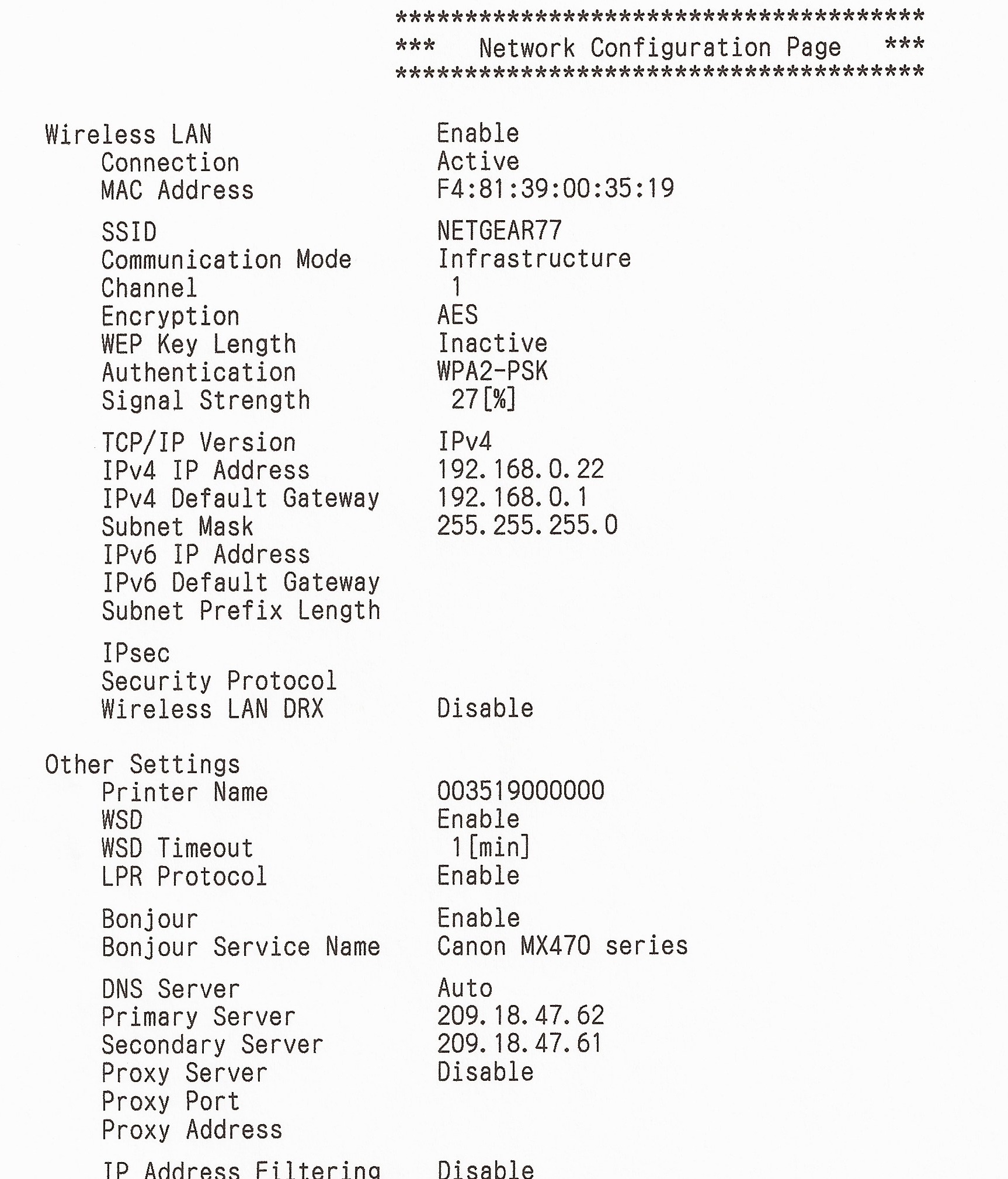
The other problem is the printer appears to drop out after some time once I manage to somehow get it working again. Help appreciated. I am very close to buying a very long USB cable, or just dropping the Canon into the electronic recycle. The image below was scanned on my HP printer.
Solved! Go to Solution.
1 ACCEPTED SOLUTION
Accepted Solutions
Options
- Mark as New
- Bookmark
- Subscribe
- Mute
- Subscribe to RSS Feed
- Permalink
- Report Inappropriate Content
02-26-2016 01:17 PM - edited 02-26-2016 01:19 PM
Yes, I think it was trying to connect with another hot spot in my house and not the router that sits 2 feet from the printer.
I was able to finally get everything connected by:
1. Resetting the printer on the Mac in the System Preferences console -> Printers & Scanners
2. Renaming the Main Disk -> Libraries -> Printers folder
3. Downloading all of the drivers and other installation software from the Canon site
4. Following the wireless instructions in the setup. However, I was not able to connect the wireless until I connected the printer via a USB cable first and set the printer up via the cable.
5. Add the printer back into the list on the Mac using the install instructions. Voila! A different name for the printer now appears that was not there before, and it is NOT a Bonjour connection!
6. For the moment it appears to work, but for how long???
Folks, this is 2016. This is way too complicated and way too cumbersome and way too unreliable. It's like something I used to do in the early 80s when the first IBM personal computers came out.
2 REPLIES 2


Options
- Mark as New
- Bookmark
- Subscribe
- Mute
- Subscribe to RSS Feed
- Permalink
- Report Inappropriate Content
02-26-2016 12:56 PM
Hello.
The weak signal strength may be a factor here. It is recommended to have a strength of about 75% or better for optimal communication. Consider moving the printer closer to your Wi-Fi router to improve the strength.
If you continue to have difficulties with this issue, find more help at Contact Us.
Did this answer your question? Please click the Accept as Solution button so that others may find the answer as well.
Options
- Mark as New
- Bookmark
- Subscribe
- Mute
- Subscribe to RSS Feed
- Permalink
- Report Inappropriate Content
02-26-2016 01:17 PM - edited 02-26-2016 01:19 PM
Yes, I think it was trying to connect with another hot spot in my house and not the router that sits 2 feet from the printer.
I was able to finally get everything connected by:
1. Resetting the printer on the Mac in the System Preferences console -> Printers & Scanners
2. Renaming the Main Disk -> Libraries -> Printers folder
3. Downloading all of the drivers and other installation software from the Canon site
4. Following the wireless instructions in the setup. However, I was not able to connect the wireless until I connected the printer via a USB cable first and set the printer up via the cable.
5. Add the printer back into the list on the Mac using the install instructions. Voila! A different name for the printer now appears that was not there before, and it is NOT a Bonjour connection!
6. For the moment it appears to work, but for how long???
Folks, this is 2016. This is way too complicated and way too cumbersome and way too unreliable. It's like something I used to do in the early 80s when the first IBM personal computers came out.


Announcements
07/22/2026: New firmware updates are available.
EOS R6 Mark III - Version 1.1.0
05/13/2026: New firmware updates are available.
EOS R5 Mark II - Version 1.3.0
EOS R6 Mark II - Version 1.7.0
04/28/2026: Service Notice: Caution Concerning use of Lithium Batteries
03/17/2026: New firmware updates are available.
SELPHY CP1500 - Version 1.0.7.0
02/23/2026: New firmware update is available for EOS C50- Version 1.0.3.1
01/23/2026: New firmware update is available for RF 24-105mm F4 IS USM- Version 2.0.7
01/20/2026: New firmware updates are available.
10/21/2025: Service Notice: To Users of the Compact Digital Camera PowerShot V1
10/15/2025: New firmware updates are available.
Speedlite EL-5 - Version 1.2.0
Speedlite EL-1 - Version 1.1.0
Speedlite Transmitter ST-E10 - Version 1.2.0
07/28/2025: Notice of Free Repair Service for the Mirrorless Camera EOS R50 (Black)
05/21/2025: New firmware update available for EOS C500 Mark II - Version 1.1.5.1
Related Content
- Can't connect Canon PRINT app to Android, Failed to configure the printer's Wi-Fi settings error in Desktop Inkjet Printers
- Connecting Pixma MX870 to print from MacBook Pro on Tahoe 26.x in Printer Software & Networking
- ImageClass LBP247dw II drops network connection and goes to sleep in Printer Software & Networking
- Just purchase a PIXMA TR4720 and ink cartridge error in Desktop Inkjet Printers
- MG3620 can’t connect my phone through wifi in Printer Software & Networking

Ⓒ 2026
Canon U.S.A Inc. All Rights Reserved. Reproduction in whole or part without permission is prohibited.
