Turn on suggestions
Auto-suggest helps you quickly narrow down your search results by suggesting possible matches as you type.
- Canon Community
- Discussions & Help
- Printer
- Printer Software & Networking
- Re: MP Navigator X and macOS Mojave
Options
- Subscribe to RSS Feed
- Mark Topic as New
- Mark Topic as Read
- Float this Topic for Current User
- Bookmark
- Subscribe
- Mute
- Printer Friendly Page

Options
- Mark as New
- Bookmark
- Subscribe
- Mute
- Subscribe to RSS Feed
- Permalink
- Report Inappropriate Content
09-27-2018 06:35 AM
My father has a canon scanner Lide 110 that uses MP Navigator X.
That software does not longer work with macOS Mojave, it wont even start. That sucks.
Does anyone know of a good scanning software that works with Lide 110?
Preferably software that detects multiple photos and saves them individually as jpegs.
thanks.
Solved! Go to Solution.
69 REPLIES 69
Options
- Mark as New
- Bookmark
- Subscribe
- Mute
- Subscribe to RSS Feed
- Permalink
- Report Inappropriate Content
01-07-2019 04:01 PM
interesting Lisa, but I see the URL is for Canon Asia. I'm wondering is the Asian version has any compatibility issues with the USA versions of the Canon drivers and with the USA versions of Mojave. Which OS flavors are you using this version of Navigator with?
Not that Navigator is working at all now, so that could not get any worse, but I have visions of turning my whole system into a brick.....
Options
- Mark as New
- Bookmark
- Subscribe
- Mute
- Subscribe to RSS Feed
- Permalink
- Report Inappropriate Content
01-13-2019 08:48 AM
Just to follow up on this. I've got a Canon Lide 110, upgraded to Mojave and this link has worked for me, unlike any of the other suggestions on the thread so far. Thanks for posting!
Options
- Mark as New
- Bookmark
- Subscribe
- Mute
- Subscribe to RSS Feed
- Permalink
- Report Inappropriate Content
01-15-2019 02:04 AM
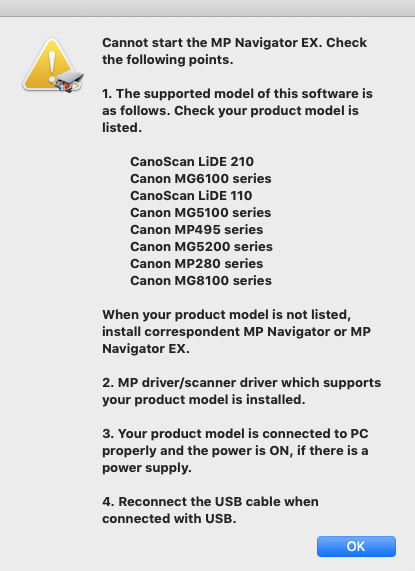
MP Navigator from the Canon Asia site won't work for my model (MG6220). Per the error window:
Options
- Mark as New
- Bookmark
- Subscribe
- Mute
- Subscribe to RSS Feed
- Permalink
- Report Inappropriate Content
01-17-2019 02:16 PM
Yeah, I got the same error message with a US version MG5320. I guess American Mac users have been abandoned by Canon .. perhaps unless we have the newest, newest printer/scanner. And I don't know if even those would be compatible. I hated my old HP AIO and used to like my Canon. I'll probably try Epson next.
Options
- Mark as New
- Bookmark
- Subscribe
- Mute
- Subscribe to RSS Feed
- Permalink
- Report Inappropriate Content
02-09-2019 09:40 PM
Here's something you can try..
Keep your MP Navigator 3.1 installed (for now)
Install the MP Navigator 4 from the link canon asia link above
go to Applications/Canon Utilities
Right click on MP Navigator 4 and select "Show Package Contents"
Navigate to Contents > Plugins > Database
You will see a bunch of .plist files -- these correspond to the scanners that the asia 4.0 version of the app supports
Right click on MP Navigator 3.1 and select "Show Package Contents"
Navigate to Contents > Plugins > Database
You will see a bunch of .plist files -- these correspond to the scanners that the us 3.1 version of the app supports
Copy the files from the 3.1 database folder to the 4.0 database folder
Now when you start MP Naviagor 4 it will launch correctly and find your scanner.
I have not analyzed the contents of these plist files so I'm not 100% sure if this will work, but the contents of the files in the 3.1 version look pretty similar to the ones provided in the 4.0 version.
Options
- Mark as New
- Bookmark
- Subscribe
- Mute
- Subscribe to RSS Feed
- Permalink
- Report Inappropriate Content
02-13-2019 10:18 PM
This^^^^^^ worked perfectly!
I have a Canoscan 9000F.
Thanks a TON robp!
Options
- Mark as New
- Bookmark
- Subscribe
- Mute
- Subscribe to RSS Feed
- Permalink
- Report Inappropriate Content
02-14-2019 02:08 PM
Yeeesss! It work. I have a Canonscan 9000F.
A lot of thanks robp!!!
Options
- Mark as New
- Bookmark
- Subscribe
- Mute
- Subscribe to RSS Feed
- Permalink
- Report Inappropriate Content
02-19-2019 03:05 AM
robp -- I don't know how you found this solution, but I'm grateful you did and that you shared it with us. I was about to ditch my (otherwise perfectly fine) 9000F and shell out some $ for a new scanner, when I came across your post. Thanks so much!!!
Options
- Mark as New
- Bookmark
- Subscribe
- Mute
- Subscribe to RSS Feed
- Permalink
- Report Inappropriate Content
02-22-2019 01:04 PM
robp this solution works great, thanks for helping me get my scanner funciton back!
Options
- Mark as New
- Bookmark
- Subscribe
- Mute
- Subscribe to RSS Feed
- Permalink
- Report Inappropriate Content
02-22-2019 06:46 PM
Although these Navigator hybrid solutions seem to work for folks with dedicated scanners, none of these work for my MG5320 AIO printer/scanner on an I-Mac with Mojave. There is a workaround that does work for me. Open system preferences/ printer scanners and select scanner. You can operate the scanner from there and save various types of files. But you have no editing capability. It's a kludge and not what I paid for. As I said before, I feel totally abandoned by Canon on this. Canon scanning devices should be sold with a discolsure label, "Mac users not supported." It's ridiculous that Canon is relying on user blogs to support basic usage of their devices on a major operating system. Boo hiss Canon.

Announcements
07/22/2026: New firmware updates are available.
EOS R6 Mark III - Version 1.1.0
05/13/2026: New firmware updates are available.
EOS R5 Mark II - Version 1.3.0
EOS R6 Mark II - Version 1.7.0
04/28/2026: Service Notice: Caution Concerning use of Lithium Batteries
03/17/2026: New firmware updates are available.
SELPHY CP1500 - Version 1.0.7.0
02/23/2026: New firmware update is available for EOS C50- Version 1.0.3.1
01/23/2026: New firmware update is available for RF 24-105mm F4 IS USM- Version 2.0.7
01/20/2026: New firmware updates are available.
10/21/2025: Service Notice: To Users of the Compact Digital Camera PowerShot V1
10/15/2025: New firmware updates are available.
Speedlite EL-5 - Version 1.2.0
Speedlite EL-1 - Version 1.1.0
Speedlite Transmitter ST-E10 - Version 1.2.0
07/28/2025: Notice of Free Repair Service for the Mirrorless Camera EOS R50 (Black)
05/21/2025: New firmware update available for EOS C500 Mark II - Version 1.1.5.1
Related Content
- CanoScan LiDE 400 "Cannot communicate with scanner" error in Scanners
- MP Navigator won't open. Update available for macOS v13? in Scanners
- CanoScan 9950F Driver for macOS 10.14.2 Mojave in Scanners
- Canon Pro 100 super saturated macOS Mojave in Professional Photo Printers
- Color Imageclass LBP622CDW PPD not working on any app in Printer Software & Networking

Ⓒ 2026
Canon U.S.A Inc. All Rights Reserved. Reproduction in whole or part without permission is prohibited.
