Turn on suggestions
Auto-suggest helps you quickly narrow down your search results by suggesting possible matches as you type.
- Canon Community
- Discussions & Help
- Printer
- Printer Software & Networking
- Re: smb connection not possible
Options
- Subscribe to RSS Feed
- Mark Topic as New
- Mark Topic as Read
- Float this Topic for Current User
- Bookmark
- Subscribe
- Mute
- Printer Friendly Page

Options
- Mark as New
- Bookmark
- Subscribe
- Mute
- Subscribe to RSS Feed
- Permalink
- Report Inappropriate Content
06-06-2022
01:14 AM
- last edited on
11-07-2023
09:30 AM
by
 Danny
Danny
Hello together,
im proud owner of a Maxify MB5150. Printing works fine so war but im not able to scan to a network folder.
My goal is to scan to my Synology NAS. I enabled SMB1 (does it really only support SMB1?), permissions on NAS are enabled for the destinated folder, user and password are correct.
So inside the Quick Utility Toolbox i find the network folder but when i set all up I always get the error:
"No connection to the folder. Check the settings."
The user and password is correct for 100%, i even changed it to a very simple one. I have the same problem when i try to scan to a shared network folder on my computer (also smb1 enabled).
Any other important settings im missing?
As alternative, is it possible to scan to a defined folder by using USB? I need the scanned PDF files in a special folder to be processed by paperless.
Thanks in advance
Solved! Go to Solution.
1 ACCEPTED SOLUTION
Accepted Solutions
Options
- Mark as New
- Bookmark
- Subscribe
- Mute
- Subscribe to RSS Feed
- Permalink
- Report Inappropriate Content
11-23-2023 04:28 PM
Hi, not sure if this is still an issue for you but I just registered to tell you that I had to change the SMB settings in my NAS to include SMB3 too. Then it worked without the need of activating the NTLMv1
hope this helps if you still have issues. My printer is a GX7050
Cheers
9 REPLIES 9

Options
- Mark as New
- Bookmark
- Subscribe
- Mute
- Subscribe to RSS Feed
- Permalink
- Report Inappropriate Content
06-06-2022 08:22 AM
Welcome to The Canon Forums!
We appreciate your participation, though we need to let you know that your product appears to be a model that is not supported by our team here at Canon USA. While the community is welcome to chime in, the Canon Community Forum is hosted and moderated within the United States by Canon USA. We are only able to provide support for Canon products manufactured for and used within the US market.
If you live outside the United States, please click HERE and select your country to find support in your part of the world.
Options
- Mark as New
- Bookmark
- Subscribe
- Mute
- Subscribe to RSS Feed
- Permalink
- Report Inappropriate Content
11-05-2023 08:56 AM
Hello phenix90,
did you solve your problem? I have the same problem too.
Thanks, Martin
Options
- Mark as New
- Bookmark
- Subscribe
- Mute
- Subscribe to RSS Feed
- Permalink
- Report Inappropriate Content
11-05-2023 09:19 AM
Hey,
i had to enable smb1 in my synology nas and additionaly the NTLMv1 authentification under SMB advanced settings. With this setting im able to scan onto my nas in any desired folder. Should be no issue for a local network.

Options
- Mark as New
- Bookmark
- Subscribe
- Mute
- Subscribe to RSS Feed
- Permalink
- Report Inappropriate Content
11-06-2023 02:04 PM
Hello,
thank you very much, unfortunately this cannot help me 😞 , again this unpretty message "No connection to the folder. Check the settings." I have Synology 718+ and fw7.2.1. Im close to break ntb :).
Options
- Mark as New
- Bookmark
- Subscribe
- Mute
- Subscribe to RSS Feed
- Permalink
- Report Inappropriate Content
11-23-2023 04:28 PM
Hi, not sure if this is still an issue for you but I just registered to tell you that I had to change the SMB settings in my NAS to include SMB3 too. Then it worked without the need of activating the NTLMv1
hope this helps if you still have issues. My printer is a GX7050
Cheers
Options
- Mark as New
- Bookmark
- Subscribe
- Mute
- Subscribe to RSS Feed
- Permalink
- Report Inappropriate Content
11-25-2023 05:36 AM
Yeeeeeeeeeeeeeeeeeeeeees 😀 It will help. Thank you very much. 🍻 or 🥂
Options
- Mark as New
- Bookmark
- Subscribe
- Mute
- Subscribe to RSS Feed
- Permalink
- Report Inappropriate Content
12-04-2023 01:27 PM
hi all! same problem here, but the solution form user Cicciopaolo does not work. in my nas logs i cannot even see a connection attempt. even if firewall is turned off. nas can be pinged by the computer, where quick utility toolbox is installed...
any other suggestions? i habe a synology ds 218+ with dsm 6.2.2
thx in advance snIP3r
Options
- Mark as New
- Bookmark
- Subscribe
- Mute
- Subscribe to RSS Feed
- Permalink
- Report Inappropriate Content
12-04-2023 03:53 PM
I also could not see any connection attempts from the sinology log.
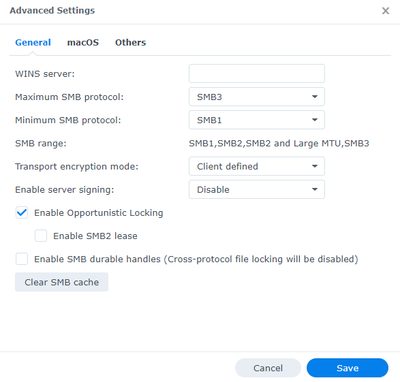
Below the settings I have. I also have the 218+ but the DSM version is the 7.1.1
Before instead of SMB3 it was SMB2 (I think as default)
Options
- Mark as New
- Bookmark
- Subscribe
- Mute
- Subscribe to RSS Feed
- Permalink
- Report Inappropriate Content
12-11-2023 01:19 AM
I tried the settings you suggested after upgrading to Version 7.2.1 - no success 😞 I cannot reach the folder. But i am wondering why you do not see any connection attempts in synology log?

Announcements
07/22/2026: New firmware updates are available.
EOS R6 Mark III - Version 1.1.0
05/13/2026: New firmware updates are available.
EOS R5 Mark II - Version 1.3.0
EOS R6 Mark II - Version 1.7.0
04/28/2026: Service Notice: Caution Concerning use of Lithium Batteries
03/17/2026: New firmware updates are available.
SELPHY CP1500 - Version 1.0.7.0
02/23/2026: New firmware update is available for EOS C50- Version 1.0.3.1
01/23/2026: New firmware update is available for RF 24-105mm F4 IS USM- Version 2.0.7
01/20/2026: New firmware updates are available.
10/21/2025: Service Notice: To Users of the Compact Digital Camera PowerShot V1
10/15/2025: New firmware updates are available.
Speedlite EL-5 - Version 1.2.0
Speedlite EL-1 - Version 1.1.0
Speedlite Transmitter ST-E10 - Version 1.2.0
07/28/2025: Notice of Free Repair Service for the Mirrorless Camera EOS R50 (Black)
05/21/2025: New firmware update available for EOS C500 Mark II - Version 1.1.5.1
Related Content
- PIXMA TS6320 prints blank pages, but test pages and copies are fine in Desktop Inkjet Printers
- PIXMA TS6420a - Won't Connect to Router in Printer Software & Networking
- PIXMA TS3750 Unable to connect to computers or iPhone in Printer Software & Networking
- Connection issues with MF662CDW on Eero Wifi 7 Mesh in Printer Software & Networking
- imageCLASS D570 - Won't Connect Via App in Office Printers

Ⓒ 2026
Canon U.S.A Inc. All Rights Reserved. Reproduction in whole or part without permission is prohibited.
