Turn on suggestions
Auto-suggest helps you quickly narrow down your search results by suggesting possible matches as you type.
- Canon Community
- Discussions & Help
- Printer
- Printer Software & Networking
- Re: Disappointed because of PIXMA TR8622a setup in...
Options
- Subscribe to RSS Feed
- Mark Topic as New
- Mark Topic as Read
- Float this Topic for Current User
- Bookmark
- Subscribe
- Mute
- Printer Friendly Page
Disappointed because of PIXMA TR8622a setup in Chromebook

Options
- Mark as New
- Bookmark
- Subscribe
- Mute
- Subscribe to RSS Feed
- Permalink
- Report Inappropriate Content
05-19-2023
01:27 PM
- last edited on
05-24-2023
02:44 PM
by
 Danny
Danny
Hi,
I faced issue multiple times while printer setup in Chromebook of different modal no. and of different brand.
As printer manufacturers don’t offer printer drivers for Chromebook. That’s why a Chromebook doesn’t support full functionality of a printer.
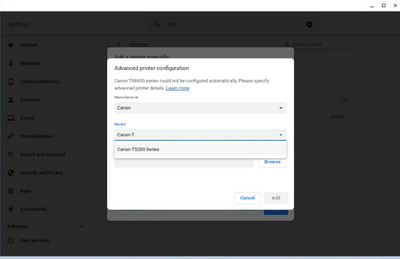
For Advanced printer configuration; Manufacturer and Model No. are required.
Chromebook compatible printers are very less. That’s why mostly it’s required for adding a printer manually.
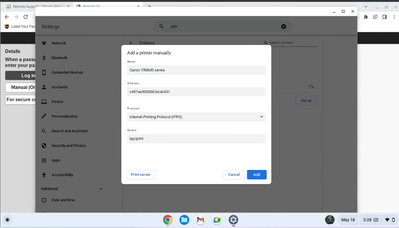
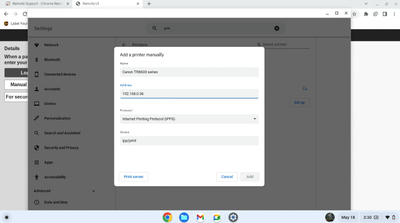
For adding a printer manually, Address, Protocol and Queue are required.
Printer is connected to the router successfully. Chromebook and the printer both are in same network. That’s why printer’s IP address is supposed as Address but it doesn’t accept.
Please let me know,
- From where I can fine Address,
- What should be in Protocol for an end user and
- What will be Queue for an end user.
Please help me so that I can setup printer successfully with Chromebook.
With Regards
NndnG
7 REPLIES 7

Options
- Mark as New
- Bookmark
- Subscribe
- Mute
- Subscribe to RSS Feed
- Permalink
- Report Inappropriate Content
05-20-2023 10:56 AM
Hi, NndnG!
So that the Community can help you better, we need to know exactly which Canon printer model you're using. That, and any other details you'd like to give will help the Community better understand your issue!
If this is a time-sensitive matter, click HERE search our knowledge base or find additional support options HERE.
Thanks and have a great day!
Options
- Mark as New
- Bookmark
- Subscribe
- Mute
- Subscribe to RSS Feed
- Permalink
- Report Inappropriate Content
05-22-2023 03:53 PM - edited 05-23-2023 01:49 PM
Hi,
Thank you for replying for the question I posted.
Canon PIXMA TR8622A is the recent case.
Pls view here for setup process and assist me urgently, how to setup Canon PIXMA TR8622A with Chromebook?
With Regards
NndnG

Options
- Mark as New
- Bookmark
- Subscribe
- Mute
- Subscribe to RSS Feed
- Permalink
- Report Inappropriate Content
05-24-2023 01:19 PM
Hi,
If you need assistance urgently, I recommend reaching out to Canon support for real time support with this issue. You will need to register your Canon gear HERE to access additional support options.
We look forward to hearing from you.
Options
- Mark as New
- Bookmark
- Subscribe
- Mute
- Subscribe to RSS Feed
- Permalink
- Report Inappropriate Content
05-24-2023 01:28 PM
Thank you for replying back. Currently the printer is not with me.
I am unable to register it. In the last reply, I attached a link for images.
I request you, one the basis of link, please assist me.


Options
- Mark as New
- Bookmark
- Subscribe
- Mute
- Subscribe to RSS Feed
- Permalink
- Report Inappropriate Content
05-24-2023 02:41 PM - edited 05-24-2023 02:59 PM
Greetings,
We are happy to try and help. If you need to post images, you can do so using the image link. I am not going to click your link (nothing personal)

This is what Google has available from a support standpoint.
Set up your printer - Chromebook Help (google.com)
I suggest you review the information and try some of the recommended solutions when the printer and chrome book are available to you again. It's unfortunate Google decided to discontinue cloud print support. Your device is fully supported under Windows & some versions of MAC OS
~Rick
Bay Area - CA
~R5 C (1.1.3.1), ~RF Trinity, ~RF 100 Macro, ~RF 100~400, ~RF 100~500, ~RF 200-800, ~RF 1.4x TC, BG-R10, 430EX III-RT ~DxO PhotoLab Elite ~DaVinci Resolve Studio ~ImageClass MF644Cdw MF656Cdw ~Pixel 10 ~CarePaks Are Worth It
Options
- Mark as New
- Bookmark
- Subscribe
- Mute
- Subscribe to RSS Feed
- Permalink
- Report Inappropriate Content
05-25-2023 10:41 AM
Hi,
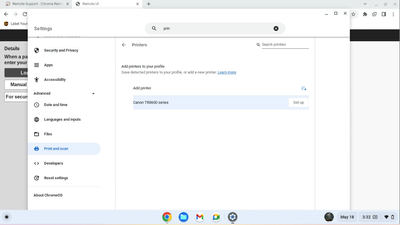
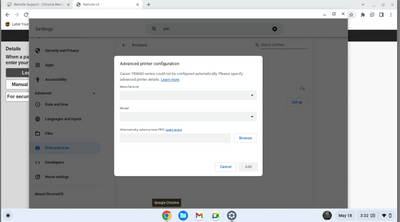
Please go through below images.

Options
- Mark as New
- Bookmark
- Subscribe
- Mute
- Subscribe to RSS Feed
- Permalink
- Report Inappropriate Content
05-25-2023 10:44 AM
Based on images, you can see, printer is connected with the router.
Moreover, you can see, the printer IP address is not accepting as Address.
Sincerely I request, let me know, how to setup the printer with Chromebook?

Announcements
07/22/2026: New firmware updates are available.
EOS R6 Mark III - Version 1.1.0
05/13/2026: New firmware updates are available.
EOS R5 Mark II - Version 1.3.0
EOS R6 Mark II - Version 1.7.0
04/28/2026: Service Notice: Caution Concerning use of Lithium Batteries
03/17/2026: New firmware updates are available.
SELPHY CP1500 - Version 1.0.7.0
02/23/2026: New firmware update is available for EOS C50- Version 1.0.3.1
01/23/2026: New firmware update is available for RF 24-105mm F4 IS USM- Version 2.0.7
01/20/2026: New firmware updates are available.
10/21/2025: Service Notice: To Users of the Compact Digital Camera PowerShot V1
10/15/2025: New firmware updates are available.
Speedlite EL-5 - Version 1.2.0
Speedlite EL-1 - Version 1.1.0
Speedlite Transmitter ST-E10 - Version 1.2.0
07/28/2025: Notice of Free Repair Service for the Mirrorless Camera EOS R50 (Black)
05/21/2025: New firmware update available for EOS C500 Mark II - Version 1.1.5.1

Ⓒ 2026
Canon U.S.A Inc. All Rights Reserved. Reproduction in whole or part without permission is prohibited.
