07-16-2016 05:54 PM
My Mac will not print to the printer.
I am running El Capitan 10.11.5
I went through an hour on the phone with Apple support and they said they cannot do anything more.
Anybody have suggestions? Seems to be on the printers side.
07-18-2016 04:45 PM - edited 07-18-2016 04:48 PM
HI hm488944ever.
I will be able to assist you.
However, so that I can best assist you, I would like to gather some more information. Please reply to the following questions.
1. Are you able to print from any other computers?
2. What is the exact error message when you attempt to print a document?
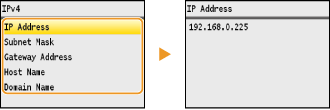
3. What is the IP address of the printer? To view the IP address, please follow the instructions below.
Viewing the IP Address
](Status Monitor)
<Network Information>
[
]
<IPv4>
[
]
Select the setting to view
[
]
I look forward to your reply. Should you need immediate assistance with this issue, please call us at 1-800-OK-CANON (1-800-652-2666).
12/18/2025: New firmware updates are available.
11/20/2025: New firmware updates are available.
EOS R6 Mark III - Version 1.0.1
EOS R5 Mark II - Version 1.2.0
PowerShot G7 X Mark III - Version 1.4.0
PowerShot SX740 HS - Version 1.0.2
10/15/2025: New firmware updates are available.
Speedlite EL-5 - Version 1.2.0
Speedlite EL-1 - Version 1.1.0
Speedlite Transmitter ST-E10 - Version 1.2.0
7/17/2025: New firmware updates are available.
02/20/2025: New firmware updates are available.
RF70-200mm F2.8 L IS USM Z - Version 1.0.6
RF24-105mm F2.8 L IS USM Z - Version 1.0.9
RF100-300mm F2.8 L IS USM - Version 1.0.8
RF50mm F1.4 L VCM - Version 1.0.2
RF24mm F1.4 L VCM - Version 1.0.3
Canon U.S.A Inc. All Rights Reserved. Reproduction in whole or part without permission is prohibited.

