Turn on suggestions
Auto-suggest helps you quickly narrow down your search results by suggesting possible matches as you type.
- Canon Community
- Discussions & Help
- Printer
- Printer Software & Networking
- Re: Cannot scan to email using Color imageCLASS MF...
Options
- Subscribe to RSS Feed
- Mark Topic as New
- Mark Topic as Read
- Float this Topic for Current User
- Bookmark
- Subscribe
- Mute
- Printer Friendly Page
Cannot scan to email using Color imageCLASS MF743Cdw

Anonymous
Not applicable
Options
- Mark as New
- Bookmark
- Subscribe
- Mute
- Subscribe to RSS Feed
- Permalink
- Report Inappropriate Content
08-08-2021 04:18 PM
My Canon MFP is connected via hard-wired Ethernet to a router that is in AP (access point) mode.
The router in AP mode is connected to the main router directly via hard-wired Ethernet cable.
Networking is working as I can ping my printer from a bash shell on macOS or from a shell on Windows 7.
Additionally, I successfully updated the firmware yesterday.
Finally, I can see my printer as active and connected from my router's Network Center Traffic Control screen.
Thus, clearly networking is working.
I consistently get the #753 error when trying to scan to email.
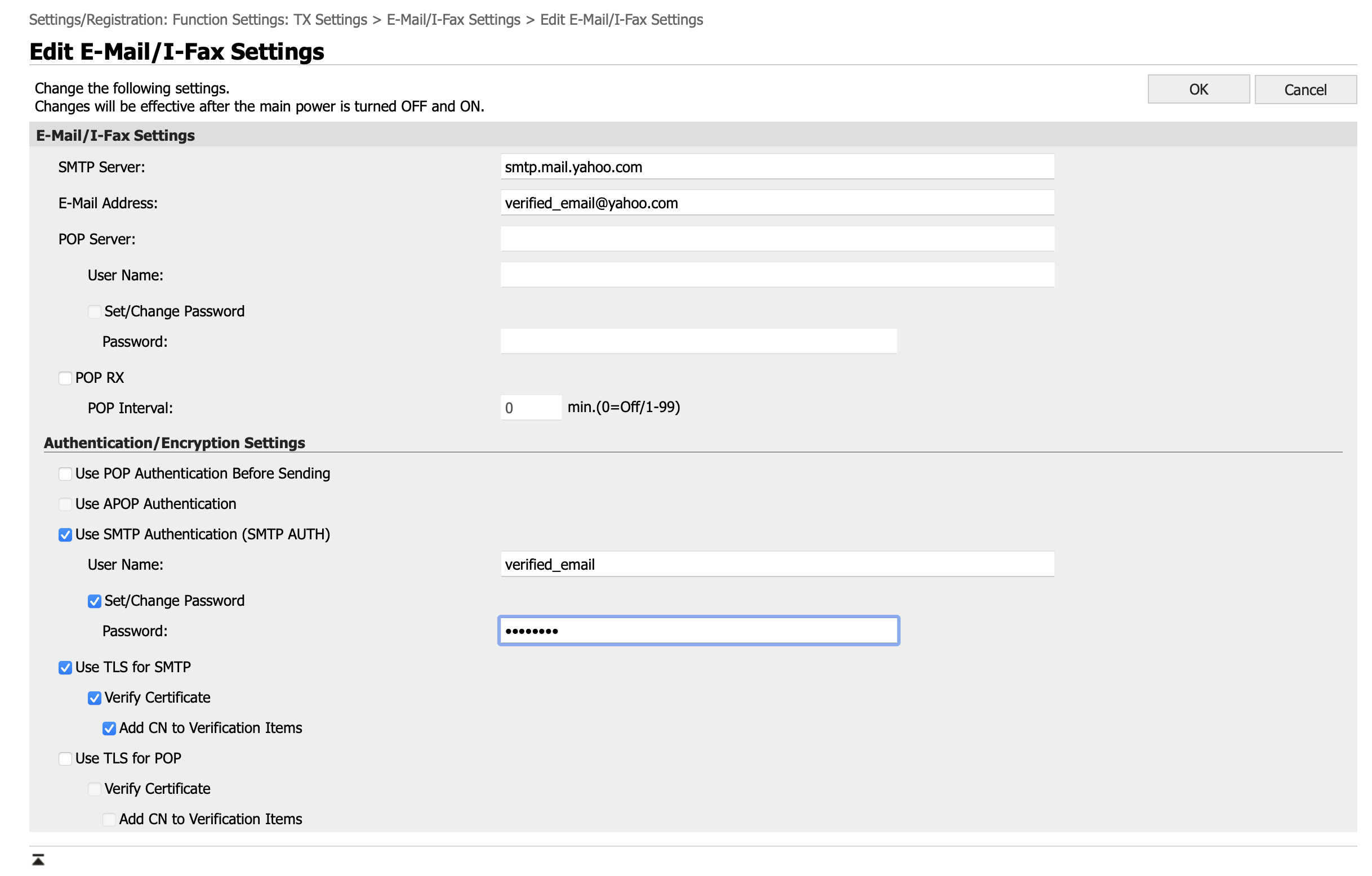
The destination Yahoo email address and password are verified correct. 2-factor authentication is OFF on the account.
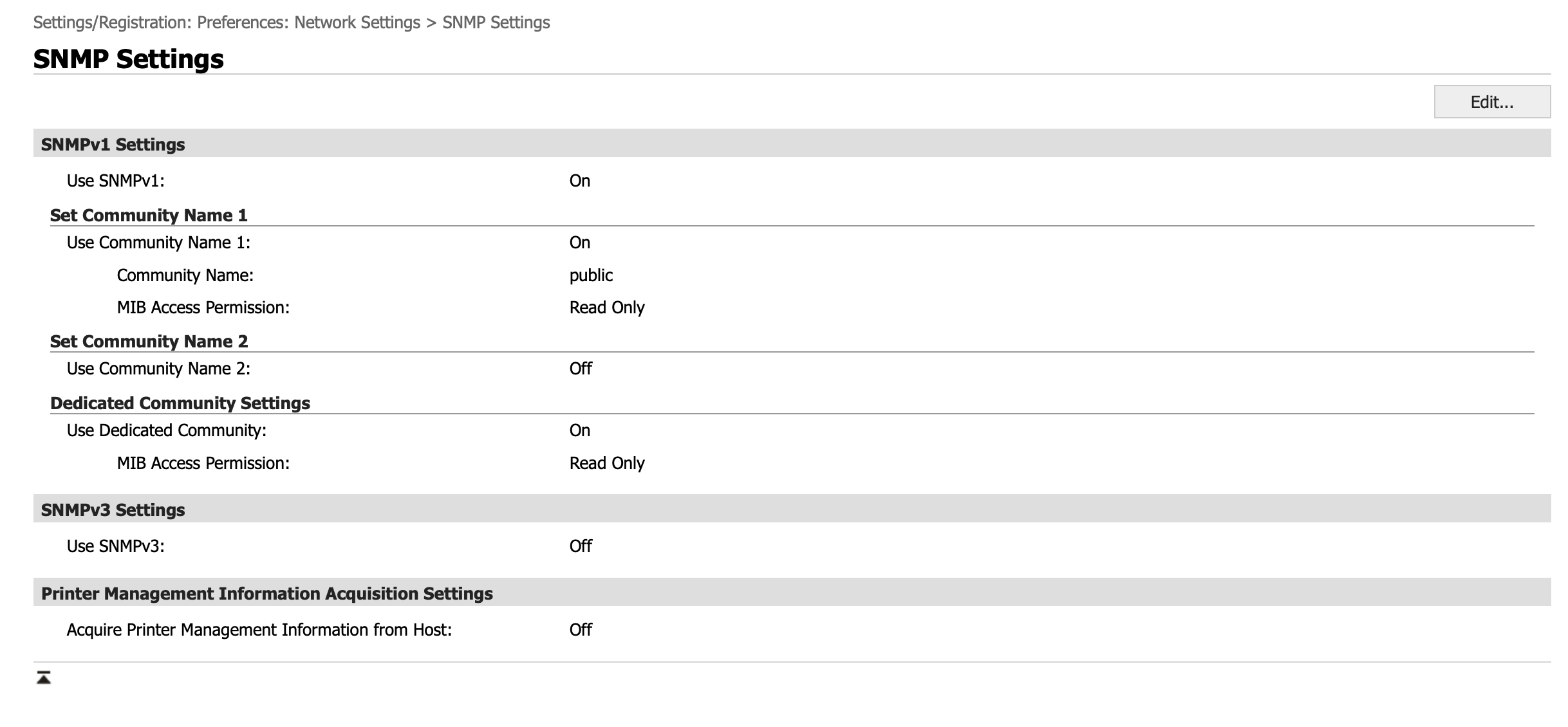
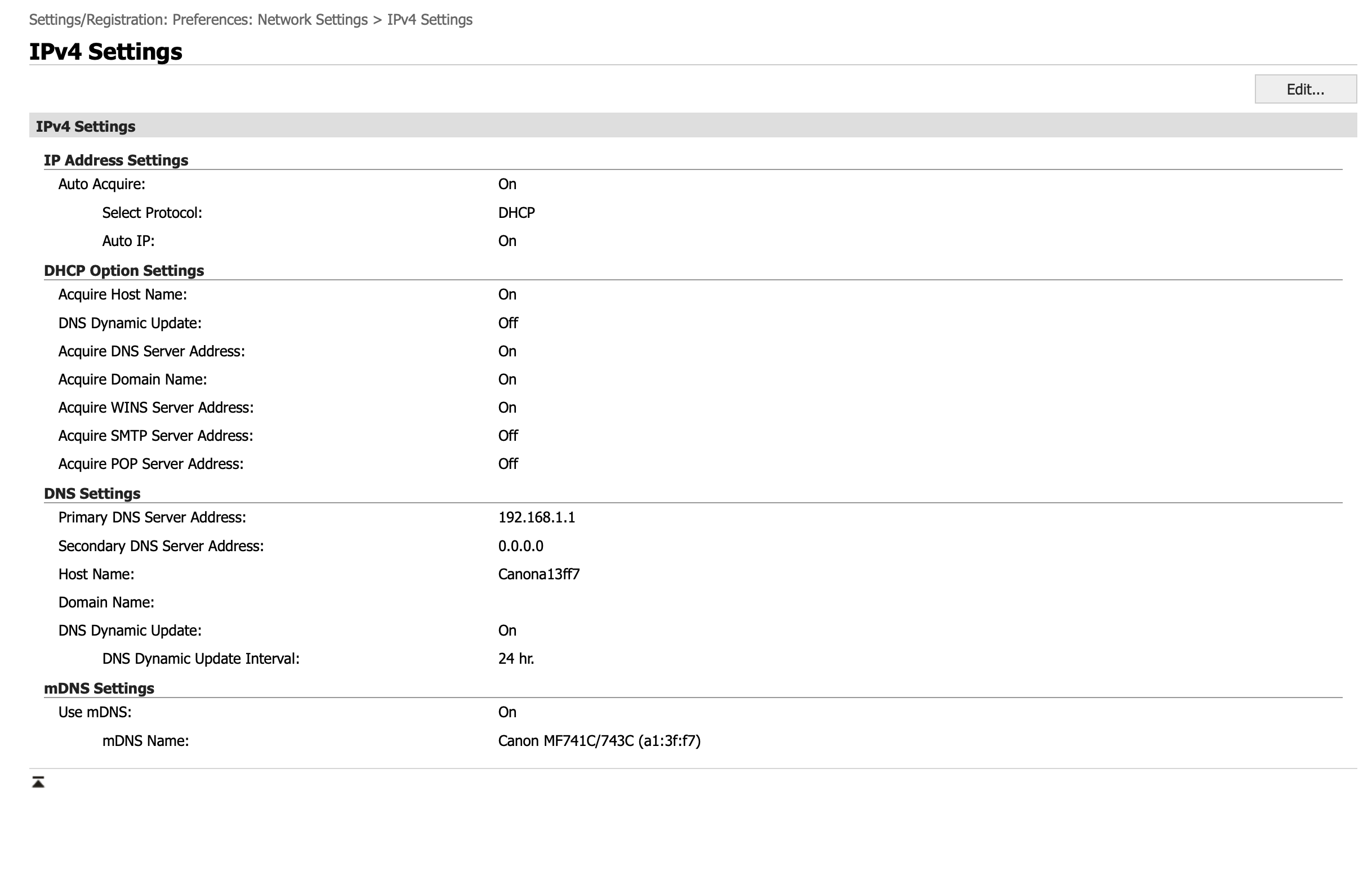
The attached screen grabs show the settings on my printer.
I noticed that the MFP resets the Primary DNS Server Address to 192.168.1.1 which is the address of my primary router.
I see many similar posts on this forum, but some are from several years past and not the exact same model printer. Thus I'm posting this with as much detail as I can.
2 REPLIES 2


Options
- Mark as New
- Bookmark
- Subscribe
- Mute
- Subscribe to RSS Feed
- Permalink
- Report Inappropriate Content
10-06-2021 03:29 PM
Hello Rhimbo,
The error would point to an issue with the scanner having problems scanning via ethernet. In this situation, it could be caused by poor network connectivity or a configuration issue between the router and main router.
We would be happy to assist further with the issue. To provide some feedback or some troubleshooting steps, we would need some additional information. If you could reply to this message with the information below, we can provide some assistance. For a faster resolution to your issue, you can also contact our support team over the phone at 1-800-652-6666. Our agents would be happy to help.
- Are you able to scan to email while the MF743 is connected to the main router via ethernet?
- Does the scanner work while connected via wifi?
Options
- Mark as New
- Bookmark
- Subscribe
- Mute
- Subscribe to RSS Feed
- Permalink
- Report Inappropriate Content
10-29-2021 06:28 PM - edited 10-29-2021 06:33 PM
Hello,
Sorry, I wasn't getting notifications of replies to this thread....
I resolved the problem. The problem was that I could not get email to work with Yahoo. I was able to get it to work using a Gmail smtp server.
I did not investigate in detail the Yahoo problem, but I suspect it was related to Yahoo third-party apps and the need to register passwords. I could not figure out how to get Yahoo to recognize my device as an acceptable device.
So I just used gmail smtp servers instead.


Announcements
07/22/2026: New firmware updates are available.
EOS R6 Mark III - Version 1.1.0
05/13/2026: New firmware updates are available.
EOS R5 Mark II - Version 1.3.0
EOS R6 Mark II - Version 1.7.0
04/28/2026: Service Notice: Caution Concerning use of Lithium Batteries
03/17/2026: New firmware updates are available.
SELPHY CP1500 - Version 1.0.7.0
02/23/2026: New firmware update is available for EOS C50- Version 1.0.3.1
01/23/2026: New firmware update is available for RF 24-105mm F4 IS USM- Version 2.0.7
01/20/2026: New firmware updates are available.
10/21/2025: Service Notice: To Users of the Compact Digital Camera PowerShot V1
10/15/2025: New firmware updates are available.
Speedlite EL-5 - Version 1.2.0
Speedlite EL-1 - Version 1.1.0
Speedlite Transmitter ST-E10 - Version 1.2.0
07/28/2025: Notice of Free Repair Service for the Mirrorless Camera EOS R50 (Black)
05/21/2025: New firmware update available for EOS C500 Mark II - Version 1.1.5.1
Related Content
- imageCLASS MF656Cdw How to disable sleep mode in Office Printers
- imageCLASS MFC743Cdw - No scan, no print, not working and can't reach Canon support after months. in Office Printers
- Canon imageCLASS MF645cx – Unable to Perform Color Correction / All Colors Misaligned in Office Printers
- MF753CDWII does not return from sleep mode in Office Printers
- MF Toolbox can't connect to scanner over the network, but printing works: registry fix MF210 in Printer Software & Networking

Ⓒ 2026
Canon U.S.A Inc. All Rights Reserved. Reproduction in whole or part without permission is prohibited.
