Turn on suggestions
Auto-suggest helps you quickly narrow down your search results by suggesting possible matches as you type.
- Canon Community
- Discussions & Help
- Camera
- Point & Shoot Digital Cameras
- Can't get G9 X to connect to OBS via capture card
Options
- Subscribe to RSS Feed
- Mark Topic as New
- Mark Topic as Read
- Float this Topic for Current User
- Bookmark
- Subscribe
- Mute
- Printer Friendly Page
Can't get G9 X to connect to OBS via capture card

Options
- Mark as New
- Bookmark
- Subscribe
- Mute
- Subscribe to RSS Feed
- Permalink
- Report Inappropriate Content
07-02-2020 04:43 PM
I'm trying to get my G9-X connected to my Macbook Pro in order to use the laptop screen as a preview monitor. I've got the G9-X connected to an HDMI capture card (via miniHDMI to HMDI In) and then the HDMI capture card connected to the laptop (via USB male to male). There's also an HDMI Output port on the capture card that is current unused. I'm not trying to live stream anything, just need to see the camera shot as I record.
So, with everything connected, I tried to use OBS to see the shot, but all I'm seeing is color bars. I don't see the camera shot.
What am I doing wrong? When I unplug the USB from the computer, the color bars go away. That leads me to believe that the laptop DOES "see" the capture card, but the capture card does NOT see the G9-X camera. And it seems like I'm not able to add it the camera as a source in OBS.
I posted previously about this, before I had a capture card, so thanks to the person who responded to that post. I made this as a new post just in case it helps it get seen faster. Not sure if anyone would be checking back on the original post.
Anyways, thanks for any help.
5 REPLIES 5


Options
- Mark as New
- Bookmark
- Subscribe
- Mute
- Subscribe to RSS Feed
- Permalink
- Report Inappropriate Content
07-02-2020 04:53 PM
You have an configuration that is not supported by Canon USA. I do not think your camera is capable of "clean HDMI."
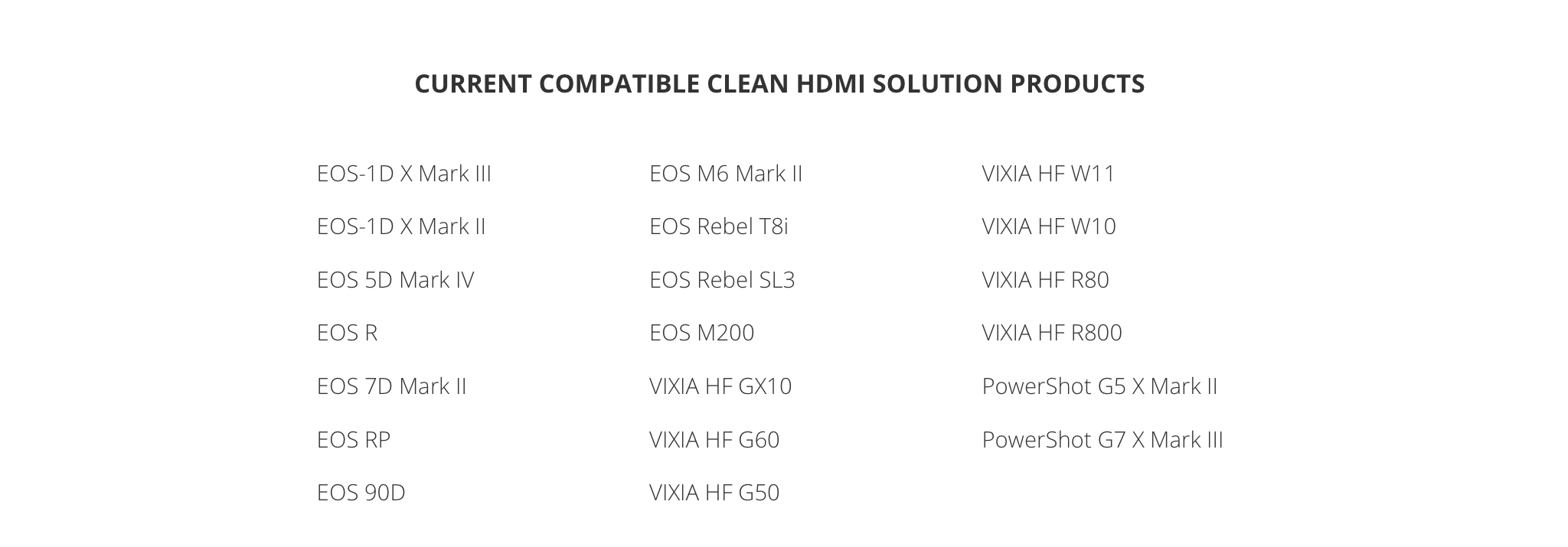
Have you checked the output coming out of the camera by plugging it into a television, just to see what it is sending? Good luck with your experiments.
--------------------------------------------------------
"Enjoying photography since 1972."
"Enjoying photography since 1972."
Options
- Mark as New
- Bookmark
- Subscribe
- Mute
- Subscribe to RSS Feed
- Permalink
- Report Inappropriate Content
07-02-2020 05:09 PM
Ok, I plugged it into a Dell monitor, and when it's in Record mode, there's no picture, but when it's in Playback mode the picture appears on the monitor. So, the cable works! But I guess that means the miniHMDI is only sending a signal when in Playback mode? Is there a way to change that? It also has a miniUSB port on there too, which is usually what I use when transferring images to the computer, but I haven't used that port for this purpose.
Options
- Mark as New
- Bookmark
- Subscribe
- Mute
- Subscribe to RSS Feed
- Permalink
- Report Inappropriate Content
07-02-2020 05:11 PM
Also, I'm okay with it not being a "clean HDMI." I don't care if the buttons and display appear on the picture. I'm just trying to use it as a preview monitor for myself while recording. I was planning to record to the SD card, but if I can get it set up to record on the computer that'd be great, too. But I really just wanted the computer for a preview monitor at least.
Options
- Mark as New
- Bookmark
- Subscribe
- Mute
- Subscribe to RSS Feed
- Permalink
- Report Inappropriate Content
07-03-2020 07:32 AM
@madkatworks wrote:
Ok, I plugged it into a Dell monitor, and when it's in Record mode, there's no picture, but when it's in Playback mode the picture appears on the monitor. So, the cable works! But I guess that means the miniHMDI is only sending a signal when in Playback mode? Is there a way to change that? It also has a miniUSB port on there too, which is usually what I use when transferring images to the computer, but I haven't used that port for this purpose.
Correct. The HDMI only sends a signal output in playback mode. This behavior is cannot be changed. Forget about trying improvise something with the USB port before you damage your camera. You have the wrong camera for your needs.
--------------------------------------------------------
"Enjoying photography since 1972."
"Enjoying photography since 1972."
Options
- Mark as New
- Bookmark
- Subscribe
- Mute
- Subscribe to RSS Feed
- Permalink
- Report Inappropriate Content
07-03-2020 05:28 PM
Ah. Alrighty then. Thank you!


Announcements
12/18/2025: New firmware updates are available.
12/15/2025: New firmware update available for EOS C50 - Version 1.0.1.1
11/20/2025: New firmware updates are available.
EOS R6 Mark III - Version 1.0.1
EOS R5 Mark II - Version 1.2.0
PowerShot G7 X Mark III - Version 1.4.0
PowerShot SX740 HS - Version 1.0.2
10/21/2025: Service Notice: To Users of the Compact Digital Camera PowerShot V1
10/15/2025: New firmware updates are available.
Speedlite EL-5 - Version 1.2.0
Speedlite EL-1 - Version 1.1.0
Speedlite Transmitter ST-E10 - Version 1.2.0
07/28/2025: Notice of Free Repair Service for the Mirrorless Camera EOS R50 (Black)
7/17/2025: New firmware updates are available.
05/21/2025: New firmware update available for EOS C500 Mark II - Version 1.1.5.1
02/20/2025: New firmware updates are available.
RF70-200mm F2.8 L IS USM Z - Version 1.0.6
RF24-105mm F2.8 L IS USM Z - Version 1.0.9
RF100-300mm F2.8 L IS USM - Version 1.0.8
RF50mm F1.4 L VCM - Version 1.0.2
RF24mm F1.4 L VCM - Version 1.0.3
01/22/2024: Canon Supports Disaster Relief Efforts in California
01/14/2025: Steps to resolve still image problem when using certain SanDisk SD cards with the Canon EOS R5 Mark II
Related Content
- 5D Mark III and Cam Link 4k - lack of clean hdmi in EOS DSLR & Mirrorless Cameras
- PowerShot G7 X Mark III Unable to update to firmware 1.4.0 via Canon Connect app in Point & Shoot Digital Cameras
- Audio crackle/scratch only when using clean HDMI out with a long cable from mic to 90D in EOS DSLR & Mirrorless Cameras
- EOS R6 Mark II photos not showing up on Camera Connect in EOS DSLR & Mirrorless Cameras
- EOS R5 won't let me start firmware update in EOS DSLR & Mirrorless Cameras

Ⓒ 2025
Canon U.S.A Inc. All Rights Reserved. Reproduction in whole or part without permission is prohibited.
