Turn on suggestions
Auto-suggest helps you quickly narrow down your search results by suggesting possible matches as you type.
- Canon Community
- Discussions & Help
- Camera
- Point & Shoot Digital Cameras
- Re: Memory card error
Options
- Subscribe to RSS Feed
- Mark Topic as New
- Mark Topic as Read
- Float this Topic for Current User
- Bookmark
- Subscribe
- Mute
- Printer Friendly Page
PowerShot SX200 IS Memory card error

Options
- Mark as New
- Bookmark
- Subscribe
- Mute
- Subscribe to RSS Feed
- Permalink
- Report Inappropriate Content
05-12-2013
08:07 PM
- last edited on
12-02-2022
08:48 AM
by
 Danny
Danny
Out of nowhere, I came up with a memory card error on my canon power shot sx 200 is. Any suggestions on how to correct the problem?
36 REPLIES 36

Options
- Mark as New
- Bookmark
- Subscribe
- Mute
- Subscribe to RSS Feed
- Permalink
- Report Inappropriate Content
05-13-2013 12:52 AM
If there is nothing in the card, you can try to reformat the card inside the camera.
--------------------------------------------------------------------------------------------------
Weekend Travelers Blog | Eastern Sierra Fall Color Guide
Weekend Travelers Blog | Eastern Sierra Fall Color Guide
Options
- Mark as New
- Bookmark
- Subscribe
- Mute
- Subscribe to RSS Feed
- Permalink
- Report Inappropriate Content
05-13-2013 11:07 AM
brand new Power Shot elph 115 Bundle out of box...MEMORY CARD ERROR (Dane Elec sdhc). Camera format did not work. Old SD card worked to take a few mother's day pix. Why would bundled card not work in new camera ????
Options
- Mark as New
- Bookmark
- Subscribe
- Mute
- Subscribe to RSS Feed
- Permalink
- Report Inappropriate Content
05-13-2013 11:50 AM
Like all items, some of them are dead on arrival. It's pretyt normal and it could be manufacture error, defective product, shipping and/or packing damage, etc...If it is new, you can exchange for another one.
--------------------------------------------------------------------------------------------------
Weekend Travelers Blog | Eastern Sierra Fall Color Guide
Weekend Travelers Blog | Eastern Sierra Fall Color Guide

Options
- Mark as New
- Bookmark
- Subscribe
- Mute
- Subscribe to RSS Feed
- Permalink
- Report Inappropriate Content
05-14-2013 04:47 PM
Hi JerryButorac,
As Hsbn mentioned, if you've saved your images and movies to your computer, I'd recommend formatting the memory card. If you're unable to do this, I recommend trying a second memory card. If the memory card error persists unfortunately, your camera will require repair.
You may set up camera repair by clicking here.
Did this answer your question? Please click the Accept as Solution button so that others may find the answer as well.
Options
- Mark as New
- Bookmark
- Subscribe
- Mute
- Subscribe to RSS Feed
- Permalink
- Report Inappropriate Content
09-17-2013 08:43 PM
The best (most dependable, error free) Memory cards are Sandisk brand.. Off the wall brands are iffy at best. Recommonded are name brand cards.
----------------------------------------------------------
There is no picture without light and shadow.
There is no picture without light and shadow.
Options
- Mark as New
- Bookmark
- Subscribe
- Mute
- Subscribe to RSS Feed
- Permalink
- Report Inappropriate Content
03-24-2015 08:27 AM
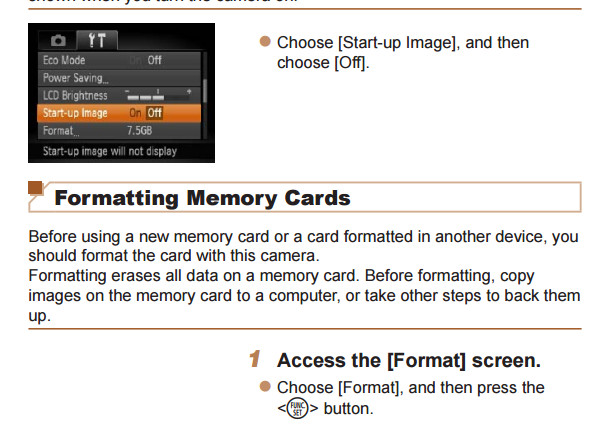
How do you reformat the memory card?
Options
- Mark as New
- Bookmark
- Subscribe
- Mute
- Subscribe to RSS Feed
- Permalink
- Report Inappropriate Content
03-24-2015 08:49 AM
How do you reformat memory card inside a Canon PowerShot ELPH 115 IS ....I've been searching online, but the instructions are for a different model.

Options
- Mark as New
- Bookmark
- Subscribe
- Mute
- Subscribe to RSS Feed
- Permalink
- Report Inappropriate Content
03-24-2015 02:04 PM
Press the menu button, then select the tools menu, scroll down to format, and press func/set button.

Steve M.
Options
- Mark as New
- Bookmark
- Subscribe
- Mute
- Subscribe to RSS Feed
- Permalink
- Report Inappropriate Content
10-05-2015 07:41 PM
1. Older Canons (pre-2007) can only use SD cards, not SDHC cards.
2. There is a tiny tab on the left side of the SD card (when you are reading the front, tab is on left side). Slide it up to lock the SD card, and slide it down to unlock it (when you want to use the camera).
3. Remember to format the SD card. See your owner's manual or look on-line to get directions.
If these things don't solve your problem, you may have damaged the SD slot reader. You may have to have them repaired.


Announcements
07/22/2026: New firmware updates are available.
EOS R6 Mark III - Version 1.1.0
05/13/2026: New firmware updates are available.
EOS R5 Mark II - Version 1.3.0
EOS R6 Mark II - Version 1.7.0
04/28/2026: Service Notice: Caution Concerning use of Lithium Batteries
03/17/2026: New firmware updates are available.
SELPHY CP1500 - Version 1.0.7.0
02/23/2026: New firmware update is available for EOS C50- Version 1.0.3.1
01/23/2026: New firmware update is available for RF 24-105mm F4 IS USM- Version 2.0.7
01/20/2026: New firmware updates are available.
10/21/2025: Service Notice: To Users of the Compact Digital Camera PowerShot V1
10/15/2025: New firmware updates are available.
Speedlite EL-5 - Version 1.2.0
Speedlite EL-1 - Version 1.1.0
Speedlite Transmitter ST-E10 - Version 1.2.0
07/28/2025: Notice of Free Repair Service for the Mirrorless Camera EOS R50 (Black)
05/21/2025: New firmware update available for EOS C500 Mark II - Version 1.1.5.1
Related Content
- EOS Rebel T3i photos not showing up on memory card in EOS DSLR & Mirrorless Cameras
- CFexpress 128GB capacity error on Canon R6 V – Shows "Full" but only 6GB are used in EOS DSLR & Mirrorless Cameras
- How to connect PowerShot SX530 HS to iMac Tahoe 26 via Wi-Fi in Point & Shoot Digital Cameras
- EOS R5 Mark II minor Firmware Update, Version 1.3.1 in Camera Software
- EOS 90D set to CRAW, photos indicate they're taken as JPG in EOS DSLR & Mirrorless Cameras

Ⓒ 2026
Canon U.S.A Inc. All Rights Reserved. Reproduction in whole or part without permission is prohibited.
