Turn on suggestions
Auto-suggest helps you quickly narrow down your search results by suggesting possible matches as you type.
- Canon Community
- Discussions & Help
- Camera
- Point & Shoot Digital Cameras
- Re: PowerShot ELPH 360 HS flash help!!
Options
- Subscribe to RSS Feed
- Mark Topic as New
- Mark Topic as Read
- Float this Topic for Current User
- Bookmark
- Subscribe
- Mute
- Printer Friendly Page

Options
- Mark as New
- Bookmark
- Subscribe
- Mute
- Subscribe to RSS Feed
- Permalink
- Report Inappropriate Content
04-25-2023
10:04 PM
- last edited on
04-26-2023
08:56 AM
by
 Danny
Danny
hi! I just purchased a powershot elph 360 hs and was wondering how I get the flash to always be on, no matter the lighting situation. it’s only giving me auto and off options when I press the flash icon. when I go to look at the specs on the camera, it says the flash should have auto, on, slow synchro and off options… I appreciate anyone’s help with this!
Solved! Go to Solution.
1 ACCEPTED SOLUTION
Accepted Solutions


Options
- Mark as New
- Bookmark
- Subscribe
- Mute
- Subscribe to RSS Feed
- Permalink
- Report Inappropriate Content
04-26-2023 01:16 AM
Greetings,
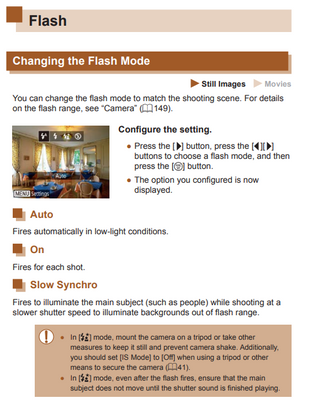
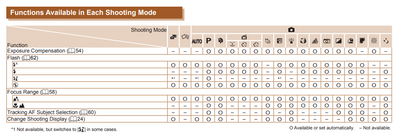
Selectable Flash options will depend on the shooting mode you have chosen. You need to be in AE [P] mode to use all of the flashes selectable options.
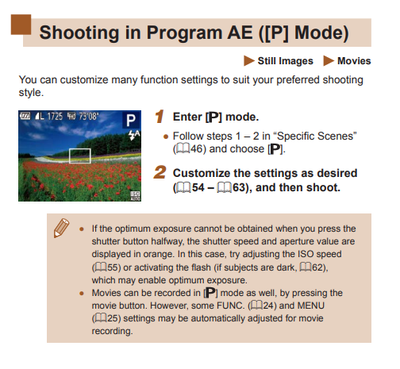
Flash settings are on page 62.
Note the shooting modes where flash operation can be adjusted.
"O" = Available or set automatically
"-" = Not available
~Rick
Bay Area - CA
~R5 C (1.1.3.1), ~RF Trinity, ~RF 100 Macro, ~RF 100~400, ~RF 100~500, ~RF 200-800, ~RF 1.4x TC, BG-R10, 430EX III-RT ~DxO PhotoLab Elite ~DaVinci Resolve Studio ~ImageClass MF644Cdw MF656Cdw ~Pixel 10 ~CarePaks Are Worth It
4 REPLIES 4
Options
- Mark as New
- Bookmark
- Subscribe
- Mute
- Subscribe to RSS Feed
- Permalink
- Report Inappropriate Content
04-26-2023 01:16 AM
Greetings,
Selectable Flash options will depend on the shooting mode you have chosen. You need to be in AE [P] mode to use all of the flashes selectable options.
Flash settings are on page 62.
Note the shooting modes where flash operation can be adjusted.
"O" = Available or set automatically
"-" = Not available
~Rick
Bay Area - CA
~R5 C (1.1.3.1), ~RF Trinity, ~RF 100 Macro, ~RF 100~400, ~RF 100~500, ~RF 200-800, ~RF 1.4x TC, BG-R10, 430EX III-RT ~DxO PhotoLab Elite ~DaVinci Resolve Studio ~ImageClass MF644Cdw MF656Cdw ~Pixel 10 ~CarePaks Are Worth It
Options
- Mark as New
- Bookmark
- Subscribe
- Mute
- Subscribe to RSS Feed
- Permalink
- Report Inappropriate Content
04-26-2023 08:57 AM
I got it thank you so much!! 🙂
Options
- Mark as New
- Bookmark
- Subscribe
- Mute
- Subscribe to RSS Feed
- Permalink
- Report Inappropriate Content
04-26-2023 09:56 AM
You're welcome. Enjoy the camera.
~Rick
Bay Area - CA
~R5 C (1.1.3.1), ~RF Trinity, ~RF 100 Macro, ~RF 100~400, ~RF 100~500, ~RF 200-800, ~RF 1.4x TC, BG-R10, 430EX III-RT ~DxO PhotoLab Elite ~DaVinci Resolve Studio ~ImageClass MF644Cdw MF656Cdw ~Pixel 10 ~CarePaks Are Worth It
Options
- Mark as New
- Bookmark
- Subscribe
- Mute
- Subscribe to RSS Feed
- Permalink
- Report Inappropriate Content
08-04-2024 02:56 PM
Hiii, I also purchased a canon powershot ELPH 360 HS but I have a problem. I have been looking for a solution.. I have the problem with the flash, but in this case I don't get the "P" (program) option in the camera. Could you help me? I have been trying to solve this problem for a year but no one has been able to help me. I have not been able to reset any setting on my camera since I don't get the "P" option when I press the "function set" button on my camera. Thank you so much!!!

Announcements
07/22/2026: New firmware updates are available.
EOS R6 Mark III - Version 1.1.0
05/13/2026: New firmware updates are available.
EOS R5 Mark II - Version 1.3.0
EOS R6 Mark II - Version 1.7.0
04/28/2026: Service Notice: Caution Concerning use of Lithium Batteries
03/17/2026: New firmware updates are available.
SELPHY CP1500 - Version 1.0.7.0
02/23/2026: New firmware update is available for EOS C50- Version 1.0.3.1
01/23/2026: New firmware update is available for RF 24-105mm F4 IS USM- Version 2.0.7
01/20/2026: New firmware updates are available.
10/21/2025: Service Notice: To Users of the Compact Digital Camera PowerShot V1
10/15/2025: New firmware updates are available.
Speedlite EL-5 - Version 1.2.0
Speedlite EL-1 - Version 1.1.0
Speedlite Transmitter ST-E10 - Version 1.2.0
07/28/2025: Notice of Free Repair Service for the Mirrorless Camera EOS R50 (Black)
05/21/2025: New firmware update available for EOS C500 Mark II - Version 1.1.5.1
Related Content
- Dropped my canon powershot elph360 A in Point & Shoot Digital Cameras
- PLEASE HELP!!! PowerShot ELPH 300 HS turns itself on and glitching in Point & Shoot Digital Cameras
- Where to download Canon Camera Connect v3 for Windows 11 in Camera Software
- Canon AF35M II/Autoboy 2 flash not working in Point & Shoot Digital Cameras
- Canon PowerShot V1 and Hot and Stuck pixels issue in Point & Shoot Digital Cameras

Ⓒ 2026
Canon U.S.A Inc. All Rights Reserved. Reproduction in whole or part without permission is prohibited.
