cancel
Showing results for 
Show  only  | Search instead for 
Did you mean: 

Cannot connect G5X to a PC via wifi

pjafla
Contributor

I am trying to estabish a wireless link from my G5X to a PC.


The camera sees and connects to the access point of my router and then sees the names of the computers connected to the router.


The latest Canon Camera Window software is installed on the PCs. Two are WIn10 Pro and one is an old WIn7 Pro,


None of the PCs can establish a Camera WIndow connection.


I used to be able to do this with a now sold SX-60.


I note that the GFX shows up as a device under WIndows 10, IP Address 192.168.1.10:49152. Cannot be accessed by browser. But obviously Win10 sees the camera. Might Camera WIndow might be incompatible with the G5X?????


The G5X has no issues connecting to an iPhone.


Any suggestions will be appreciated.


I could, of course, pop the SD card and read from that into the computers or attach a USB cord, But sometimes it is convenient to have the wireless link.


FOLLOWUP ---


SOLVED!


I finally got it to work.


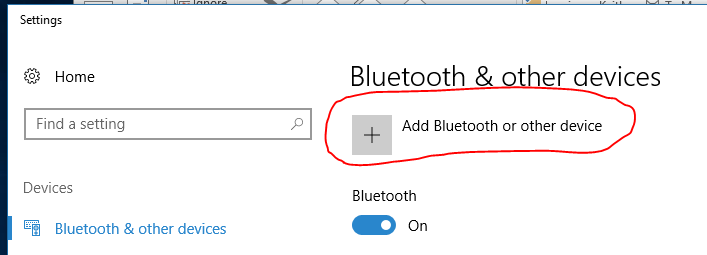
I must have read the Canon instructions on WIFI setup 20 times but never ran the COntorl Panel/Add Devices to get the G5X driver installed.


And then, once it was installed, I never got the autorun popup selection as I generally have autorun turned off.


Once that was fixed and I went through a restart, the process works.


.

1 REPLY 1

Kvanwem
Apprentice

Don't feel alone, I read and tried the step with no avail then read your post and it dawned on me that you actually have to click on the "Add" button. Works like a charm now.


Capture.PNG

Holiday
Announcements
12/15/2025: New firmware update available for EOS C50 - Version 1.0.1.1

11/20/2025: New firmware updates are available.

EOS R6 Mark III - Version 1.0.1

EOS R3 - Version 2.0.0

EOS R1 - Version 1.2.0

EOS R5 Mark II - Version 1.2.0

EOS R5 - Version 2.2.1

PowerShot G7 X Mark III - Version 1.4.0

PowerShot SX740 HS - Version 1.0.2


10/21/2025: Service Notice: To Users of the Compact Digital Camera PowerShot V1

10/15/2025: New firmware updates are available.

Speedlite EL-5 - Version 1.2.0

Speedlite EL-1 - Version 1.1.0

Speedlite Transmitter ST-E10 - Version 1.2.0


07/28/2025: Notice of Free Repair Service for the Mirrorless Camera EOS R50 (Black)

07/24/2025: New firmware updates are available.


07/23/2025: New firmware updates are available.

EOS R5C - Version 1.1.1.1

EOS C80 - Version 1.0.3.1


7/17/2025: New firmware updates are available.

EOS R7 - Version 1.7.1

EOS R10 - Version 1.7.0

EOS R8 - Version 1.5.0

EOS R50 - Version 1.4.0

Powershot V10 - Version 1.4.0

Powershot V1 - Version 1.1.0

EOS R50V - Version 1.1.1


05/21/2025: New firmware update available for EOS C500 Mark II - Version 1.1.5.1

02/20/2025: New firmware updates are available.

RF70-200mm F2.8 L IS USM Z - Version 1.0.6

RF24-105mm F2.8 L IS USM Z - Version 1.0.9

RF100-300mm F2.8 L IS USM - Version 1.0.8

RF50mm F1.4 L VCM - Version 1.0.2

RF24mm F1.4 L VCM - Version 1.0.3


01/22/2024: Canon Supports Disaster Relief Efforts in California
01/14/2025: Steps to resolve still image problem when using certain SanDisk SD cards with the Canon EOS R5 Mark II