Turn on suggestions
Auto-suggest helps you quickly narrow down your search results by suggesting possible matches as you type.
- Canon Community
- Discussions & Help
- Camera
- Point & Shoot Digital Cameras
- Re: Can't connect my canon camera to my computer
Options
- Subscribe to RSS Feed
- Mark Topic as New
- Mark Topic as Read
- Float this Topic for Current User
- Bookmark
- Subscribe
- Mute
- Printer Friendly Page
Can't connect my canon camera to my computer

Options
- Mark as New
- Bookmark
- Subscribe
- Mute
- Subscribe to RSS Feed
- Permalink
- Report Inappropriate Content
01-14-2021 08:10 AM
Hi,
I am trying to connect my Canon Powershot G7X Mark II to my Laptop. I have followed the instructions on the canon videos I found on youtube. But when I press "Add a device" on my computer, and then search for the device on my camera, my camera simply returns "device not found".
I have installed all the softwares, did the thing with wifi connection setup, even found my Wifi on my camera but passed this point, it doesn't find my laptop.
Do you know where the problem might come from ?
Best regards,
Charles Cochener
4 REPLIES 4
Options
- Mark as New
- Bookmark
- Subscribe
- Mute
- Subscribe to RSS Feed
- Permalink
- Report Inappropriate Content
01-20-2021 04:34 PM
Thanks for the great customer service !


Options
- Mark as New
- Bookmark
- Subscribe
- Mute
- Subscribe to RSS Feed
- Permalink
- Report Inappropriate Content
01-20-2021 04:46 PM
I assume that was sarcastic.
It would help if you help us help you.
What computer? Mac or Windows?
What version of the OS?
What kind of connection? WIFI or USB?
For what it is worth. I have never had an issue connecting a computer to any of my macs via USB. I don't bother with the Canon software.
Options
- Mark as New
- Bookmark
- Subscribe
- Mute
- Subscribe to RSS Feed
- Permalink
- Report Inappropriate Content
01-20-2021 05:17 PM
Well I managed to connect the Canon camera to a phone via Wi-FI. It sure must be possible to a computer. There is even a Canon-made video about that on Youtube, which I followed thoroughly but it ended up not working...
Sorry for sounding exasperated in my previous message. I thought this was a customer service platform and was expecting a quicker response from Canon.
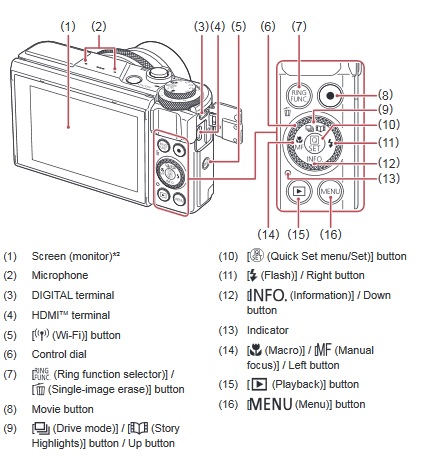
I didn't find any port on my camera and thus I rejected the USB option. I am on Windows 10 btw.
Options
- Mark as New
- Bookmark
- Subscribe
- Mute
- Subscribe to RSS Feed
- Permalink
- Report Inappropriate Content
01-20-2021 05:30 PM - edited 01-20-2021 05:31 PM
Most of us are users. Canon will tell you that if you want a quick response, call them.
Note numbers 3 for the USB connection:
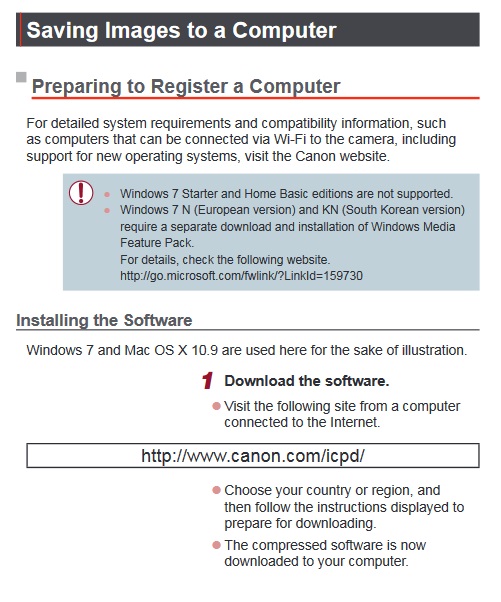
For wifi on your computer it appears you need to install some software:


Announcements
05/13/2026: New firmware updates are available.
EOS R5 Mark II - Version 1.3.0
EOS R6 Mark II - Version 1.7.0
04/28/2026: Service Notice: Caution Concerning use of Lithium Batteries
03/17/2026: New firmware updates are available.
SELPHY CP1500 - Version 1.0.7.0
02/23/2026: New firmware update is available for EOS C50- Version 1.0.3.1
01/23/2026: New firmware update is available for RF 24-105mm F4 IS USM- Version 2.0.7
01/20/2026: New firmware updates are available.
12/22/2025: New firmware update is available for EOS R6 Mark III- Version 1.0.2
10/21/2025: Service Notice: To Users of the Compact Digital Camera PowerShot V1
10/15/2025: New firmware updates are available.
Speedlite EL-5 - Version 1.2.0
Speedlite EL-1 - Version 1.1.0
Speedlite Transmitter ST-E10 - Version 1.2.0
07/28/2025: Notice of Free Repair Service for the Mirrorless Camera EOS R50 (Black)
05/21/2025: New firmware update available for EOS C500 Mark II - Version 1.1.5.1
Related Content
- EOS R5 Mark II 1.0.3 Firmware update in EOS DSLR & Mirrorless Cameras
- EOS R5 Mark II Firmware Update, Version 1.3.0 [Windows] in EOS DSLR & Mirrorless Cameras
- EOS R6 Mark II – Firmware 1.7.0 – Bug: 5GHz hotspot invisible on Samsung Android (DFS channel issue) in EOS DSLR & Mirrorless Cameras
- No White Balance option on Canon Camera Connect app in Camera Software
- Trouble Transferring Firmware from Camera Connect to Camera in Camera Software

Ⓒ 2026
Canon U.S.A Inc. All Rights Reserved. Reproduction in whole or part without permission is prohibited.
