Turn on suggestions
Auto-suggest helps you quickly narrow down your search results by suggesting possible matches as you type.
- Canon Community
- Discussions & Help
- Printer
- Office Printers
- Re: Network Scan Utility Not Installed By MP Drive...
Options
- Subscribe to RSS Feed
- Mark Topic as New
- Mark Topic as Read
- Float this Topic for Current User
- Bookmark
- Subscribe
- Mute
- Printer Friendly Page
Network Scan Utility Not Installed By MP Driver Software in Windows 10

Options
- Mark as New
- Bookmark
- Subscribe
- Mute
- Subscribe to RSS Feed
- Permalink
- Report Inappropriate Content
01-27-2016 02:25 AM
I was having some problems with the network scan functionality on my Maxify MB2320 and decided to re-install the driver software. I first uninstalled all Canon drivers. Then I downloaded the driver installer from the usa.canon.com site -- which says it's Windows 10 compatible -- and installed and everything seemed to work correctly -- in fact, the installation program said installation was successful.
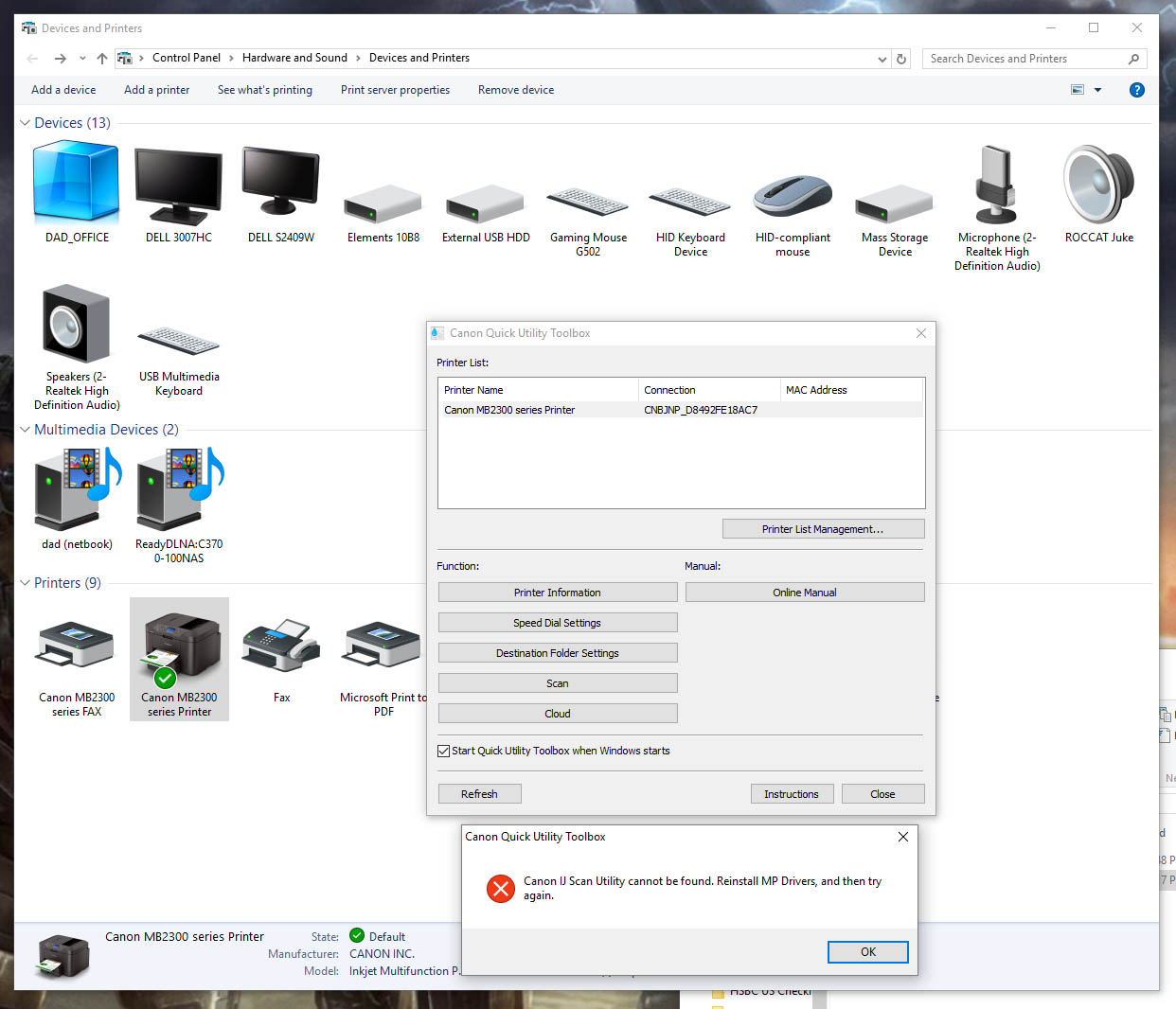
But now when I pull up the Canon Quick Toolbox and select the Scan button, it gives me an error message: "Cannot find Canon IJ Scan Utility. Reinstall MP Driver, and then try again." So I reinstalled the driver package -- even re-downloaded in case the first package had gotten corrupted -- and got the same results. The network scan utility is no longer anywhere to be found. It should be part of the MP driver package, correct? I mean, there are no other driver packages available for this printer on the Canon site.
2 REPLIES 2


Options
- Mark as New
- Bookmark
- Subscribe
- Mute
- Subscribe to RSS Feed
- Permalink
- Report Inappropriate Content
01-29-2016 02:55 PM
Hello.
Please try the following to see if we can resolve this issue:
1. From the Start menu, click Settings, Devices, Printers & Scanners.
2. Towards the bottom of the Printers & Scanners area, turn off Let Windows manage my default printer.
3. Once this has been done, reinstall the MP Drivers again.
You may also have to delete any extra icons of the printer in the Printers & Scanners menu.
If you continue to have difficulties once this has been done, find more help at Contact Us.
Did this answer your question? Please click the Accept as Solution button so that others may find the answer as well.
Options
- Mark as New
- Bookmark
- Subscribe
- Mute
- Subscribe to RSS Feed
- Permalink
- Report Inappropriate Content
05-28-2016 08:58 PM
I am having the same problem. I did the fix you suggested. No joy.


Announcements
07/22/2026: New firmware updates are available.
EOS R6 Mark III - Version 1.1.0
05/13/2026: New firmware updates are available.
EOS R5 Mark II - Version 1.3.0
EOS R6 Mark II - Version 1.7.0
04/28/2026: Service Notice: Caution Concerning use of Lithium Batteries
03/17/2026: New firmware updates are available.
SELPHY CP1500 - Version 1.0.7.0
02/23/2026: New firmware update is available for EOS C50- Version 1.0.3.1
01/23/2026: New firmware update is available for RF 24-105mm F4 IS USM- Version 2.0.7
01/20/2026: New firmware updates are available.
10/21/2025: Service Notice: To Users of the Compact Digital Camera PowerShot V1
10/15/2025: New firmware updates are available.
Speedlite EL-5 - Version 1.2.0
Speedlite EL-1 - Version 1.1.0
Speedlite Transmitter ST-E10 - Version 1.2.0
07/28/2025: Notice of Free Repair Service for the Mirrorless Camera EOS R50 (Black)
05/21/2025: New firmware update available for EOS C500 Mark II - Version 1.1.5.1
Related Content
- imageCLASS MFC743Cdw - No scan, no print, not working and can't reach Canon support after months. in Office Printers
- MF Toolbox can't connect to scanner over the network, but printing works: registry fix MF210 in Printer Software & Networking
- RS40 Scanner driver installation error on Windows 11 in Scanners
- Latest Photo Printer Software for TR8620 Printer, or 3rd party suggestions in Printer Software & Networking
- MF662Cdw Driver Install Pack for Windows Error in Printer Software & Networking

Ⓒ 2026
Canon U.S.A Inc. All Rights Reserved. Reproduction in whole or part without permission is prohibited.
