Turn on suggestions
Auto-suggest helps you quickly narrow down your search results by suggesting possible matches as you type.
- Canon Community
- Discussions & Help
- Printer
- Office Printers
- Re: MF4890DW will not scan and MF Network Scan Uti...
Options
- Subscribe to RSS Feed
- Mark Topic as New
- Mark Topic as Read
- Float this Topic for Current User
- Bookmark
- Subscribe
- Mute
- Printer Friendly Page
MF4890DW will not scan and MF Network Scan Utility will NOT open

Options
- Mark as New
- Bookmark
- Subscribe
- Mute
- Subscribe to RSS Feed
- Permalink
- Report Inappropriate Content
12-13-2021 06:19 PM
I've only got about 6 hours into this nightmare. My scanner quit working after my beloved ISP had a hicup.
I have my MF4890DW set up on Ethernet and it prints just fine, but it will not scan. I've reloaded all the programs and updates including the patches.
But, the first thing it tells you on the Operation guide manual for scanning is to Register the machine to the MF Network Scan Utility FIRST. So I try to open that up and it will not open. I go into the Control Panel under programs to see if it is even showing up as a program, and do NOT see it. Making things worse, I don't see anywhere that I can download it again from this support site.
And while I'm in a bitching mood, why can't Canon just call these devices what they really are, like "printer" , "scanner", "fax machine". But now, they assign names like "Canon MF4800 SeriesUFRII LT", and "Canon MF4800 SeriesUFRII XPS". The FAX device is clear in the description, but how would I know if the "LT" is the printer or the scanner? I mean just stupid as hell.
Is this MF Network Scan Utility even still available? If not I guess I'll be looking for a new unit, and it won't be a Canon.
2 REPLIES 2
Options
- Mark as New
- Bookmark
- Subscribe
- Mute
- Subscribe to RSS Feed
- Permalink
- Report Inappropriate Content
12-13-2021 07:15 PM
I should have mentioned that every time I try a scan I get the error code:255,0,0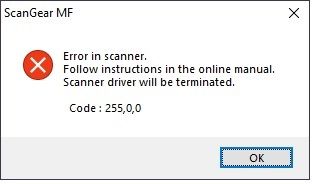
Seems like the scanner is not communicating with the PC
Options
- Mark as New
- Bookmark
- Subscribe
- Mute
- Subscribe to RSS Feed
- Permalink
- Report Inappropriate Content
12-13-2021 08:53 PM
One more update. I just switched back to a USB connection and everything works. Go figure. But I'd like to know why? I want to be able to use this printer from other computers.

Announcements
07/22/2026: New firmware updates are available.
EOS R6 Mark III - Version 1.1.0
05/13/2026: New firmware updates are available.
EOS R5 Mark II - Version 1.3.0
EOS R6 Mark II - Version 1.7.0
04/28/2026: Service Notice: Caution Concerning use of Lithium Batteries
03/17/2026: New firmware updates are available.
SELPHY CP1500 - Version 1.0.7.0
02/23/2026: New firmware update is available for EOS C50- Version 1.0.3.1
01/23/2026: New firmware update is available for RF 24-105mm F4 IS USM- Version 2.0.7
01/20/2026: New firmware updates are available.
10/21/2025: Service Notice: To Users of the Compact Digital Camera PowerShot V1
10/15/2025: New firmware updates are available.
Speedlite EL-5 - Version 1.2.0
Speedlite EL-1 - Version 1.1.0
Speedlite Transmitter ST-E10 - Version 1.2.0
07/28/2025: Notice of Free Repair Service for the Mirrorless Camera EOS R50 (Black)
05/21/2025: New firmware update available for EOS C500 Mark II - Version 1.1.5.1
Related Content
- imageCLASS MF753Cdw will not print or scan with MF Scan Utility in Printer Software & Networking
- PIXMA TR8520 prints OK but when attempting to scan get can't connect message in Desktop Inkjet Printers
- LPB632cdw - ethernet port not working, wifi is in Printer Software & Networking
- Mac osX 24.2 lost recognition of scanner in TS9521Ca in Desktop Inkjet Printers
- Can't find driver & mf scan utility for imageCLASS MF452dw in Printer Software & Networking

Ⓒ 2026
Canon U.S.A Inc. All Rights Reserved. Reproduction in whole or part without permission is prohibited.
