- Meet Our Illuminaries
- Discussions & Help
- Gallery
- Learn With Canon
- About Our Community
- Meet Our Illuminaries
- Discussions & Help
- Gallery
- Learn With Canon
- About Our Community
Turn on suggestions
Auto-suggest helps you quickly narrow down your search results by suggesting possible matches as you type.
- Canon Community
- Discussions & Help
- Printer
- Office Printers
- Re: Load Paper.LTR Error Message when printing - C...
Options
- Subscribe to RSS Feed
- Mark Topic as New
- Mark Topic as Read
- Float this Topic for Current User
- Bookmark
- Subscribe
- Mute
- Printer Friendly Page
Load Paper.LTR Error Message when printing - Canon MF635Cx

Options
- Mark as New
- Bookmark
- Subscribe
- Mute
- Subscribe to RSS Feed
- Permalink
- Report Inappropriate Content
02-07-2018 04:46 AM
Good day,
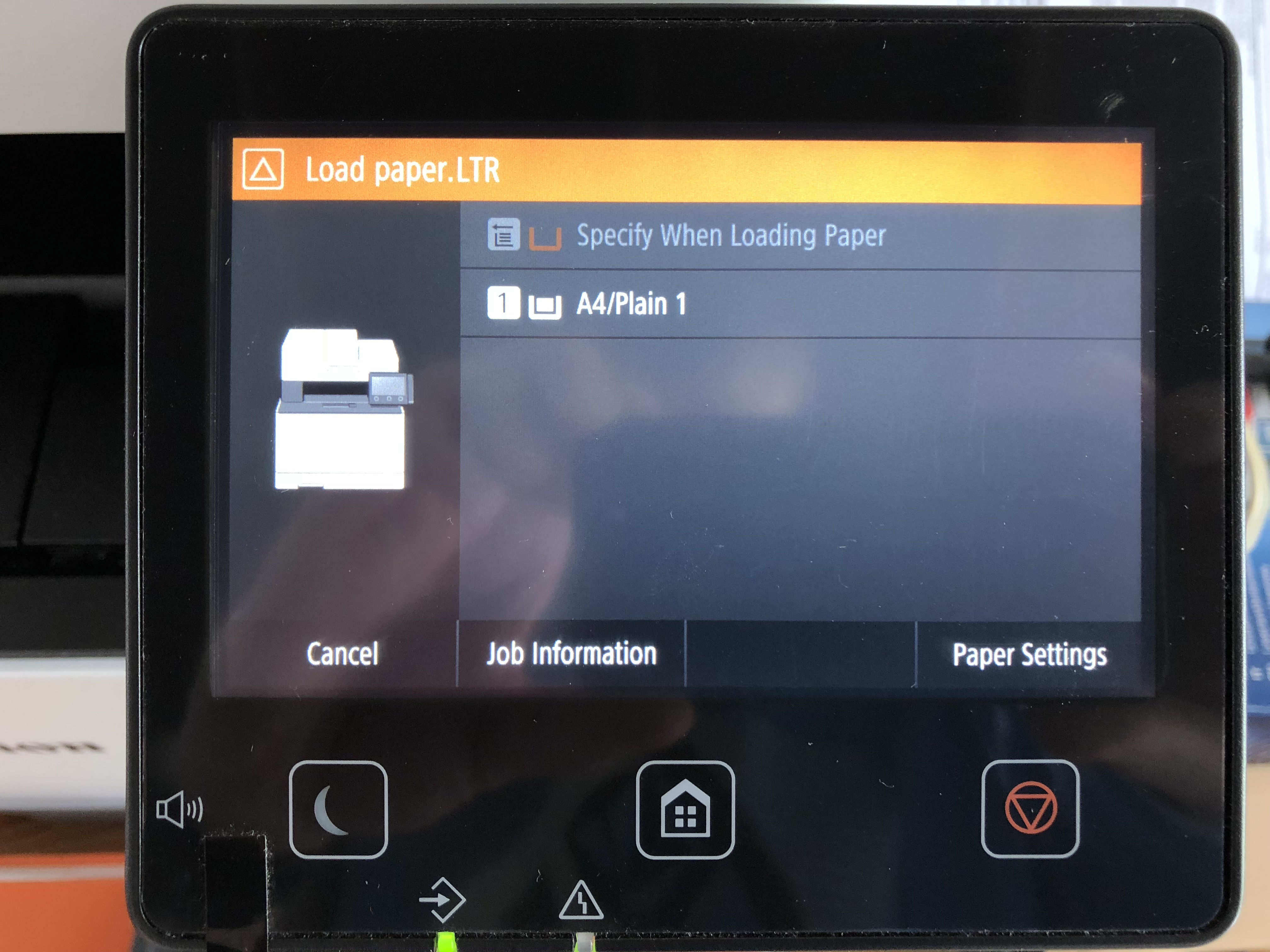
I added new paper to my printer, and an error message appears everytime I print a document, prompting me to select the correct paper source. I have disabled the manual feed source and still everytime I want to print a document, I have to select the paper tray before it starts to print.
I have attached an image of the message.
Please help?
16 REPLIES 16


Options
- Mark as New
- Bookmark
- Subscribe
- Mute
- Subscribe to RSS Feed
- Permalink
- Report Inappropriate Content
02-07-2018 08:43 AM
Hi, LouisGroen!
Welcome to The Canon Forums, and thanks for posting!
We appreciate your participation, though we need to let you know that your product appears to be a model that is not supported by our team here at Canon USA. The Canon Community Forum is hosted and moderated within the United States by Canon USA. We are only able to provide support for Canon products manufactured for and used within the US market.
If you live outside the United States, please click HERE and select your country to find support in your part of the world.
Feel free to discuss Canon products sold outside of the United States, but please be aware that you will not receive support directly from Canon USA.
Thanks for choosing Canon!
Options
- Mark as New
- Bookmark
- Subscribe
- Mute
- Subscribe to RSS Feed
- Permalink
- Report Inappropriate Content
03-20-2019 01:46 AM
Your com's print setting for paper size must be letter size.
Your printer's ltr paper size is A4.
So, you have to change the print setting paper size of com. to A4.
Options
- Mark as New
- Bookmark
- Subscribe
- Mute
- Subscribe to RSS Feed
- Permalink
- Report Inappropriate Content
09-18-2019 09:51 AM
Hi,
I am having the same issue -- I most certainly have a printer bought and sourced in the US -- an Imageclass MF741cdw. It is displaying the same exact thing everytime I print as what appears in this poster's image. Since my printer was purchased in the US, can you please simply tell me what the fix is so I don't have to manually get up and go to the other room to select an option everytime I print something? I basically can't queue up multiple print jobs and have to go downstairs for every single thing I need to print.
Options
- Mark as New
- Bookmark
- Subscribe
- Mute
- Subscribe to RSS Feed
- Permalink
- Report Inappropriate Content
01-22-2020 07:49 PM
You have to install the canon driver. The windows 10 driver causes that error. Found it through trial and error. Delete the device and install using the software that came with the printer.
Options
- Mark as New
- Bookmark
- Subscribe
- Mute
- Subscribe to RSS Feed
- Permalink
- Report Inappropriate Content
03-19-2020 02:31 AM
On the printer go to:
Menu>Function Settings>Printer>Printer Settings>Prioritize Driver Settings> Drawer 1.
Set to "On", click "Apply".
In Windows open the printer driver>Paper source>
Set default to Drawer 1 and choose paper quality.
The Windows driver should then override the printer settings and no error message should pop-up.
Menu>Function Settings>Printer>Printer Settings>Prioritize Driver Settings> Drawer 1.
Set to "On", click "Apply".
In Windows open the printer driver>Paper source>
Set default to Drawer 1 and choose paper quality.
The Windows driver should then override the printer settings and no error message should pop-up.
Options
- Mark as New
- Bookmark
- Subscribe
- Mute
- Subscribe to RSS Feed
- Permalink
- Report Inappropriate Content
04-21-2020 05:00 PM
Thanks. Your solution worked for my MF743 model. You were much more helpful than Danny the Canon Moderator.
Options
- Mark as New
- Bookmark
- Subscribe
- Mute
- Subscribe to RSS Feed
- Permalink
- Report Inappropriate Content
07-24-2020 12:43 AM - edited 07-24-2020 12:45 AM
Thank you Mailinator! Your response fixed my Load paper.LTR/Plain 1 printing error on my MF743Cdw
Options
- Mark as New
- Bookmark
- Subscribe
- Mute
- Subscribe to RSS Feed
- Permalink
- Report Inappropriate Content
07-31-2020 01:32 PM
Would you be able to walk me through that for the MF743? I went to pronter settings and made tray 1 LTR. Then I went to Windoes/settings/devices/printer/print preferences/ and set LTR and Tray 1. I still get the error the first time I try to print. Thanks again for your help!!!
Options
- Mark as New
- Bookmark
- Subscribe
- Mute
- Subscribe to RSS Feed
- Permalink
- Report Inappropriate Content
07-31-2020 01:51 PM
It didn't work for me either hence my earlier post. I had to unstall the old print driver that windows installed and use the canon software to install the driver. That fixed it for me.

Announcements
07/22/2026: New firmware updates are available.
EOS R6 Mark III - Version 1.1.0
05/13/2026: New firmware updates are available.
EOS R5 Mark II - Version 1.3.0
EOS R6 Mark II - Version 1.7.0
04/28/2026: Service Notice: Caution Concerning use of Lithium Batteries
03/17/2026: New firmware updates are available.
SELPHY CP1500 - Version 1.0.7.0
02/23/2026: New firmware update is available for EOS C50- Version 1.0.3.1
01/23/2026: New firmware update is available for RF 24-105mm F4 IS USM- Version 2.0.7
01/20/2026: New firmware updates are available.
10/21/2025: Service Notice: To Users of the Compact Digital Camera PowerShot V1
10/15/2025: New firmware updates are available.
Speedlite EL-5 - Version 1.2.0
Speedlite EL-1 - Version 1.1.0
Speedlite Transmitter ST-E10 - Version 1.2.0
07/28/2025: Notice of Free Repair Service for the Mirrorless Camera EOS R50 (Black)
05/21/2025: New firmware update available for EOS C500 Mark II - Version 1.1.5.1
Related Content
- imageCLASS LBP6030w only working one job at a time after toner replacement in Office Printers
- PIXMA G7020 only prints in red from all ink tanks in Desktop Inkjet Printers
- TR8600 printer, faint printing and missing lines in Desktop Inkjet Printers
- MF 269 dw II recognized by Mac but offline or online but will not print in Office Printers
- PIXMA TS6320 prints blank pages, but test pages and copies are fine in Desktop Inkjet Printers

Ⓒ 2026
Canon U.S.A Inc. All Rights Reserved. Reproduction in whole or part without permission is prohibited.
