Turn on suggestions
Auto-suggest helps you quickly narrow down your search results by suggesting possible matches as you type.
- Canon Community
- Discussions & Help
- Printer
- Office Printers
- Canon Maxify 2720 dropping line
Options
- Subscribe to RSS Feed
- Mark Topic as New
- Mark Topic as Read
- Float this Topic for Current User
- Bookmark
- Subscribe
- Mute
- Printer Friendly Page
Canon Maxify 2720 dropping line

Options
- Mark as New
- Bookmark
- Subscribe
- Mute
- Subscribe to RSS Feed
- Permalink
- Report Inappropriate Content
05-06-2023 01:47 PM
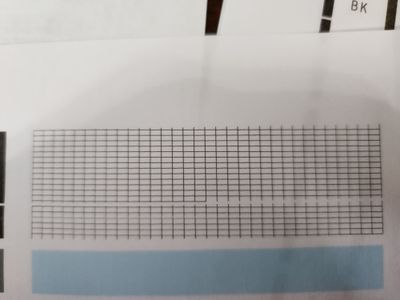
I have run the clean and deep clean several times on 2 different ink cartridges and still have this nozzle pattern. I have tried various alignments with the printer and still have this pattern when printing. Any suggestions or fixes for the problem other than buying a new printer? Firmware is up to date, paper is correct. I am at a loss. Help!
2 REPLIES 2


Options
- Mark as New
- Bookmark
- Subscribe
- Mute
- Subscribe to RSS Feed
- Permalink
- Report Inappropriate Content
05-06-2023 06:57 PM
If troubleshooting procedures don't work, I would reach out to Canon Customer Support to determine if the unit needs to be sent in for repair. 🤔


Options
- Mark as New
- Bookmark
- Subscribe
- Mute
- Subscribe to RSS Feed
- Permalink
- Report Inappropriate Content
05-16-2023 03:16 PM
Hello CharlesCstaley,
The issue looks like some of the nozzles for the black ink are clogged or there is a problem with the black ink tank. If you have tried several deep cleanings and have replaced the black ink, it would mean the print head is damaged and the printer needs service. In this situation, you can check your available service options from your MyCanon account

Announcements
07/22/2026: New firmware updates are available.
EOS R6 Mark III - Version 1.1.0
05/13/2026: New firmware updates are available.
EOS R5 Mark II - Version 1.3.0
EOS R6 Mark II - Version 1.7.0
04/28/2026: Service Notice: Caution Concerning use of Lithium Batteries
03/17/2026: New firmware updates are available.
SELPHY CP1500 - Version 1.0.7.0
02/23/2026: New firmware update is available for EOS C50- Version 1.0.3.1
01/23/2026: New firmware update is available for RF 24-105mm F4 IS USM- Version 2.0.7
01/20/2026: New firmware updates are available.
10/21/2025: Service Notice: To Users of the Compact Digital Camera PowerShot V1
10/15/2025: New firmware updates are available.
Speedlite EL-5 - Version 1.2.0
Speedlite EL-1 - Version 1.1.0
Speedlite Transmitter ST-E10 - Version 1.2.0
07/28/2025: Notice of Free Repair Service for the Mirrorless Camera EOS R50 (Black)
05/21/2025: New firmware update available for EOS C500 Mark II - Version 1.1.5.1
Related Content
- PIXMA TR7120 keeps going offline from my network in Printer Software & Networking
- Canon Print Studio Pro Plugin dropped? in Printer Software & Networking
- Small spring fell out of MAXIFY GX7050 paper cassette. Where does it go? in Office Printers
- Need a Mac driver for MAXIFY GX7120- I DO NOT want to use AirPrint driver in Printer Software & Networking
- ScanApp Lei v1.5 disconnecting after every scan in Printer Software & Networking

Ⓒ 2026
Canon U.S.A Inc. All Rights Reserved. Reproduction in whole or part without permission is prohibited.
