Turn on suggestions
Auto-suggest helps you quickly narrow down your search results by suggesting possible matches as you type.
- Canon Community
- Discussions & Help
- Printer
- Mobile & Compact Printers
- SELPHY CP1500 Does a paper size change require an ...
Options
- Subscribe to RSS Feed
- Mark Topic as New
- Mark Topic as Read
- Float this Topic for Current User
- Bookmark
- Subscribe
- Mute
- Printer Friendly Page

Options
- Mark as New
- Bookmark
- Subscribe
- Mute
- Subscribe to RSS Feed
- Permalink
- Report Inappropriate Content
12-08-2025
07:14 PM
- last edited on
12-09-2025
11:52 AM
by
 Danny
Danny
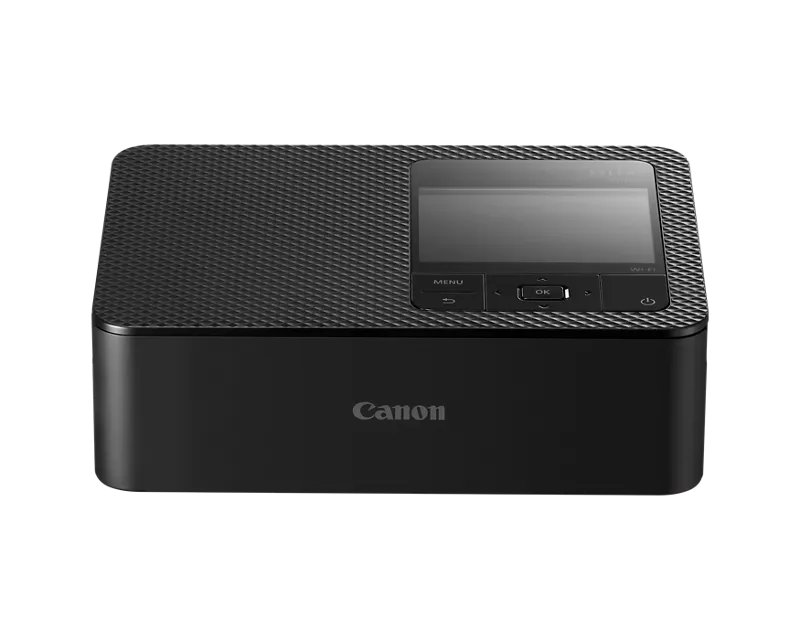
When I change to a different paper size on the CP-1500, do I also need to change the ink ribbon?
Solved! Go to Solution.
1 ACCEPTED SOLUTION
Accepted Solutions

Options
- Mark as New
- Bookmark
- Subscribe
- Mute
- Subscribe to RSS Feed
- Permalink
- Report Inappropriate Content
12-11-2025 02:17 PM
Hi Eric! Thanks for contributing to the Canon Community. I see you would like to know what is required when you want to print on a different paper size.
The CP1500 uses Canon's specially designed paper and ink meant for SELPHY printers. The ink and the paper are sold together (inside a package). It is not possible to use paper unless it comes in the same pack that the ink came in. If you purchase an ink/paper set that is a different size, you will need to use the ink that came with that paper.
Please note that Canon sells Postcard-size, L-Size, and Card-size paper/ink sets for the CP-1500 and other SELPHY printers. You only need to change the ink cartridge when switching to a different paper size.
You should also note that the paper cassette that comes with the printer is designed to be used with Postcard size (4x6 inch) paper and L-size paper. Therefore, the ink cartridge and paper should also be "Postcard size" or "L size."
The following ink/paper sets contain postcard size paper:
- KP-36IP
- KP-108IN
- RP-54
- RP-108
- RP-1080V
The paper cassette that comes with the printer does have an adapter that can be used when loading L-size paper (label size). The manual instructs you to remove that adapter when loading post-card size paper. However, if you purchase an ink/paper set that contains L size paper, you will need to put that adapter back on.
The instructions for loading both the P size and L size paper can be found on page 23-25 of the printer's manual Here is a link that will open a PDF version of that manual.
https://cam.start.canon/en/P001/manual/p001.pdf
After loading the P or L size paper, please be sure to install the ink cartridge that is meant for that paper. Instructions for loading the ink cartridge can be found on page 20 of the printer's manual.
The ink/paper sets that contain L size paper are:
- KL-36IP
- KL-36IP 3PACK
If you purchase an ink/paper set that contains Card size paper, you will need to purchase a different paper cassette. The cassette that comes with the printer will not work with Card size paper (it only works with P and L size). To load Card-size paper you will need to purchase the PCC-CP400 paper cassette separately.
The steps for loading the Card-size paper are the same as the ones for loading Postcard size paper. You just need to make sure you have the appropriate paper cassette. Please be sure to load the ink cartridge that came with the card size paper when switching to that paper size.
The ink/paper sets that contain card size paper are:
- KC-36IP
- KC-18IF
- KC-18IL
- KC-18IS
If you would like to see the manuals list of ink/paper sets recommended for the printer, please see page 7. That list does provide a description of each ink/paper set.
I hope this helps. Thanks again.
3 REPLIES 3
Options
- Mark as New
- Bookmark
- Subscribe
- Mute
- Subscribe to RSS Feed
- Permalink
- Report Inappropriate Content
12-11-2025 02:17 PM
Hi Eric! Thanks for contributing to the Canon Community. I see you would like to know what is required when you want to print on a different paper size.
The CP1500 uses Canon's specially designed paper and ink meant for SELPHY printers. The ink and the paper are sold together (inside a package). It is not possible to use paper unless it comes in the same pack that the ink came in. If you purchase an ink/paper set that is a different size, you will need to use the ink that came with that paper.
Please note that Canon sells Postcard-size, L-Size, and Card-size paper/ink sets for the CP-1500 and other SELPHY printers. You only need to change the ink cartridge when switching to a different paper size.
You should also note that the paper cassette that comes with the printer is designed to be used with Postcard size (4x6 inch) paper and L-size paper. Therefore, the ink cartridge and paper should also be "Postcard size" or "L size."
The following ink/paper sets contain postcard size paper:
- KP-36IP
- KP-108IN
- RP-54
- RP-108
- RP-1080V
The paper cassette that comes with the printer does have an adapter that can be used when loading L-size paper (label size). The manual instructs you to remove that adapter when loading post-card size paper. However, if you purchase an ink/paper set that contains L size paper, you will need to put that adapter back on.
The instructions for loading both the P size and L size paper can be found on page 23-25 of the printer's manual Here is a link that will open a PDF version of that manual.
https://cam.start.canon/en/P001/manual/p001.pdf
After loading the P or L size paper, please be sure to install the ink cartridge that is meant for that paper. Instructions for loading the ink cartridge can be found on page 20 of the printer's manual.
The ink/paper sets that contain L size paper are:
- KL-36IP
- KL-36IP 3PACK
If you purchase an ink/paper set that contains Card size paper, you will need to purchase a different paper cassette. The cassette that comes with the printer will not work with Card size paper (it only works with P and L size). To load Card-size paper you will need to purchase the PCC-CP400 paper cassette separately.
The steps for loading the Card-size paper are the same as the ones for loading Postcard size paper. You just need to make sure you have the appropriate paper cassette. Please be sure to load the ink cartridge that came with the card size paper when switching to that paper size.
The ink/paper sets that contain card size paper are:
- KC-36IP
- KC-18IF
- KC-18IL
- KC-18IS
If you would like to see the manuals list of ink/paper sets recommended for the printer, please see page 7. That list does provide a description of each ink/paper set.
I hope this helps. Thanks again.
Options
- Mark as New
- Bookmark
- Subscribe
- Mute
- Subscribe to RSS Feed
- Permalink
- Report Inappropriate Content
12-11-2025 02:33 PM
Thanks for that extensive reply! I assume that it's OK to remove/insert ink ribbons as needed each time a different sized paper is used.
I bought a card-sized paper/ink set with the printer, not knowing I needed another paper holder for the different size, so I have the paper holder on order. It would have been nice if the need for another paper holder was more prominently displayed somewhere.
I don't see an adapter for "L" size paper, I've been using the postcard-sized paper holder that came with the printer as-is. Didn't see any adapter that had to be (re)moved.
Thanks again!

Options
- Mark as New
- Bookmark
- Subscribe
- Mute
- Subscribe to RSS Feed
- Permalink
- Report Inappropriate Content
01-01-2026 05:02 PM
I don't see an adapter for "L" size paper, I've been using the postcard-sized paper holder that came with the printer as-is. Didn't see any adapter that had to be (re)moved.

Announcements
07/22/2026: New firmware updates are available.
EOS R6 Mark III - Version 1.1.0
05/13/2026: New firmware updates are available.
EOS R5 Mark II - Version 1.3.0
EOS R6 Mark II - Version 1.7.0
04/28/2026: Service Notice: Caution Concerning use of Lithium Batteries
03/17/2026: New firmware updates are available.
SELPHY CP1500 - Version 1.0.7.0
02/23/2026: New firmware update is available for EOS C50- Version 1.0.3.1
01/23/2026: New firmware update is available for RF 24-105mm F4 IS USM- Version 2.0.7
01/20/2026: New firmware updates are available.
10/21/2025: Service Notice: To Users of the Compact Digital Camera PowerShot V1
10/15/2025: New firmware updates are available.
Speedlite EL-5 - Version 1.2.0
Speedlite EL-1 - Version 1.1.0
Speedlite Transmitter ST-E10 - Version 1.2.0
07/28/2025: Notice of Free Repair Service for the Mirrorless Camera EOS R50 (Black)
05/21/2025: New firmware update available for EOS C500 Mark II - Version 1.1.5.1
Related Content
- MF8380CDW not scanning to email - Anyone find a solution past the TLS requirement? in Office Printers
- imageRUNNER ADVANCE C256 Series - Scan to Folder not working in Production Printing
- e161 403f error canon iPF8300 cannot move printhead in Office Printers
- How to Get Print Studio Pro to respect desired image size in Professional Photo Printers

Ⓒ 2026
Canon U.S.A Inc. All Rights Reserved. Reproduction in whole or part without permission is prohibited.
