Turn on suggestions
Auto-suggest helps you quickly narrow down your search results by suggesting possible matches as you type.
- Canon Community
- Discussions & Help
- General Discussion
- General Discussion
- My image Garden
Options
- Subscribe to RSS Feed
- Mark Topic as New
- Mark Topic as Read
- Float this Topic for Current User
- Bookmark
- Subscribe
- Mute
- Printer Friendly Page
My image Garden

Options
- Mark as New
- Bookmark
- Subscribe
- Mute
- Subscribe to RSS Feed
- Permalink
- Report Inappropriate Content
02-27-2020 12:34 PM
I scan items to be submitted for med claims. As a result of scanning My Image Garden pops up and the scanned item is there. and I drag the scanned item to a folder where I keep the scanned items. This isnt a big deal. The problem is I cant figure out how to delete photos or scanned items from My Image garden. I double click on the item, it opens in another screen, I can delete it there and when I close the screen it tells me I will be unable to recover the item, I click yes. When I go back to the scanned photos screen where all my scanned items are the item is still there. Any help is appreciated.
4 REPLIES 4


Options
- Mark as New
- Bookmark
- Subscribe
- Mute
- Subscribe to RSS Feed
- Permalink
- Report Inappropriate Content
02-28-2020 03:43 PM
Hi Jasper1,
What version of Windows are you using?
If you are using a Mac, what version of OSX is installed?
What is the model of Canon product that you own?
Options
- Mark as New
- Bookmark
- Subscribe
- Mute
- Subscribe to RSS Feed
- Permalink
- Report Inappropriate Content
02-28-2020 06:58 PM
Canon printer is TR 8520 Pixma
OS Mojave 10.14.6


Options
- Mark as New
- Bookmark
- Subscribe
- Mute
- Subscribe to RSS Feed
- Permalink
- Report Inappropriate Content
02-29-2020 10:29 AM
Greetings,
Start here...
My Image garden MAC User Guide
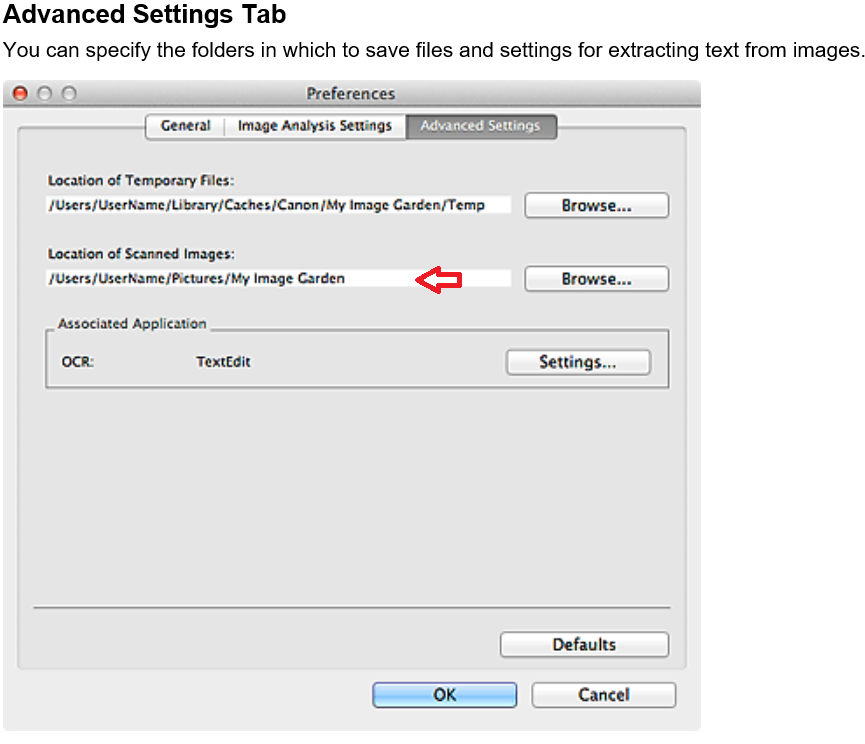
Select Preferences... in the My Image Garden menu of My Image Garden to display the Preferences dialog.
Click the Advanced Settings Tab
Location of Scanned Images... This is the path to where your Scanned images are saved. Open there and delete.
~Rick
Bay Area - CA
~R5 C (1.1.2.1), ~R50v (1.1.1) ~RF Trinity, ~RF 100 Macro, ~RF 100~400, ~RF 100~500, ~RF 200-800 +RF 1.4x TC, BG-R10, 430EX III-RT ~DxO PhotoLab Elite ~DaVinci Resolve Studio ~ImageClass MF644Cdw/MF656Cdw ~Pixel 8 ~CarePaks Are Worth It
Options
- Mark as New
- Bookmark
- Subscribe
- Mute
- Subscribe to RSS Feed
- Permalink
- Report Inappropriate Content
03-02-2020 03:58 PM
di leave location of temporay files allow ? I delete the string in "location of scanned images" and search for and added where I want images to go. I had created a file called "scans." Then scanned a item, it went to My Image garden.
Still trying to figure out how to delete items in image garden.

Announcements
01/23/2026: New firmware update is available for RF 24-105mm F4 IS USM- Version 2.0.7
12/22/2025: New firmware update is available for EOS R6 Mark III- Version 1.0.2
10/21/2025: Service Notice: To Users of the Compact Digital Camera PowerShot V1
07/28/2025: Notice of Free Repair Service for the Mirrorless Camera EOS R50 (Black)
05/21/2025: New firmware update available for EOS C500 Mark II - Version 1.1.5.1
01/20/2026: New firmware updates are available.
12/22/2025: New firmware update is available for EOS R6 Mark III- Version 1.0.2
11/20/2025: New firmware updates are available.
EOS R5 Mark II - Version 1.2.0
PowerShot G7 X Mark III - Version 1.4.0
PowerShot SX740 HS - Version 1.0.2
10/21/2025: Service Notice: To Users of the Compact Digital Camera PowerShot V1
10/15/2025: New firmware updates are available.
Speedlite EL-5 - Version 1.2.0
Speedlite EL-1 - Version 1.1.0
Speedlite Transmitter ST-E10 - Version 1.2.0
07/28/2025: Notice of Free Repair Service for the Mirrorless Camera EOS R50 (Black)
7/17/2025: New firmware updates are available.
05/21/2025: New firmware update available for EOS C500 Mark II - Version 1.1.5.1
02/20/2025: New firmware updates are available.
RF70-200mm F2.8 L IS USM Z - Version 1.0.6
RF24-105mm F2.8 L IS USM Z - Version 1.0.9
RF100-300mm F2.8 L IS USM - Version 1.0.8
Related Content
- Canon CPS at PPA Imaging USA in General Discussion
- AI in post-processing, a helping hand or a quiet step away from creativity? in General Discussion
- Congratulations LeeP, You Ranked Up! in General Discussion
- Images I Posted On This Forum That Are Being Used As Examples For A Lens On A Polish Website. in General Discussion
- 2025 Fall Gallery in General Discussion

Ⓒ 2026
Canon U.S.A Inc. All Rights Reserved. Reproduction in whole or part without permission is prohibited.
