Turn on suggestions
Auto-suggest helps you quickly narrow down your search results by suggesting possible matches as you type.
- Canon Community
- Discussions & Help
- General Discussion
- General Discussion
- Re: Removing Equipment from Registration
Options
- Subscribe to RSS Feed
- Mark Topic as New
- Mark Topic as Read
- Float this Topic for Current User
- Bookmark
- Subscribe
- Mute
- Printer Friendly Page

Options
- Mark as New
- Bookmark
- Subscribe
- Mute
- Subscribe to RSS Feed
- Permalink
- Report Inappropriate Content
10-16-2023
05:41 PM
- last edited on
10-17-2023
10:53 AM
by
 Danny
Danny
I have sold some of my registered camera equipment. How do I remove them so the new owner can register them. I am not worried about transferring warranties or carepaks.
Solved! Go to Solution.
1 ACCEPTED SOLUTION
Accepted Solutions

Options
- Mark as New
- Bookmark
- Subscribe
- Mute
- Subscribe to RSS Feed
- Permalink
- Report Inappropriate Content
10-17-2023 10:36 AM - edited 10-17-2023 10:37 AM
Hello!
Simply log into your My Canon Account at canon.us/account and delete the registered item. 😊
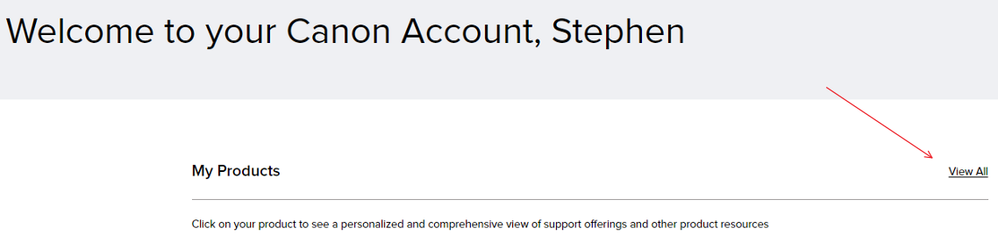
Go to "View All" on the right side:
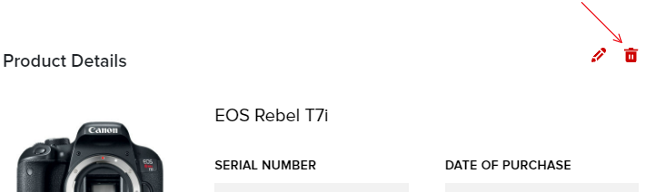
Then select the product & trash it:
9 REPLIES 9


Options
- Mark as New
- Bookmark
- Subscribe
- Mute
- Subscribe to RSS Feed
- Permalink
- Report Inappropriate Content
10-16-2023 09:16 PM
Greetings,
If I'm not mistaken, I do not believe a device can be registered more than once, even if you remove it from your registered devices. I'll have to research a bit, or a Moderator might answer 🙂
CarePaks can be transferred once as you noted.
~Rick
Bay Area - CA
~R5 C (1.1.3.1), ~RF Trinity, ~RF 100 Macro, ~RF 100~400, ~RF 100~500, ~RF 200-800, ~RF 1.4x TC, BG-R10, 430EX III-RT ~DxO PhotoLab Elite ~DaVinci Resolve Studio ~ImageClass MF644Cdw MF656Cdw ~Pixel 10 ~CarePaks Are Worth It
Options
- Mark as New
- Bookmark
- Subscribe
- Mute
- Subscribe to RSS Feed
- Permalink
- Report Inappropriate Content
10-17-2023 10:14 AM
Thanks. I am just looking more than anything to remove the sold equipment. If the new owner wants to register them that is up to them. I find it a nice way to document the serial number in case of theft.
Options
- Mark as New
- Bookmark
- Subscribe
- Mute
- Subscribe to RSS Feed
- Permalink
- Report Inappropriate Content
10-17-2023 10:36 AM - edited 10-17-2023 10:37 AM
Hello!
Simply log into your My Canon Account at canon.us/account and delete the registered item. 😊
Go to "View All" on the right side:
Then select the product & trash it:
Options
- Mark as New
- Bookmark
- Subscribe
- Mute
- Subscribe to RSS Feed
- Permalink
- Report Inappropriate Content
10-17-2023 11:36 AM
ohhhhhhhhhh.... it is the image that is hyperlinked, not the name or numbers. Thanks!😁
Options
- Mark as New
- Bookmark
- Subscribe
- Mute
- Subscribe to RSS Feed
- Permalink
- Report Inappropriate Content
10-17-2023 12:44 PM
@Stephen,
So after removing, another user is then free to enter the same serial number and fictitious date of purchase and the item will be added to their MyCanon?
Thanks in advance for clarifying this for me.
~Rick
Bay Area - CA
~R5 C (1.1.3.1), ~RF Trinity, ~RF 100 Macro, ~RF 100~400, ~RF 100~500, ~RF 200-800, ~RF 1.4x TC, BG-R10, 430EX III-RT ~DxO PhotoLab Elite ~DaVinci Resolve Studio ~ImageClass MF644Cdw MF656Cdw ~Pixel 10 ~CarePaks Are Worth It
Options
- Mark as New
- Bookmark
- Subscribe
- Mute
- Subscribe to RSS Feed
- Permalink
- Report Inappropriate Content
10-17-2023 12:49 PM - edited 10-17-2023 12:53 PM
yessir! but like you indicated before - the Factory Service Center determines warranty eligibility. 😊
This is a more recent enhancement of our systems, and a benefit of using My Canon Account.

Options
- Mark as New
- Bookmark
- Subscribe
- Mute
- Subscribe to RSS Feed
- Permalink
- Report Inappropriate Content
08-31-2025 03:57 PM
The trash can doesn't show up for me when I select the product.
Options
- Mark as New
- Bookmark
- Subscribe
- Mute
- Subscribe to RSS Feed
- Permalink
- Report Inappropriate Content
08-31-2025 04:58 PM
Greetings,
Does the product you are trying to remove have an active CarePak?
~Rick
Bay Area - CA
~R5 C (1.1.3.1), ~RF Trinity, ~RF 100 Macro, ~RF 100~400, ~RF 100~500, ~RF 200-800, ~RF 1.4x TC, BG-R10, 430EX III-RT ~DxO PhotoLab Elite ~DaVinci Resolve Studio ~ImageClass MF644Cdw MF656Cdw ~Pixel 10 ~CarePaks Are Worth It
Options
- Mark as New
- Bookmark
- Subscribe
- Mute
- Subscribe to RSS Feed
- Permalink
- Report Inappropriate Content
08-31-2025 08:43 PM
Thanks for responding! There are several I'm trying to remove but even the ones that don't have an active CarePak don't come up with a trash can symbol. I have numerous Canon cameras and lenses, just trying to clean up house so that only the ones I still have show up.

Announcements
07/22/2026: New firmware updates are available.
EOS R6 Mark III - Version 1.1.0
05/13/2026: New firmware updates are available.
EOS R5 Mark II - Version 1.3.0
EOS R6 Mark II - Version 1.7.0
04/28/2026: Service Notice: Caution Concerning use of Lithium Batteries
03/17/2026: New firmware updates are available.
SELPHY CP1500 - Version 1.0.7.0
02/23/2026: New firmware update is available for EOS C50- Version 1.0.3.1
01/23/2026: New firmware update is available for RF 24-105mm F4 IS USM- Version 2.0.7
01/20/2026: New firmware updates are available.
10/21/2025: Service Notice: To Users of the Compact Digital Camera PowerShot V1
10/15/2025: New firmware updates are available.
Speedlite EL-5 - Version 1.2.0
Speedlite EL-1 - Version 1.1.0
Speedlite Transmitter ST-E10 - Version 1.2.0
07/28/2025: Notice of Free Repair Service for the Mirrorless Camera EOS R50 (Black)
05/21/2025: New firmware update available for EOS C500 Mark II - Version 1.1.5.1
Related Content
- Can't remove 5D MKlll body from registration in General Discussion
- Remove Lens Registration in General Discussion
- Can't remove camera kit from registration after trading it in. in General Discussion
- Removing a device from registration Kit in General Discussion
- Cannot Remove Product Registration in General Discussion

Ⓒ 2026
Canon U.S.A Inc. All Rights Reserved. Reproduction in whole or part without permission is prohibited.
