Turn on suggestions
Auto-suggest helps you quickly narrow down your search results by suggesting possible matches as you type.
- Canon Community
- Discussions & Help
- General Discussion
- General Discussion
- Re: Need file cnmnpu.exe
Options
- Subscribe to RSS Feed
- Mark Topic as New
- Mark Topic as Read
- Float this Topic for Current User
- Bookmark
- Subscribe
- Mute
- Printer Friendly Page

Options
- Mark as New
- Bookmark
- Subscribe
- Mute
- Subscribe to RSS Feed
- Permalink
- Report Inappropriate Content
01-05-2020 01:25 PM
I need a link to this file: cnmnpu.exe. Please do NOT tell me to look on installation disk. Obvioulsy if I had it I wouldn't be asking the question.
Solved! Go to Solution.
18 REPLIES 18
Options
- Mark as New
- Bookmark
- Subscribe
- Mute
- Subscribe to RSS Feed
- Permalink
- Report Inappropriate Content
01-15-2020 03:23 PM
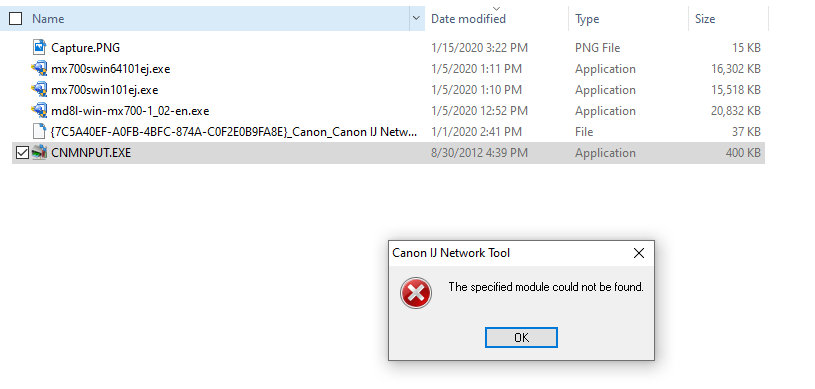
I have a CNMNPUT.exe but it is inoperable. Date created 8/30/12.


Options
- Mark as New
- Bookmark
- Subscribe
- Mute
- Subscribe to RSS Feed
- Permalink
- Report Inappropriate Content
01-15-2020 03:25 PM
Did you try what Patrick provided?
John Hoffman
Conway, NH
R6 Mark III, M200 (converted to infrared), RF lenses, Pixma PRO-100, Pixma TR8620a, Lr Classic
Conway, NH
R6 Mark III, M200 (converted to infrared), RF lenses, Pixma PRO-100, Pixma TR8620a, Lr Classic
Options
- Mark as New
- Bookmark
- Subscribe
- Mute
- Subscribe to RSS Feed
- Permalink
- Report Inappropriate Content
01-15-2020 03:28 PM
Yes. Does not work. See post directly above yours.


Options
- Mark as New
- Bookmark
- Subscribe
- Mute
- Subscribe to RSS Feed
- Permalink
- Report Inappropriate Content
01-15-2020 03:33 PM
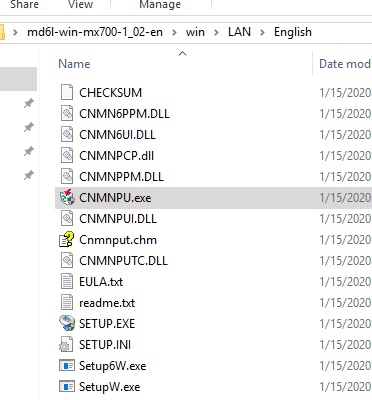
Do not move the file outside of the folder that it is in before running it.
Options
- Mark as New
- Bookmark
- Subscribe
- Mute
- Subscribe to RSS Feed
- Permalink
- Report Inappropriate Content
01-15-2020 04:09 PM - edited 01-15-2020 04:10 PM
Thank you. Found it.
Please leave this up. There are other people who need this solution as I saw many posts about the same subject.
Options
- Mark as New
- Bookmark
- Subscribe
- Mute
- Subscribe to RSS Feed
- Permalink
- Report Inappropriate Content
03-15-2020 05:31 PM
I have a MF741Cdw and I couln't find the cnmnpu.exe file. The driver's folder extracted is MF741CMFDriverV6401W64

Options
- Mark as New
- Bookmark
- Subscribe
- Mute
- Subscribe to RSS Feed
- Permalink
- Report Inappropriate Content
03-16-2020 08:34 AM
Hello oopseedo,
If you've followed the instructions in this thread and you still need assistance, we recommend reaching out to support.
Click HERE to visit your My Canon Account to discover your personalized support options.
If you're outside of the USA, please click HERE to find your support options.
Options
- Mark as New
- Bookmark
- Subscribe
- Mute
- Subscribe to RSS Feed
- Permalink
- Report Inappropriate Content
08-14-2020 04:23 PM
I too need this file, or at least a solution for my MF644cdw. When I try to run the driver installation software from the optical disk it fails because it cannot create a port. Best solution I can find from others with the same problem is to run this file to remove printer ports. This is a refurbished computer and may have had other printers installed in the past.
This is extremely frustrating that I cannot use my $400 laser printer because of a basic software conflict. I really thought the Canon software would be written well enough to fix this issue itself. Please help.
Options
- Mark as New
- Bookmark
- Subscribe
- Mute
- Subscribe to RSS Feed
- Permalink
- Report Inappropriate Content
08-20-2020 01:11 PM
Hi sweso82.
For imageCLASS models, the process may be different. If you're located in the U.S., our support is available at 1-800-OK-CANON (1-800-652-2666) Monday-Friday from 10:00 am to 6:30 pm ET, excluding holidays.
If you're located outside of the U.S., you may find your branch of Canon through the map at https://global.canon/en/support.

- « Previous
-
- 1
- 2
- Next »
- « Previous
-
- 1
- 2
- Next »

Announcements
07/22/2026: New firmware updates are available.
EOS R6 Mark III - Version 1.1.0
05/13/2026: New firmware updates are available.
EOS R5 Mark II - Version 1.3.0
EOS R6 Mark II - Version 1.7.0
04/28/2026: Service Notice: Caution Concerning use of Lithium Batteries
03/17/2026: New firmware updates are available.
SELPHY CP1500 - Version 1.0.7.0
02/23/2026: New firmware update is available for EOS C50- Version 1.0.3.1
01/23/2026: New firmware update is available for RF 24-105mm F4 IS USM- Version 2.0.7
01/20/2026: New firmware updates are available.
10/21/2025: Service Notice: To Users of the Compact Digital Camera PowerShot V1
10/15/2025: New firmware updates are available.
Speedlite EL-5 - Version 1.2.0
Speedlite EL-1 - Version 1.1.0
Speedlite Transmitter ST-E10 - Version 1.2.0
07/28/2025: Notice of Free Repair Service for the Mirrorless Camera EOS R50 (Black)
05/21/2025: New firmware update available for EOS C500 Mark II - Version 1.1.5.1

Ⓒ 2026
Canon U.S.A Inc. All Rights Reserved. Reproduction in whole or part without permission is prohibited.
