Turn on suggestions
Auto-suggest helps you quickly narrow down your search results by suggesting possible matches as you type.
- Canon Community
- Discussions & Help
- General Discussion
- General Discussion
- Re: Mod Please Help - Suspicious Email
Options
- Subscribe to RSS Feed
- Mark Topic as New
- Mark Topic as Read
- Float this Topic for Current User
- Bookmark
- Subscribe
- Mute
- Printer Friendly Page
Mod Please Help - Suspicious Email

Options
- Mark as New
- Bookmark
- Subscribe
- Mute
- Subscribe to RSS Feed
- Permalink
- Report Inappropriate Content
09-20-2020 11:32 AM
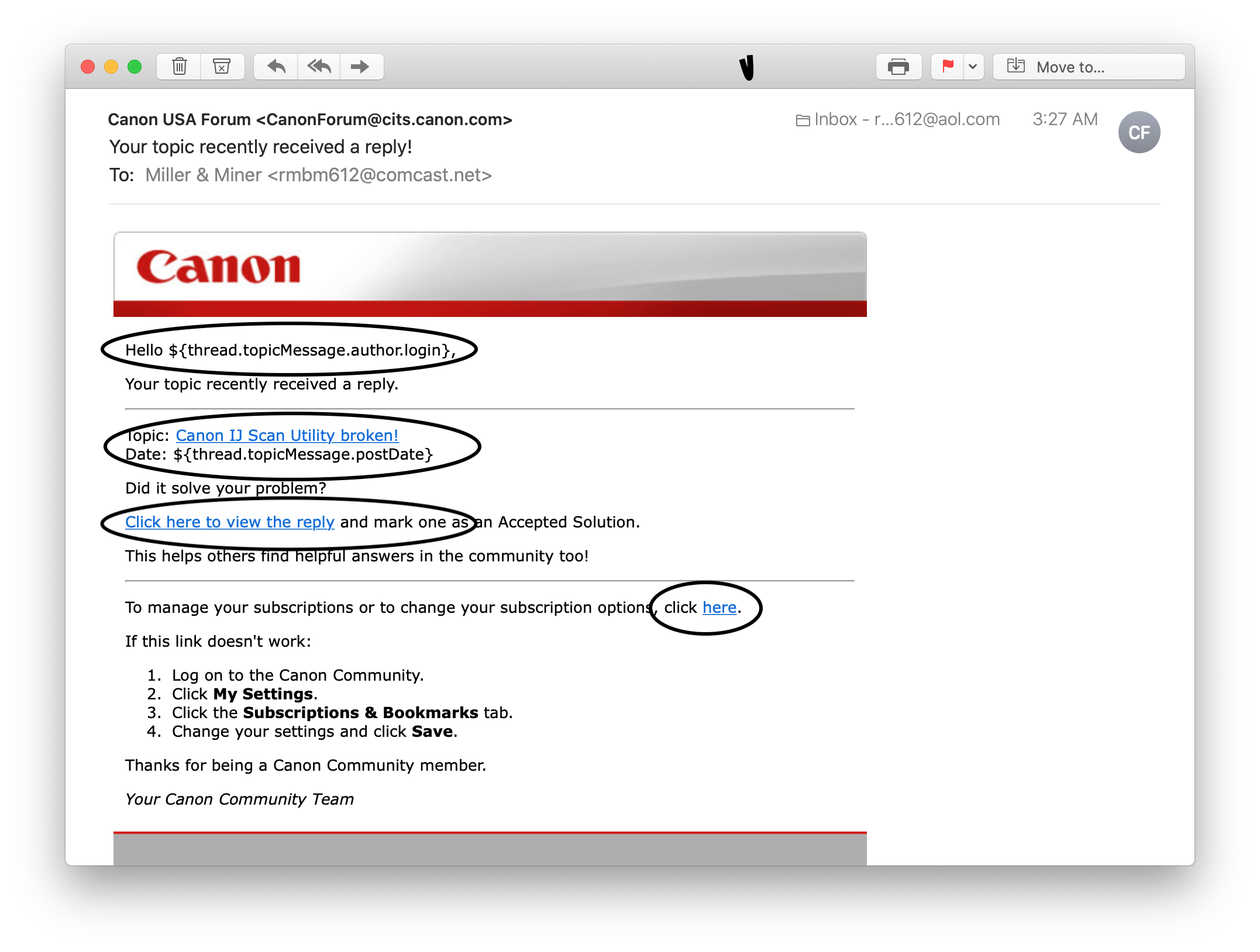
See the enclosed screen shot of an email I recieved that appears to be from <[email protected]>; however, none of the links work and it is addressed not to my username but to <Hello ${thread.topicMessage.author.login}> When I logged in to the Forum, I did not have a new reply. I ran Malwarebytes and did not find any threats or intrusion detected. Is this a scam? phishing? Rod
4 REPLIES 4
Options
- Mark as New
- Bookmark
- Subscribe
- Mute
- Subscribe to RSS Feed
- Permalink
- Report Inappropriate Content
09-20-2020 11:58 AM
This is a legit email from us. We apologize for the links not working.
Options
- Mark as New
- Bookmark
- Subscribe
- Mute
- Subscribe to RSS Feed
- Permalink
- Report Inappropriate Content
09-28-2020 07:52 AM
Porcha: I recieved another of these emails that I have a reply to my posting. None of the links work. There is no new reply. Rod


Options
- Mark as New
- Bookmark
- Subscribe
- Mute
- Subscribe to RSS Feed
- Permalink
- Report Inappropriate Content
09-28-2020 08:23 AM
People have replied to your post(s). Double check the date on the email vs the date of the last response (even your own replies to your thread are counted). You can unsubscribe to the emails by going HERE

If the link in the email routes you to forum.usa.canon.com, that's simply an old link. We changed the address to the Community to be community.usa.canon.com
It could also be your firewall/antivirus software blocking the site from within your email.
The emails are from us.
Options
- Mark as New
- Bookmark
- Subscribe
- Mute
- Subscribe to RSS Feed
- Permalink
- Report Inappropriate Content
09-28-2020 08:47 AM
Thanks for your reply Stephen. The links from the email alerting me to this posting work. One person (jrhoffman75) has replied to my four different posting on this topic. He also sent a couple of private messages. We had a couple of exchanges on the topic thread. One person (Porcha) previously replied to this topic. The links on all of those email alerts worked. I replied to the original topic to post what i learned on my own. I did not get an alert after my postings. Today's notice may have referenced the last personal message I recieved last week from jrhoffman 75, just delayed. The links on notices of the legitimate replies have worked and the dates were current with the reply. Since the links for all but these two work, I doubt my firewall, antiivirus software, browser or mail filters are blocking the links. It sort of moot since there has been only one response and I've decided the problem is a software conflict that can't be corrected. I'll use my Macbook for scanning with the IJ Scan Utility. Again, thanks for your response.

Announcements
07/22/2026: New firmware updates are available.
EOS R6 Mark III - Version 1.1.0
05/13/2026: New firmware updates are available.
EOS R5 Mark II - Version 1.3.0
EOS R6 Mark II - Version 1.7.0
04/28/2026: Service Notice: Caution Concerning use of Lithium Batteries
03/17/2026: New firmware updates are available.
SELPHY CP1500 - Version 1.0.7.0
02/23/2026: New firmware update is available for EOS C50- Version 1.0.3.1
01/23/2026: New firmware update is available for RF 24-105mm F4 IS USM- Version 2.0.7
01/20/2026: New firmware updates are available.
10/21/2025: Service Notice: To Users of the Compact Digital Camera PowerShot V1
10/15/2025: New firmware updates are available.
Speedlite EL-5 - Version 1.2.0
Speedlite EL-1 - Version 1.1.0
Speedlite Transmitter ST-E10 - Version 1.2.0
07/28/2025: Notice of Free Repair Service for the Mirrorless Camera EOS R50 (Black)
05/21/2025: New firmware update available for EOS C500 Mark II - Version 1.1.5.1
Related Content
- Best first customer experience ever (not)! - Unable to cancel order in General Discussion
- Official website!!! Why is it so buggy soooo frequently? in General Discussion
- Need to change CPS account email, but lose all registered products in General Discussion
- Staff at Canon USA continues to be outstanding in General Discussion
- Trouble migrating to MyCanon Pro in General Discussion

Ⓒ 2026
Canon U.S.A Inc. All Rights Reserved. Reproduction in whole or part without permission is prohibited.
