Turn on suggestions
Auto-suggest helps you quickly narrow down your search results by suggesting possible matches as you type.
Options
- Subscribe to RSS Feed
- Mark Topic as New
- Mark Topic as Read
- Float this Topic for Current User
- Bookmark
- Subscribe
- Mute
- Printer Friendly Page
Webcam Utility

Options
- Mark as New
- Bookmark
- Subscribe
- Mute
- Subscribe to RSS Feed
- Permalink
- Report Inappropriate Content
11-11-2020 05:10 PM
Having learned through Peta Pixel that a new version of EOS Webcam Utility has been issued I eagerly followed the instructions through clicking on "downloads & software". After that I couldn't find a "software tab" anywhere on the page except the thumb/icon which did not reveal a chance to indicate my operating system and download the software. Where am I going wrong?
6 REPLIES 6


Options
- Mark as New
- Bookmark
- Subscribe
- Mute
- Subscribe to RSS Feed
- Permalink
- Report Inappropriate Content
11-11-2020 06:18 PM
Which camera are you using?
Which Operating Systme are you running?
--------------------------------------------------------
"Enjoying photography since 1972."
"Enjoying photography since 1972."
Options
- Mark as New
- Bookmark
- Subscribe
- Mute
- Subscribe to RSS Feed
- Permalink
- Report Inappropriate Content
11-11-2020 08:00 PM
It's some kind of joke. I'm on a 2013 macbook using Catalina. I shoot with 5Ds and I've followed the instructions on the video and the web site and there simply is no "software" tab that leads to a selection of operating systems and the ability to download the re-issued webcam utility.

Options
- Mark as New
- Bookmark
- Subscribe
- Mute
- Subscribe to RSS Feed
- Permalink
- Report Inappropriate Content
11-12-2020 09:44 AM - edited 11-12-2020 09:48 AM
MAC OS Catalina
• Cisco WebEx® (browser version only*)
• Discord (browser version only*)
• Facebook Live
• Hangouts™
• Hangouts Meet™
• Messenger
• Microsoft Teams (browser version only*)
• Open Broadcaster Software
• Skype (browser version only*)
• Slack (browser version only*)
• Streamlabs
• YouTube Live
• Zoom
Not compatible with FaceTime and Photo Booth®
*Google Chrome browser recommended, not compatible with Safari.
*EOS Webcam Utility software does not support apps downloaded from the App Store. Please download the application from the service provider’s website where available.
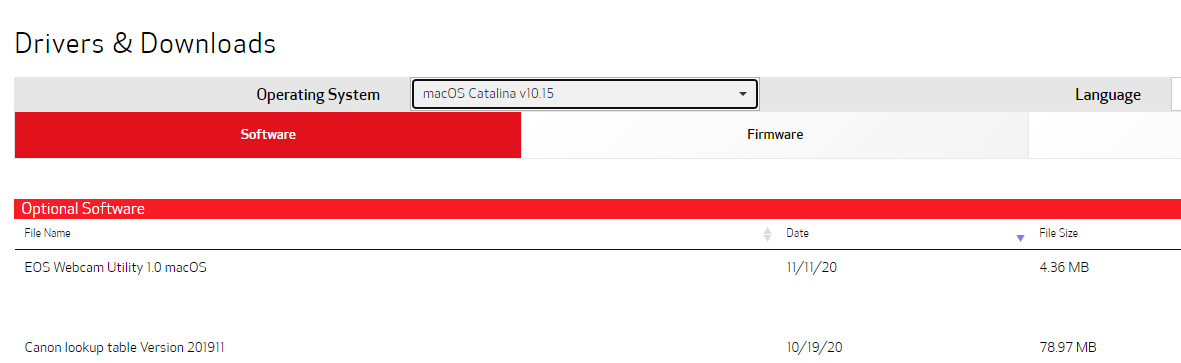
New Release yesterday 11/11 v1.0
This is what we see??
~Rick
Bay Area - CA
~R5 C (1.1.3.1), ~RF Trinity, ~RF 100 Macro, ~RF 100~400, ~RF 100~500, ~RF 200-800, ~RF 1.4x TC, BG-R10, 430EX III-RT ~DxO PhotoLab Elite ~DaVinci Resolve Studio ~ImageClass MF644Cdw MF656Cdw ~Pixel 10 ~CarePaks Are Worth It
Options
- Mark as New
- Bookmark
- Subscribe
- Mute
- Subscribe to RSS Feed
- Permalink
- Report Inappropriate Content
11-12-2020 03:31 PM
Thanks. That page never appeared to me but I can try the link you included.
Options
- Mark as New
- Bookmark
- Subscribe
- Mute
- Subscribe to RSS Feed
- Permalink
- Report Inappropriate Content
11-13-2020 07:54 AM
Upon clicking on the link in your reply I get the download dialog box, not the software download web page. After following the unzip and install procedures I'm able to see EOS Webcam Utility in my Zoom video options but no picture appears from my EOS 5Ds.
Using a 2013 macbook, Catalina. How did you arrive at the "drivers & downloads" page in your initial reply? Thanks for your help.
Options
- Mark as New
- Bookmark
- Subscribe
- Mute
- Subscribe to RSS Feed
- Permalink
- Report Inappropriate Content
11-13-2020 07:16 PM - edited 11-13-2020 07:16 PM
@DanMilham wrote:Upon clicking on the link in your reply I get the download dialog box, not the software download web page. After following the unzip and install procedures I'm able to see EOS Webcam Utility in my Zoom video options but no picture appears from my EOS 5Ds.
Using a 2013 macbook, Catalina. How did you arrive at the "drivers & downloads" page in your initial reply? Thanks for your help.
Where is it? It is on the same page you would use to download a copy of the user manual, [or] Digital Photo Professional 4.
--------------------------------------------------------
"Enjoying photography since 1972."
"Enjoying photography since 1972."


Announcements
07/22/2026: New firmware updates are available.
EOS R6 Mark III - Version 1.1.0
05/13/2026: New firmware updates are available.
EOS R5 Mark II - Version 1.3.0
EOS R6 Mark II - Version 1.7.0
04/28/2026: Service Notice: Caution Concerning use of Lithium Batteries
03/17/2026: New firmware updates are available.
SELPHY CP1500 - Version 1.0.7.0
02/23/2026: New firmware update is available for EOS C50- Version 1.0.3.1
01/23/2026: New firmware update is available for RF 24-105mm F4 IS USM- Version 2.0.7
01/20/2026: New firmware updates are available.
10/21/2025: Service Notice: To Users of the Compact Digital Camera PowerShot V1
10/15/2025: New firmware updates are available.
Speedlite EL-5 - Version 1.2.0
Speedlite EL-1 - Version 1.1.0
Speedlite Transmitter ST-E10 - Version 1.2.0
07/28/2025: Notice of Free Repair Service for the Mirrorless Camera EOS R50 (Black)
05/21/2025: New firmware update available for EOS C500 Mark II - Version 1.1.5.1
Related Content
- eos webcam utility pro on windows 10 home not working in EOS Webcam Utility Pro - Discussions
- EOS Webcam Utility stopped working after a Windows Update. in EOS Webcam Utility Pro - Discussions
- This version of "EOSWebcamUtility" will not open in a future release of MacOS in EOS Webcam Utility Pro - Discussions
- EOS Webcam utility pro not working with 6D Mark 2 in EOS Webcam Utility Pro - Discussions
- EOS Webcam Utility PRO does not work after upgrade to Windows 11 in EOS Webcam Utility Pro - Discussions

Ⓒ 2026
Canon U.S.A Inc. All Rights Reserved. Reproduction in whole or part without permission is prohibited.
