Turn on suggestions
Auto-suggest helps you quickly narrow down your search results by suggesting possible matches as you type.
- Canon Community
- Discussions & Help
- EOS Webcam Utility Pro
- EOS Webcam Utility Pro - Discussions
- Re: EOS Webcam Utility no longer working
Options
- Subscribe to RSS Feed
- Mark Topic as New
- Mark Topic as Read
- Float this Topic for Current User
- Bookmark
- Subscribe
- Mute
- Printer Friendly Page
EOS Webcam Utility no longer working

Options
- Mark as New
- Bookmark
- Subscribe
- Mute
- Subscribe to RSS Feed
- Permalink
- Report Inappropriate Content
08-07-2022 06:13 AM
Hello, The beta worked spot on but since the update it no longer works. OBS doesn't recognise it as a source to select, ive tried turning off EOS ultity ive tried unistalling it altogether. I have a 2000D and connected via a USB and the computer picks up the camera and i can transfer my pictures but i use it for live streaming EOS webcam software doesn't start i don't have a splash screen. 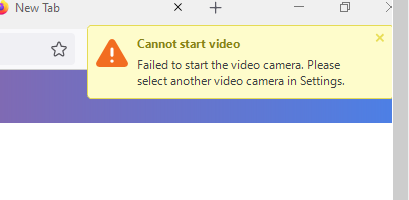
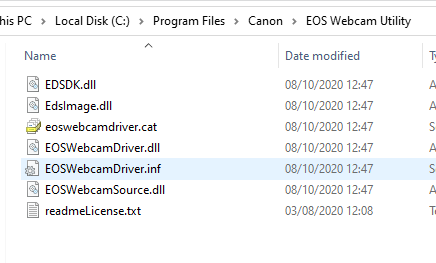
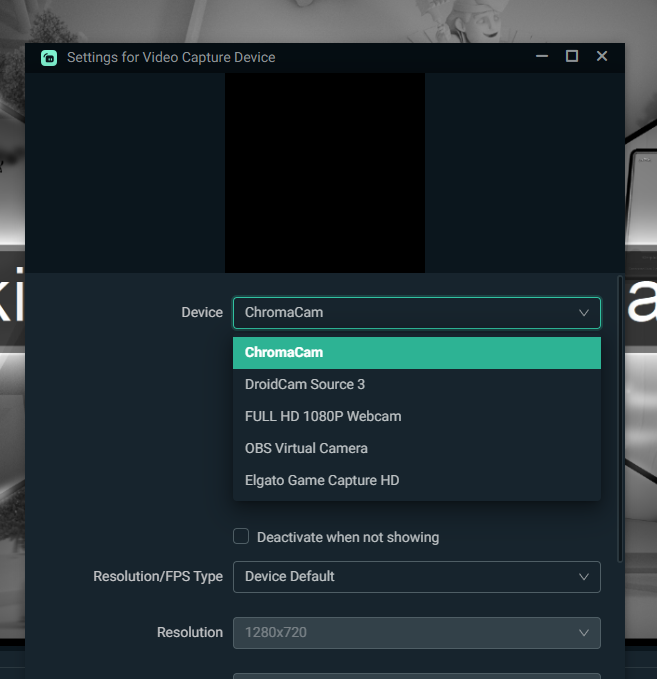
please can advise
i have a
Intel(R) Core(TM) i7-4770 CPU @ 3.40GHz
NVIDIA GeForce GTX 1050 Ti
16 GB Ram
Windows 10
9 REPLIES 9


Options
- Mark as New
- Bookmark
- Subscribe
- Mute
- Subscribe to RSS Feed
- Permalink
- Report Inappropriate Content
08-07-2022 06:30 AM
Check to make sure the EOS Utility Launcher Service is not running, too. You never would have been able to run the Beta version if the service was running. When you upgrade to the release version the service could have been re-enabled.
--------------------------------------------------------
"Enjoying photography since 1972."
"Enjoying photography since 1972."
Options
- Mark as New
- Bookmark
- Subscribe
- Mute
- Subscribe to RSS Feed
- Permalink
- Report Inappropriate Content
08-07-2022 10:42 AM
Nope i can't find a launcher service on my system
Options
- Mark as New
- Bookmark
- Subscribe
- Mute
- Subscribe to RSS Feed
- Permalink
- Report Inappropriate Content
08-07-2022 10:45 AM - edited 08-07-2022 10:46 AM
Services are not apps. A bad comparison would be to compare it to a device driver.
it would look like a camera icon in the System Tray near the clock, typically on the lower right. Also, the Task Manager would list the EOS service, if it were running.
--------------------------------------------------------
"Enjoying photography since 1972."
"Enjoying photography since 1972."
Options
- Mark as New
- Bookmark
- Subscribe
- Mute
- Subscribe to RSS Feed
- Permalink
- Report Inappropriate Content
08-07-2022 11:27 AM
nope


Options
- Mark as New
- Bookmark
- Subscribe
- Mute
- Subscribe to RSS Feed
- Permalink
- Report Inappropriate Content
08-07-2022 11:56 AM - edited 08-07-2022 12:33 PM
Greetings,
Since only limited information was provided, we don't know much about your environment or system, actual feature and build of windows 10 or what "update" windows or the WebCam Utility you are referring to, we are only guessing. AVG might also be blocking something required for the utility to operate.
The release notes for the WebCam Utility states you should uninstall the the beta before installing v1.1.
At this point, maybe System Restore would be a good idea.
~Rick
Bay Area - CA
~R5 C (1.1.3.1), ~RF Trinity, ~RF 100 Macro, ~RF 100~400, ~RF 100~500, ~RF 200-800, ~RF 1.4x TC, BG-R10, 430EX III-RT ~DxO PhotoLab Elite ~DaVinci Resolve Studio ~ImageClass MF644Cdw MF656Cdw ~Pixel 10 ~CarePaks Are Worth It
Options
- Mark as New
- Bookmark
- Subscribe
- Mute
- Subscribe to RSS Feed
- Permalink
- Report Inappropriate Content
08-07-2022 12:35 PM
The icon for the EOS Service looks like a camera, nearly identical to the icon used for Digital Photo Professional. That green smudge of an icon could be it. Right click on it.
--------------------------------------------------------
"Enjoying photography since 1972."
"Enjoying photography since 1972."
Options
- Mark as New
- Bookmark
- Subscribe
- Mute
- Subscribe to RSS Feed
- Permalink
- Report Inappropriate Content
08-07-2022 05:53 PM
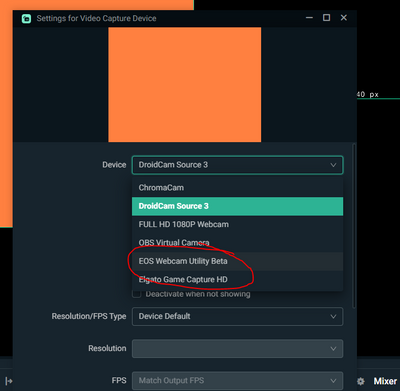
Okay so i tried the system restore and that didn't work, however i found a download of the beta version and its appeared on my streaming service options... However when i tried to select it the camera display flickered a few times and streamlabs (the streaming service) crashed and wouldn't allow me to select it.
.
Options
- Mark as New
- Bookmark
- Subscribe
- Mute
- Subscribe to RSS Feed
- Permalink
- Report Inappropriate Content
08-09-2022 02:11 AM - edited 08-09-2022 02:14 AM
Thanks to @shadowsports for saying something about AVG.
I had this same issue where the Webcam Utility just stopped working last week. (8/5) and was finding nothing. I uninstalled and reinstalled several times. I just checked AVG and turned off my "webcam security" and the EOS webcam splash screen returned. So IF you are running AVG, I think the new AVG update is not allowing the Webcam Utility to start up. Unsure if this is something Canon just needs to submit to AVG or patch themselves.
TL;DR - You can just turn off the "Webcam security" function on AVG while you're in need of using the EOS webcam utility. Hope that helps!
Options
- Mark as New
- Bookmark
- Subscribe
- Mute
- Subscribe to RSS Feed
- Permalink
- Report Inappropriate Content
08-11-2022 09:02 AM
Further to this I found a download link to the beta version. This showed up in strealabs but crashed when I tried to select it. I restarted the pc and this time with the camera turned off it had activate selecting this and then turning the camera on worked a charm. Now whenever I use streamlabs it picks up my camera straight away although it is the beta software that it's using, I just hope I'm not forced to install the update.


Announcements
07/22/2026: New firmware updates are available.
EOS R6 Mark III - Version 1.1.0
05/13/2026: New firmware updates are available.
EOS R5 Mark II - Version 1.3.0
EOS R6 Mark II - Version 1.7.0
04/28/2026: Service Notice: Caution Concerning use of Lithium Batteries
03/17/2026: New firmware updates are available.
SELPHY CP1500 - Version 1.0.7.0
02/23/2026: New firmware update is available for EOS C50- Version 1.0.3.1
01/23/2026: New firmware update is available for RF 24-105mm F4 IS USM- Version 2.0.7
01/20/2026: New firmware updates are available.
10/21/2025: Service Notice: To Users of the Compact Digital Camera PowerShot V1
10/15/2025: New firmware updates are available.
Speedlite EL-5 - Version 1.2.0
Speedlite EL-1 - Version 1.1.0
Speedlite Transmitter ST-E10 - Version 1.2.0
07/28/2025: Notice of Free Repair Service for the Mirrorless Camera EOS R50 (Black)
05/21/2025: New firmware update available for EOS C500 Mark II - Version 1.1.5.1
Related Content
- eos webcam utility pro on windows 10 home not working in EOS Webcam Utility Pro - Discussions
- EOS Webcam Utility stopped working after a Windows Update. in EOS Webcam Utility Pro - Discussions
- EOS Webcam utility pro not working with 6D Mark 2 in EOS Webcam Utility Pro - Discussions
- EOS Webcam Utility PRO does not work after upgrade to Windows 11 in EOS Webcam Utility Pro - Discussions
- EOS M50 mark ii Will not connect to EOS Utility Pro in EOS Webcam Utility Pro - Discussions

Ⓒ 2026
Canon U.S.A Inc. All Rights Reserved. Reproduction in whole or part without permission is prohibited.
