Turn on suggestions
Auto-suggest helps you quickly narrow down your search results by suggesting possible matches as you type.
- Canon Community
- Discussions & Help
- EOS Webcam Utility Pro
- EOS Webcam Utility Pro - Discussions
- Re: EOS Webcam Utility Not Working in my PC
Options
- Subscribe to RSS Feed
- Mark Topic as New
- Mark Topic as Read
- Float this Topic for Current User
- Bookmark
- Subscribe
- Mute
- Printer Friendly Page
EOS Webcam Utility Not Working in my PC

Options
- Mark as New
- Bookmark
- Subscribe
- Mute
- Subscribe to RSS Feed
- Permalink
- Report Inappropriate Content
10-02-2023 12:04 AM
Hello, I have a problem with EOS Webcam Utility on my PC. It only displays the EOS Webcam Utility logo. I have tried reinstalling it multiple times, but it still remains like that. The operating system I'm using is Windows 10. Is there anyone who can help me because it works on other devices when I try it?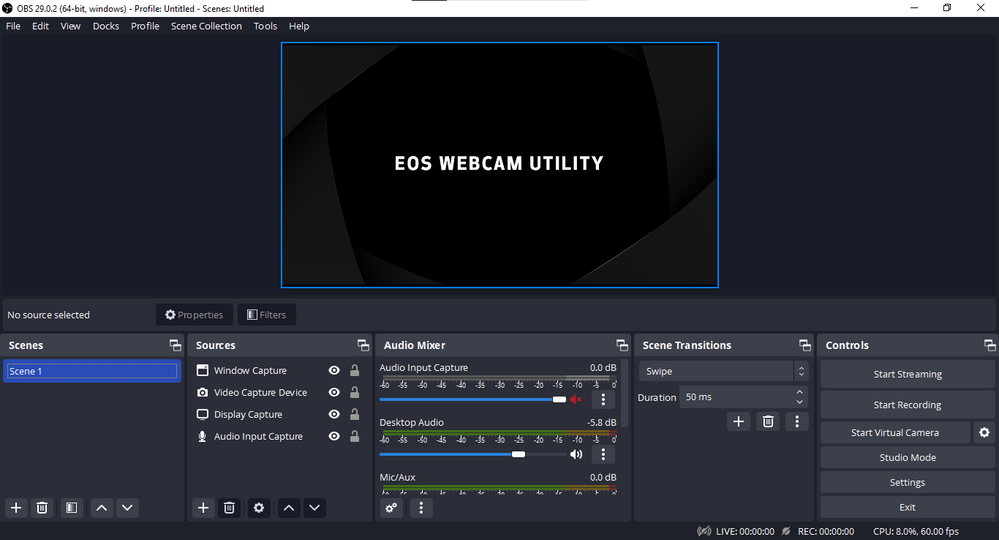
6 REPLIES 6


Options
- Mark as New
- Bookmark
- Subscribe
- Mute
- Subscribe to RSS Feed
- Permalink
- Report Inappropriate Content
10-02-2023 05:30 AM - edited 10-02-2023 07:49 PM
Do not use a USB port expander. There are known issues associated with USB ports on many of the AMD motherboards. Make sure that your motherboard has the latest firmware. If you built your PC platform yourself, then I will not be able to assist you any further.
--------------------------------------------------------
"Enjoying photography since 1972."
"Enjoying photography since 1972."
Options
- Mark as New
- Bookmark
- Subscribe
- Mute
- Subscribe to RSS Feed
- Permalink
- Report Inappropriate Content
10-02-2023 05:57 AM
I don't use an extended USB port, and I'm using an Asrock motherboard with an Intel i5 processor. The motherboard firmware is also up to date.

Options
- Mark as New
- Bookmark
- Subscribe
- Mute
- Subscribe to RSS Feed
- Permalink
- Report Inappropriate Content
10-02-2023 11:55 AM
Make sure that the EOS Utility is not running when using the EOS Webcam Utility. Check the taskbar to see if it is running, and close it. What camera are you using and how are you connecting to the computer (Wi-Fi or USB cable)?
Options
- Mark as New
- Bookmark
- Subscribe
- Mute
- Subscribe to RSS Feed
- Permalink
- Report Inappropriate Content
10-02-2023 02:22 PM
Canon 1200D and i'm connect to my computer use the USB Cable.


Options
- Mark as New
- Bookmark
- Subscribe
- Mute
- Subscribe to RSS Feed
- Permalink
- Report Inappropriate Content
10-02-2023 02:26 PM
You need to make sure you have the most current version of the software installed. Learn more at canon.us/livestream
Options
- Mark as New
- Bookmark
- Subscribe
- Mute
- Subscribe to RSS Feed
- Permalink
- Report Inappropriate Content
10-02-2023 06:06 PM - edited 10-02-2023 06:30 PM
Make sure that Wi-Fi is disabled in the camera in order to use the USB cable.
Google Drive or One Drive will often interfere with EOS Webcam Utility.

Announcements
07/22/2026: New firmware updates are available.
EOS R6 Mark III - Version 1.1.0
05/13/2026: New firmware updates are available.
EOS R5 Mark II - Version 1.3.0
EOS R6 Mark II - Version 1.7.0
04/28/2026: Service Notice: Caution Concerning use of Lithium Batteries
03/17/2026: New firmware updates are available.
SELPHY CP1500 - Version 1.0.7.0
02/23/2026: New firmware update is available for EOS C50- Version 1.0.3.1
01/23/2026: New firmware update is available for RF 24-105mm F4 IS USM- Version 2.0.7
01/20/2026: New firmware updates are available.
10/21/2025: Service Notice: To Users of the Compact Digital Camera PowerShot V1
10/15/2025: New firmware updates are available.
Speedlite EL-5 - Version 1.2.0
Speedlite EL-1 - Version 1.1.0
Speedlite Transmitter ST-E10 - Version 1.2.0
07/28/2025: Notice of Free Repair Service for the Mirrorless Camera EOS R50 (Black)
05/21/2025: New firmware update available for EOS C500 Mark II - Version 1.1.5.1
Related Content
- eos webcam utility pro on windows 10 home not working in EOS Webcam Utility Pro - Discussions
- EOS Webcam Utility stopped working after a Windows Update. in EOS Webcam Utility Pro - Discussions
- This version of "EOSWebcamUtility" will not open in a future release of MacOS in EOS Webcam Utility Pro - Discussions
- EOS Webcam utility pro not working with 6D Mark 2 in EOS Webcam Utility Pro - Discussions
- EOS Webcam Utility PRO does not work after upgrade to Windows 11 in EOS Webcam Utility Pro - Discussions

Ⓒ 2026
Canon U.S.A Inc. All Rights Reserved. Reproduction in whole or part without permission is prohibited.
