Turn on suggestions
Auto-suggest helps you quickly narrow down your search results by suggesting possible matches as you type.
- Canon Community
- Discussions & Help
- Camera
- EOS DSLR & Mirrorless Cameras
- built in flash
Options
- Subscribe to RSS Feed
- Mark Topic as New
- Mark Topic as Read
- Float this Topic for Current User
- Bookmark
- Subscribe
- Mute
- Printer Friendly Page

Options
- Mark as New
- Bookmark
- Subscribe
- Mute
- Subscribe to RSS Feed
- Permalink
- Report Inappropriate Content
01-26-2018 08:29 AM
Hi,
My brand new 6Ti's built in flash is acting out. When I click the shutter button half way down on Auto mode - the flash pops up, flickers a few times but when I actually take the picture - it doesn't flash. The pictures turn out really dark - meaning that the light wasn't good enough and the flash should have flashed. In the first week of having the camera, there was no problem with the flash in Auto mode, so It could be that someone changed something in the settings, as I'm not the only one here using the camera - but I have no clue of what it was. Any advice? Thanks!
Solved! Go to Solution.
1 ACCEPTED SOLUTION
Accepted Solutions
Options
- Mark as New
- Bookmark
- Subscribe
- Mute
- Subscribe to RSS Feed
- Permalink
- Report Inappropriate Content
02-03-2018 08:44 AM
No, I don't have anything on the hot shoe.
The camera went back to the store, the built-in flash was defected.
Thanks, everyone!
6 REPLIES 6


Options
- Mark as New
- Bookmark
- Subscribe
- Mute
- Subscribe to RSS Feed
- Permalink
- Report Inappropriate Content
01-26-2018 09:28 AM - edited 01-26-2018 09:35 AM
The flickering you see is probably the focus assist function which happens in low light. There is an option to turn this off as many people find it anoying.
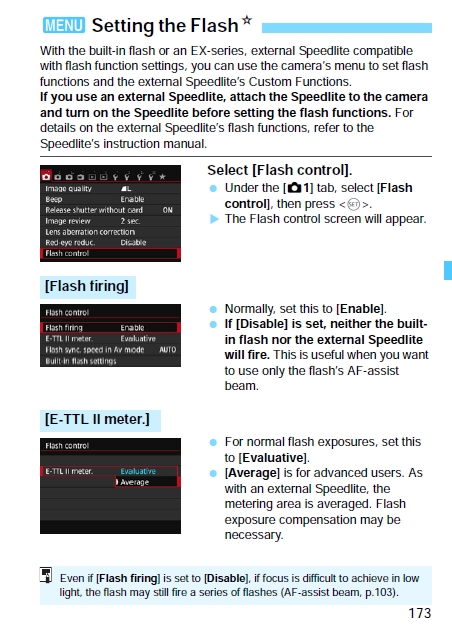
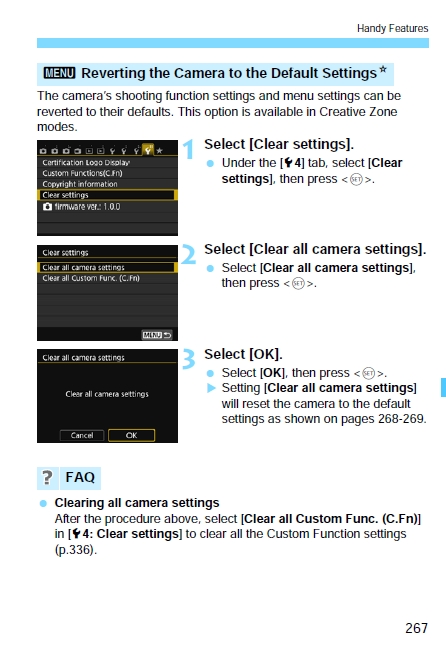
The flash not firing could be because someone has gone into the flash menu and disabled the flash. Go into your flash menu and check the settings, or you can also restore the factory default settings.
Mike Sowsun
Options
- Mark as New
- Bookmark
- Subscribe
- Mute
- Subscribe to RSS Feed
- Permalink
- Report Inappropriate Content
01-26-2018 01:48 PM
Thanks for the reply andinstructions, my camera doesn't have the same options on the menu page. I don't ave the flash control option the same way it appears on the instructions you posted 😞

Options
- Mark as New
- Bookmark
- Subscribe
- Mute
- Subscribe to RSS Feed
- Permalink
- Report Inappropriate Content
01-26-2018 02:02 PM
Don't keep us in suspense, tell us what camera!
See the little star in the exerpts above? That means you have to be in a creative zone mode - usually P - to see all the options.
Options
- Mark as New
- Bookmark
- Subscribe
- Mute
- Subscribe to RSS Feed
- Permalink
- Report Inappropriate Content
01-26-2018 02:25 PM
I started my question with telling about my brand new Rebel t6i 🙂 It seem like all the flash setings are correct, the built in flash just doesn't work. Back to th store it goes.

Options
- Mark as New
- Bookmark
- Subscribe
- Mute
- Subscribe to RSS Feed
- Permalink
- Report Inappropriate Content
01-26-2018 02:48 PM
You don't have anything mounted in the hot-shoe by chance, do you?
Options
- Mark as New
- Bookmark
- Subscribe
- Mute
- Subscribe to RSS Feed
- Permalink
- Report Inappropriate Content
02-03-2018 08:44 AM
No, I don't have anything on the hot shoe.
The camera went back to the store, the built-in flash was defected.
Thanks, everyone!

Announcements
07/22/2026: New firmware updates are available.
EOS R6 Mark III - Version 1.1.0
05/13/2026: New firmware updates are available.
EOS R5 Mark II - Version 1.3.0
EOS R6 Mark II - Version 1.7.0
04/28/2026: Service Notice: Caution Concerning use of Lithium Batteries
03/17/2026: New firmware updates are available.
SELPHY CP1500 - Version 1.0.7.0
02/23/2026: New firmware update is available for EOS C50- Version 1.0.3.1
01/23/2026: New firmware update is available for RF 24-105mm F4 IS USM- Version 2.0.7
01/20/2026: New firmware updates are available.
10/21/2025: Service Notice: To Users of the Compact Digital Camera PowerShot V1
10/15/2025: New firmware updates are available.
Speedlite EL-5 - Version 1.2.0
Speedlite EL-1 - Version 1.1.0
Speedlite Transmitter ST-E10 - Version 1.2.0
07/28/2025: Notice of Free Repair Service for the Mirrorless Camera EOS R50 (Black)
05/21/2025: New firmware update available for EOS C500 Mark II - Version 1.1.5.1
Related Content
- EOS Rebel T7 shows "Busy" icon and runs slow, especially with flash in EOS DSLR & Mirrorless Cameras
- Canon AF35M II/Autoboy 2 flash not working in Point & Shoot Digital Cameras
- Speedlite 320EX not seen by Canon RP in Speedlite Flashes
- EOS R5 Mark II Hot shoe keeps failing in EOS DSLR & Mirrorless Cameras
- vertical line on my canon ixus 145 in Point & Shoot Digital Cameras

Ⓒ 2026
Canon U.S.A Inc. All Rights Reserved. Reproduction in whole or part without permission is prohibited.
