Turn on suggestions
Auto-suggest helps you quickly narrow down your search results by suggesting possible matches as you type.
- Canon Community
- Discussions & Help
- Camera
- EOS DSLR & Mirrorless Cameras
- Re: RP Red Blinking Camera Icon on Screen
Options
- Subscribe to RSS Feed
- Mark Topic as New
- Mark Topic as Read
- Float this Topic for Current User
- Bookmark
- Subscribe
- Mute
- Printer Friendly Page
RP Red Blinking Camera Icon on Screen

Options
- Mark as New
- Bookmark
- Subscribe
- Mute
- Subscribe to RSS Feed
- Permalink
- Report Inappropriate Content
09-30-2022 12:12 PM
How do I get rid of this red blinking camera icon in the corner of the screen? I have the EOS RP.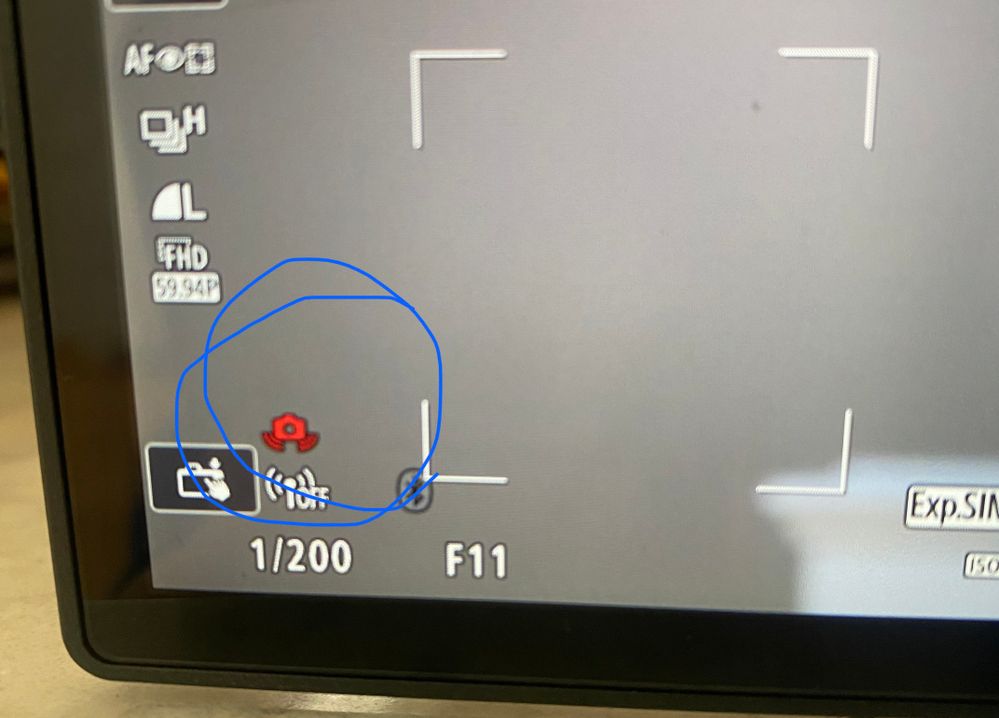
6 REPLIES 6

Options
- Mark as New
- Bookmark
- Subscribe
- Mute
- Subscribe to RSS Feed
- Permalink
- Report Inappropriate Content
09-30-2022 02:14 PM - edited 09-30-2022 02:31 PM
The blinking red camera icon is what Canon calls a "jitter alert". It means that motion blur is likely at the shutter speed selected for the focal length of the lens in use when shooting hand-held.
What is the FL of the lens you were using?
That warning means that Canon recommends using a tripod, opening up the aperture, switching to an "IS" lens, or increasing the sensitivity (ISO) setting to achieve a higher shutter speed. Since 1/200th is usually a reasonable speed for lens focal lengths of 200 mm or shorter, I suspect you had a long telephoto lens mounted.
Also, having the camera set to Tv mode (fixed shutter speed selected) and having a lens cap attached (no light entering the lens) will also trigger a "jitter alert".
Options
- Mark as New
- Bookmark
- Subscribe
- Mute
- Subscribe to RSS Feed
- Permalink
- Report Inappropriate Content
09-30-2022 02:28 PM
Yes the 100-400 and the 600


Options
- Mark as New
- Bookmark
- Subscribe
- Mute
- Subscribe to RSS Feed
- Permalink
- Report Inappropriate Content
09-30-2022 02:32 PM
Conventional wisdom suggests that you should have a shutter speed that is at least equal to the inverse of your focal length, so for example: when shooting with your 600mm lens, you need a shutter speed of 1/600sec. Lens optical stabilization will assist, but much depends on the steadiness of your ability to hold a lens.
cheers, TREVOR
The mark of good photographer is less what they hold in their hand, it's more what they hold in their head;
"All the variety, all the charm, all the beauty of life is made up of light and shadow", Leo Tolstoy;
"Skill in photography is acquired by practice and not by purchase" Percy W. Harris
Options
- Mark as New
- Bookmark
- Subscribe
- Mute
- Subscribe to RSS Feed
- Permalink
- Report Inappropriate Content
09-30-2022 02:48 PM
Yep! Crank up the ISO for a higher shutter speed or learn to use a braced two-handed lens holding technique and practice releasing the shutter while exhaling slowly. Of course, that only is workable for fixed (still) subjects. If you're shooting anything that moves with the 600 mm lens, even with smooth panning you really should be shooting at 1/2000 or 1/4000.
Options
- Mark as New
- Bookmark
- Subscribe
- Mute
- Subscribe to RSS Feed
- Permalink
- Report Inappropriate Content
09-30-2022 03:22 PM
I absolutely agree with you there. Holding technique is very important. I don't know how @jponzini holds the camera, but it is imperative for all but the shortest focal lengths to hold the camera with the eye to the viewfinder and the elbows tucked into the torso. Have the left hand under the lens to cradle it and gently manipulate the camera controls with the right. 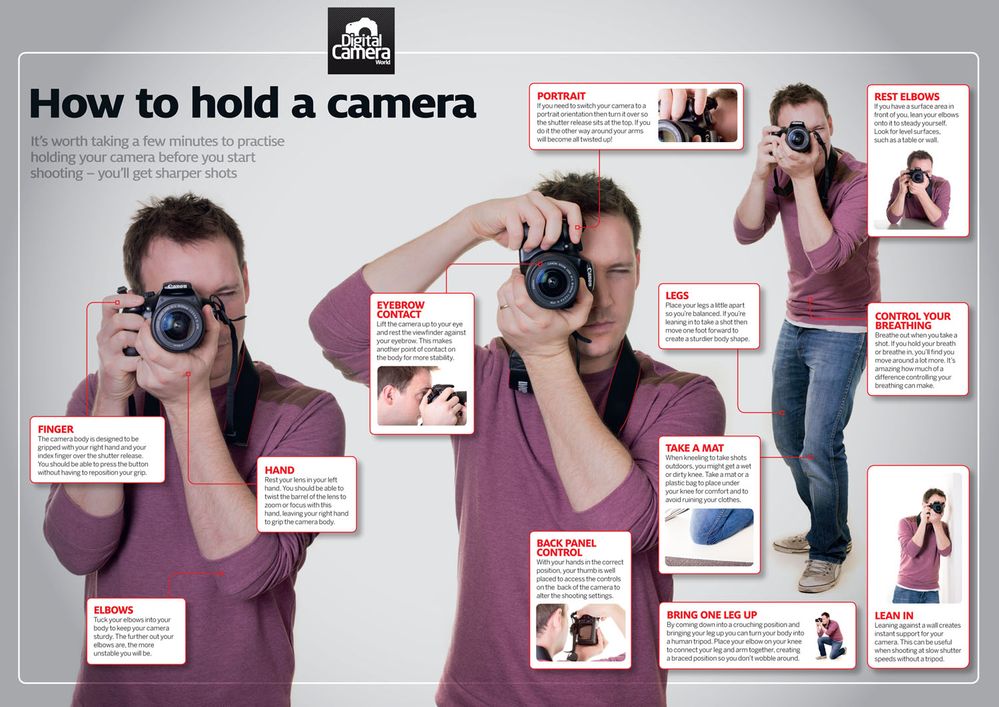
cheers, TREVOR
The mark of good photographer is less what they hold in their hand, it's more what they hold in their head;
"All the variety, all the charm, all the beauty of life is made up of light and shadow", Leo Tolstoy;
"Skill in photography is acquired by practice and not by purchase" Percy W. Harris

Options
- Mark as New
- Bookmark
- Subscribe
- Mute
- Subscribe to RSS Feed
- Permalink
- Report Inappropriate Content
09-30-2022 04:30 PM
Are you shooting video? If so, then you need a tripod when using super telephoto focal lengths.
--------------------------------------------------------
"Enjoying photography since 1972."
"Enjoying photography since 1972."

Announcements
07/22/2026: New firmware updates are available.
EOS R6 Mark III - Version 1.1.0
05/13/2026: New firmware updates are available.
EOS R5 Mark II - Version 1.3.0
EOS R6 Mark II - Version 1.7.0
04/28/2026: Service Notice: Caution Concerning use of Lithium Batteries
03/17/2026: New firmware updates are available.
SELPHY CP1500 - Version 1.0.7.0
02/23/2026: New firmware update is available for EOS C50- Version 1.0.3.1
01/23/2026: New firmware update is available for RF 24-105mm F4 IS USM- Version 2.0.7
01/20/2026: New firmware updates are available.
10/21/2025: Service Notice: To Users of the Compact Digital Camera PowerShot V1
10/15/2025: New firmware updates are available.
Speedlite EL-5 - Version 1.2.0
Speedlite EL-1 - Version 1.1.0
Speedlite Transmitter ST-E10 - Version 1.2.0
07/28/2025: Notice of Free Repair Service for the Mirrorless Camera EOS R50 (Black)
05/21/2025: New firmware update available for EOS C500 Mark II - Version 1.1.5.1
Related Content
- Upgrade for Canon Rebel T7 - issues with flash in EF & RF Lenses
- Can not find a screen for my ixus canon camera (UK) in Point & Shoot Digital Cameras
- EOS Canon R6 mkIII Image write failure in EOS DSLR & Mirrorless Cameras
- Dropped my canon powershot elph360 A in Point & Shoot Digital Cameras
- PLEASE HELP!!! PowerShot ELPH 300 HS turns itself on and glitching in Point & Shoot Digital Cameras

Ⓒ 2026
Canon U.S.A Inc. All Rights Reserved. Reproduction in whole or part without permission is prohibited.
