Turn on suggestions
Auto-suggest helps you quickly narrow down your search results by suggesting possible matches as you type.
- Canon Community
- Discussions & Help
- Camera
- EOS DSLR & Mirrorless Cameras
- Re: LCD okay but menu won't display
Options
- Subscribe to RSS Feed
- Mark Topic as New
- Mark Topic as Read
- Float this Topic for Current User
- Bookmark
- Subscribe
- Mute
- Printer Friendly Page
LCD okay but menu won't display

Options
- Mark as New
- Bookmark
- Subscribe
- Mute
- Subscribe to RSS Feed
- Permalink
- Report Inappropriate Content
01-18-2017 01:13 PM
I just inherited this camera...Rebel EOS xsi...learning to use it. Obviously I punced the wrong button, no doubt...now the LCD's okaybut can't access the menu or see image playback.....what'd I do and how canI correct this????
6 REPLIES 6


Options
- Mark as New
- Bookmark
- Subscribe
- Mute
- Subscribe to RSS Feed
- Permalink
- Report Inappropriate Content
01-18-2017 01:21 PM
Did you ever see a menu display? Do you have a copy of the insruction manual?
https://www.usa.canon.com/internet/portal/us/home/support
Use the above link to navigate to your camera's product support page. From there, you can download the manual and camera software.
The <MENU> button is used to display the menu. You may have a bad button. What happens when you press <DISP> a few times?
--------------------------------------------------------
"Enjoying photography since 1972."
"Enjoying photography since 1972."
Options
- Mark as New
- Bookmark
- Subscribe
- Mute
- Subscribe to RSS Feed
- Permalink
- Report Inappropriate Content
01-18-2017 01:30 PM
I have the manual...the settings, display and everything was working fine until I tried to change settings...now I see settings when camera is on, but when I try to display menu nothing happens, and when I hit display it's a dark screen...no image.
Options
- Mark as New
- Bookmark
- Subscribe
- Mute
- Subscribe to RSS Feed
- Permalink
- Report Inappropriate Content
01-18-2017 02:36 PM
@nelliemae wrote:I have the manual...the settings, display and everything was working fine until I tried to change settings...now I see settings when camera is on, but when I try to display menu nothing happens, and when I hit display it's a dark screen...no image.
It almost sounds like your display has died. Change your memory card. Does Live View show an image?
--------------------------------------------------------
"Enjoying photography since 1972."
"Enjoying photography since 1972."


Options
- Mark as New
- Bookmark
- Subscribe
- Mute
- Subscribe to RSS Feed
- Permalink
- Report Inappropriate Content
01-18-2017 03:26 PM
Hi Nelliemae,
Thank you for posting.
I recommend that you reset your camera to its default settings. Here's how:
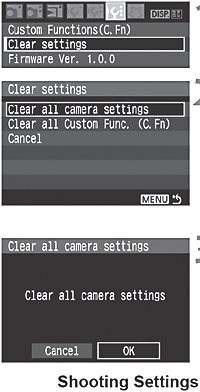 | Select [Clear settings].
Select the desired setting.
Select [OK].
|
 ] tab, select [Clear settings], then press <SET>.
Did this answer your question? Please click the Accept as Solution button so that others may find the answer as well.

Options
- Mark as New
- Bookmark
- Subscribe
- Mute
- Subscribe to RSS Feed
- Permalink
- Report Inappropriate Content
01-18-2017 04:42 PM
I don't believe the XSi *has* live view.
Options
- Mark as New
- Bookmark
- Subscribe
- Mute
- Subscribe to RSS Feed
- Permalink
- Report Inappropriate Content
01-19-2017 10:21 AM
Thanks everyone...I figured it out and it's doing fine! I just managed to get the menu up and readjusted the settings. Somehow I'd turned off the review function for photos.
Cheers,
Nell May

Announcements
07/22/2026: New firmware updates are available.
EOS R6 Mark III - Version 1.1.0
05/13/2026: New firmware updates are available.
EOS R5 Mark II - Version 1.3.0
EOS R6 Mark II - Version 1.7.0
04/28/2026: Service Notice: Caution Concerning use of Lithium Batteries
03/17/2026: New firmware updates are available.
SELPHY CP1500 - Version 1.0.7.0
02/23/2026: New firmware update is available for EOS C50- Version 1.0.3.1
01/23/2026: New firmware update is available for RF 24-105mm F4 IS USM- Version 2.0.7
01/20/2026: New firmware updates are available.
10/21/2025: Service Notice: To Users of the Compact Digital Camera PowerShot V1
10/15/2025: New firmware updates are available.
Speedlite EL-5 - Version 1.2.0
Speedlite EL-1 - Version 1.1.0
Speedlite Transmitter ST-E10 - Version 1.2.0
07/28/2025: Notice of Free Repair Service for the Mirrorless Camera EOS R50 (Black)
05/21/2025: New firmware update available for EOS C500 Mark II - Version 1.1.5.1
Related Content
- EOS R6 Mark II light meter disappears when shooting on fixed ISO in EOS DSLR & Mirrorless Cameras
- EOS R5 Mark II minor Firmware Update, Version 1.3.1 in Camera Software
- R5 Mark II Owners Update Your Firmware to Version 1.3.1 in EOS DSLR & Mirrorless Cameras
- EOS R6 Mk 2 - Display of lens focal length in Playback display in EOS DSLR & Mirrorless Cameras
- EOS R5 Mark II firmware 1.30 notes in Camera Software

Ⓒ 2026
Canon U.S.A Inc. All Rights Reserved. Reproduction in whole or part without permission is prohibited.
