Turn on suggestions
Auto-suggest helps you quickly narrow down your search results by suggesting possible matches as you type.
- Canon Community
- Discussions & Help
- Camera
- EOS DSLR & Mirrorless Cameras
- Image Stablization for the SL3/250D
Options
- Subscribe to RSS Feed
- Mark Topic as New
- Mark Topic as Read
- Float this Topic for Current User
- Bookmark
- Subscribe
- Mute
- Printer Friendly Page
Image Stablization for the SL3/250D

Options
- Mark as New
- Bookmark
- Subscribe
- Mute
- Subscribe to RSS Feed
- Permalink
- Report Inappropriate Content
03-12-2023 04:50 PM
I'm a newbie...and I've been reading/hearing about the Image Stablization on my EOS 250D...
This may sound silly...but, I can't find the Image Stablization button on my camera body or on the 18-55mm lens.
Can somebody please explain where I can find this button...I've heard that by pressing this button will stop the shakiness of my hands.
Thank you.
4 REPLIES 4


Options
- Mark as New
- Bookmark
- Subscribe
- Mute
- Subscribe to RSS Feed
- Permalink
- Report Inappropriate Content
03-12-2023 06:47 PM
None of Canon's DSLR cameras have In body Image Stabilization (IBIS). The lens will provide Optical image stabilization (IS) or (OIS). If you have a lens that supports (IS).
-Demetrius
Bodies: EOS 5D Mark IV
Lenses: EF F/2.8 Holy Trinity
Speedlites: 420EX, 470EX-AI, 550EX & 600EX II-RT
Bodies: EOS 5D Mark IV
Lenses: EF F/2.8 Holy Trinity
Speedlites: 420EX, 470EX-AI, 550EX & 600EX II-RT

Options
- Mark as New
- Bookmark
- Subscribe
- Mute
- Subscribe to RSS Feed
- Permalink
- Report Inappropriate Content
03-12-2023 06:58 PM - edited 03-14-2023 01:50 PM
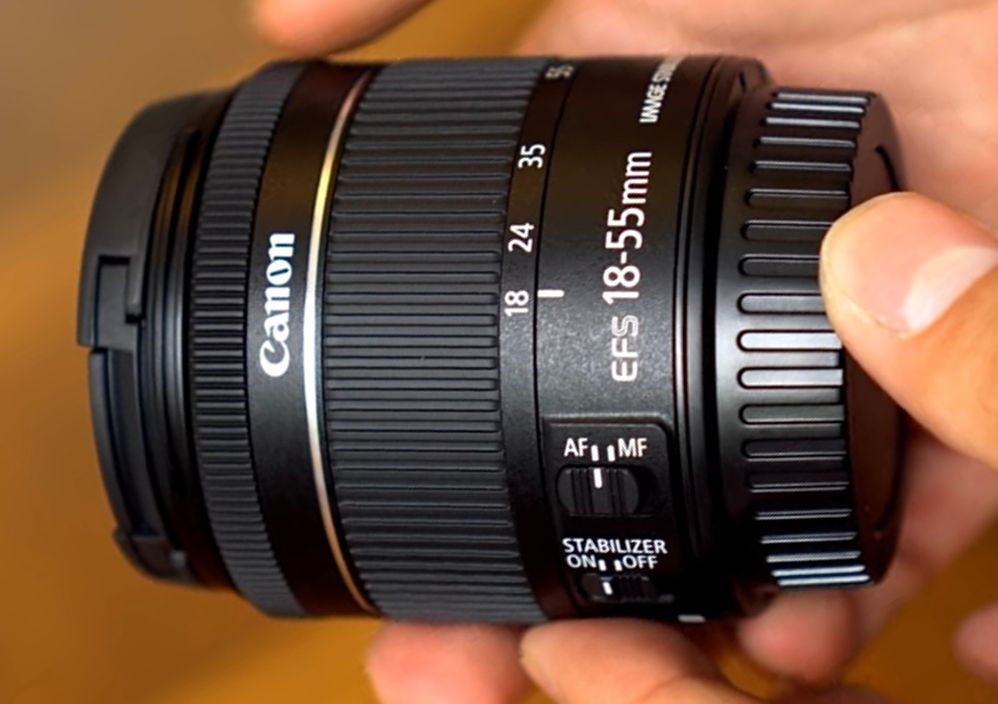
The SL3 normally comes with an EF-S 18-55 IS lens, which has Image Stabilization built into the lens. Just make the “Stabilizer” switch is turned on.
Mike Sowsun
Options
- Mark as New
- Bookmark
- Subscribe
- Mute
- Subscribe to RSS Feed
- Permalink
- Report Inappropriate Content
03-12-2023 07:14 PM
Are you sure it wasn't the EF-S 18-55mm IS STM variant of the lens. Not just the DC Motor IS variant of the EF-S 18-55mm.
-Demetrius
Bodies: EOS 5D Mark IV
Lenses: EF F/2.8 Holy Trinity
Speedlites: 420EX, 470EX-AI, 550EX & 600EX II-RT
Bodies: EOS 5D Mark IV
Lenses: EF F/2.8 Holy Trinity
Speedlites: 420EX, 470EX-AI, 550EX & 600EX II-RT

Options
- Mark as New
- Bookmark
- Subscribe
- Mute
- Subscribe to RSS Feed
- Permalink
- Report Inappropriate Content
03-14-2023 10:54 AM - edited 03-14-2023 10:54 AM
There are a lot of versions of the EF-S 18-55 lens. Not all have image stabilization. Sounds like you have one of the ones that doesn't. You can't miss the IS switch if it is there.

Announcements
07/22/2026: New firmware updates are available.
EOS R6 Mark III - Version 1.1.0
05/13/2026: New firmware updates are available.
EOS R5 Mark II - Version 1.3.0
EOS R6 Mark II - Version 1.7.0
04/28/2026: Service Notice: Caution Concerning use of Lithium Batteries
03/17/2026: New firmware updates are available.
SELPHY CP1500 - Version 1.0.7.0
02/23/2026: New firmware update is available for EOS C50- Version 1.0.3.1
01/23/2026: New firmware update is available for RF 24-105mm F4 IS USM- Version 2.0.7
01/20/2026: New firmware updates are available.
10/21/2025: Service Notice: To Users of the Compact Digital Camera PowerShot V1
10/15/2025: New firmware updates are available.
Speedlite EL-5 - Version 1.2.0
Speedlite EL-1 - Version 1.1.0
Speedlite Transmitter ST-E10 - Version 1.2.0
07/28/2025: Notice of Free Repair Service for the Mirrorless Camera EOS R50 (Black)
05/21/2025: New firmware update available for EOS C500 Mark II - Version 1.1.5.1
Related Content
- EOS R5 Mark II How and Why to Use Picture Style settings and In-Camera Sharpening in EOS DSLR & Mirrorless Cameras
- EOS Canon R6 mkIII Image write failure in EOS DSLR & Mirrorless Cameras
- Struggling with HDR: Edit highlights and shadows in RAW image before merging in DPP4? in Camera Software
- RF 70-200 blurry edges on some images in EF & RF Lenses
- EOS R5 CF card not recording images in EOS DSLR & Mirrorless Cameras

Ⓒ 2026
Canon U.S.A Inc. All Rights Reserved. Reproduction in whole or part without permission is prohibited.
