Turn on suggestions
Auto-suggest helps you quickly narrow down your search results by suggesting possible matches as you type.
- Canon Community
- Discussions & Help
- Camera
- EOS DSLR & Mirrorless Cameras
- Re: I cannot access Menu and other options on Cano...
Options
- Subscribe to RSS Feed
- Mark Topic as New
- Mark Topic as Read
- Float this Topic for Current User
- Bookmark
- Subscribe
- Mute
- Printer Friendly Page

Options
- Mark as New
- Bookmark
- Subscribe
- Mute
- Subscribe to RSS Feed
- Permalink
- Report Inappropriate Content
06-30-2018 10:57 PM
I noticed today that I couldn't preview photos that I took on my camera by pressing the preview button. It acted like it would show me a preview and just jumped to showing me a blank screen.
I also noticed that when I can't access the menu options. Neither Menu nor Info buttons worked. When I turn off the camera and turn it on I see this
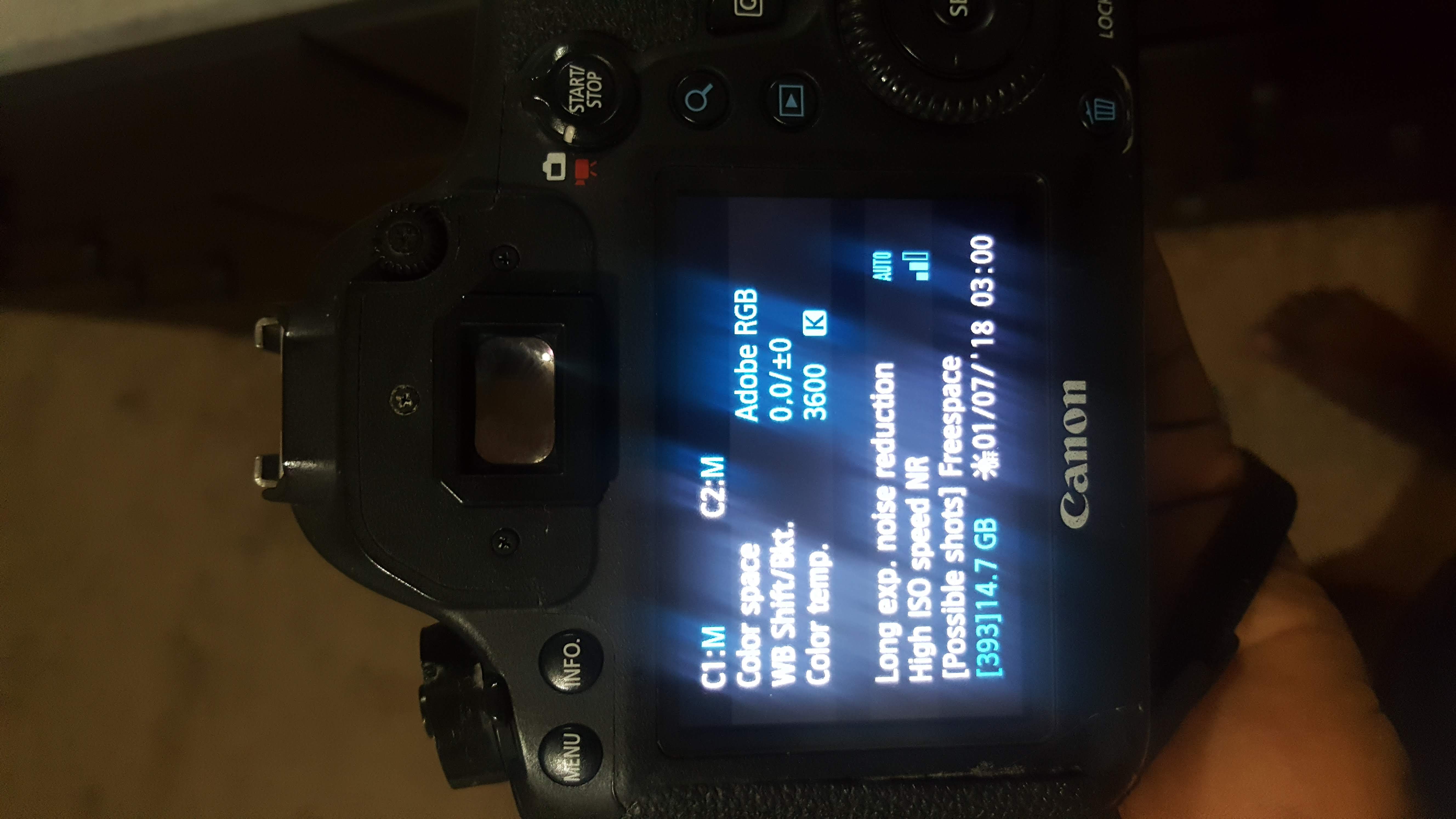
I have tried all the types of reset. I removed the battery, removed the memory card, removed the lens etc. Still nothing has happened.
I hope someone can direct me into what I can do. Thanks
Solved! Go to Solution.
1 ACCEPTED SOLUTION
Accepted Solutions


Options
- Mark as New
- Bookmark
- Subscribe
- Mute
- Subscribe to RSS Feed
- Permalink
- Report Inappropriate Content
07-01-2018 06:58 PM
Two things.
1. Sit it on a warm heating pad, not hot, just warm for several days. Open all doors and leave the lens off.
2. Call Canon 1 (800) 652-2666
In the future never turn on an electrical device if it gets wet until it drys thoroughly. You can short our the MB. Big problem. 
EB
EOS 1DX and many lenses.
EOS 1DX and many lenses.
6 REPLIES 6

Options
- Mark as New
- Bookmark
- Subscribe
- Mute
- Subscribe to RSS Feed
- Permalink
- Report Inappropriate Content
07-01-2018 07:39 AM
Contact Canon Support.. You seem to have a board failure.
You could have a chunk of foreign debris jamming one of your keys. There is also a “lock” feature on certain keys, which can disable them when you are shooting, but this is unlikely to be your issue.
Make sure that you are using genuine name brand SD memory cards. Only use full size cards, never the microSD cards with a plastic adapter. Be sure to always low level format your SD card in the camera prior to first use, too.
--------------------------------------------------------
"Enjoying photography since 1972."
"Enjoying photography since 1972."
Options
- Mark as New
- Bookmark
- Subscribe
- Mute
- Subscribe to RSS Feed
- Permalink
- Report Inappropriate Content
07-01-2018 10:12 AM - edited 07-01-2018 10:13 AM
" I removed the battery, removed the memory card, removed the lens etc. Still nothing has happened."
That's because none of that really effects a 6D. Did you drop it or get it a little wet. 6D's are not weather sealed so water is an enemy. It looks like it is a little wet!
EB
EOS 1DX and many lenses.
EOS 1DX and many lenses.
Options
- Mark as New
- Bookmark
- Subscribe
- Mute
- Subscribe to RSS Feed
- Permalink
- Report Inappropriate Content
07-01-2018 01:10 PM
You are right, it rained a bit while I was shooting. But I didn't think it would affect it at all. Is there anything I can do now(considering this may be the issue).
Options
- Mark as New
- Bookmark
- Subscribe
- Mute
- Subscribe to RSS Feed
- Permalink
- Report Inappropriate Content
07-01-2018 06:58 PM
Two things.
1. Sit it on a warm heating pad, not hot, just warm for several days. Open all doors and leave the lens off.
2. Call Canon 1 (800) 652-2666
In the future never turn on an electrical device if it gets wet until it drys thoroughly. You can short our the MB. Big problem.
EB
EOS 1DX and many lenses.
EOS 1DX and many lenses.
Options
- Mark as New
- Bookmark
- Subscribe
- Mute
- Subscribe to RSS Feed
- Permalink
- Report Inappropriate Content
07-08-2018 10:37 PM
Thanks. My camera worked after days tucked in a bowl full of raw rice.
Options
- Mark as New
- Bookmark
- Subscribe
- Mute
- Subscribe to RSS Feed
- Permalink
- Report Inappropriate Content
07-09-2018 02:02 AM
Fantastic! 
EB
EOS 1DX and many lenses.
EOS 1DX and many lenses.


Announcements
05/13/2026: New firmware updates are available.
EOS R5 Mark II - Version 1.3.0
EOS R6 Mark II - Version 1.7.0
04/28/2026: Service Notice: Caution Concerning use of Lithium Batteries
03/17/2026: New firmware updates are available.
SELPHY CP1500 - Version 1.0.7.0
02/23/2026: New firmware update is available for EOS C50- Version 1.0.3.1
01/23/2026: New firmware update is available for RF 24-105mm F4 IS USM- Version 2.0.7
01/20/2026: New firmware updates are available.
12/22/2025: New firmware update is available for EOS R6 Mark III- Version 1.0.2
10/21/2025: Service Notice: To Users of the Compact Digital Camera PowerShot V1
10/15/2025: New firmware updates are available.
Speedlite EL-5 - Version 1.2.0
Speedlite EL-1 - Version 1.1.0
Speedlite Transmitter ST-E10 - Version 1.2.0
07/28/2025: Notice of Free Repair Service for the Mirrorless Camera EOS R50 (Black)
05/21/2025: New firmware update available for EOS C500 Mark II - Version 1.1.5.1
Related Content
- PowerShot V1 language options include Russian? in Point & Shoot Digital Cameras
- How to connect PowerShot SX530 HS to iMac Tahoe 26 via Wi-Fi in Point & Shoot Digital Cameras
- Methods of exposure bracketing in EOS DSLR & Mirrorless Cameras
- Dealing with stuck filters in Camera Accessories
- Canon, please make a firmware update to remove the 4gb file limit from the rebel T7 in EOS DSLR & Mirrorless Cameras

Ⓒ 2026
Canon U.S.A Inc. All Rights Reserved. Reproduction in whole or part without permission is prohibited.
