Turn on suggestions
Auto-suggest helps you quickly narrow down your search results by suggesting possible matches as you type.
- Canon Community
- Discussions & Help
- Camera
- EOS DSLR & Mirrorless Cameras
- How do I enable infrared remote triggering on my C...
Options
- Subscribe to RSS Feed
- Mark Topic as New
- Mark Topic as Read
- Float this Topic for Current User
- Bookmark
- Subscribe
- Mute
- Printer Friendly Page

Options
- Mark as New
- Bookmark
- Subscribe
- Mute
- Subscribe to RSS Feed
- Permalink
- Report Inappropriate Content
10-08-2014 03:09 PM
My awesome wife bought me a complete starter kit with a Canon Rebel T5 (not a T5i) for my birthday... I'm so stoked! In the starter kit was an infrared remote that looks like this.
It says I just need to set my camera to accept remote triggering in order to use this remote. But I cannot for the life of me find it! I tried searching google but any time I type anything remotely (no pun intended) related to Canon Rebel, I get pages and pages of places to buy one and not much information at all on how to use one.
Thanks for your time!
Solved! Go to Solution.
1 ACCEPTED SOLUTION
Accepted Solutions

Options
- Mark as New
- Bookmark
- Subscribe
- Mute
- Subscribe to RSS Feed
- Permalink
- Report Inappropriate Content
10-09-2014 10:36 AM
19 REPLIES 19
Options
- Mark as New
- Bookmark
- Subscribe
- Mute
- Subscribe to RSS Feed
- Permalink
- Report Inappropriate Content
10-08-2014 03:37 PM
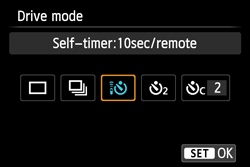
It's under the drive settings (left button on the circle on back), look for this icon:

Options
- Mark as New
- Bookmark
- Subscribe
- Mute
- Subscribe to RSS Feed
- Permalink
- Report Inappropriate Content
10-08-2014 03:44 PM
You have to change the Drive mode to Self Timer
http://www.dummies.com/how-to/content/how-to-change-the-drive-mode-on-the-canon-rebel-t5.html
--------------------------------------------------------------------------------------------------
Weekend Travelers Blog | Eastern Sierra Fall Color Guide
Weekend Travelers Blog | Eastern Sierra Fall Color Guide
Options
- Mark as New
- Bookmark
- Subscribe
- Mute
- Subscribe to RSS Feed
- Permalink
- Report Inappropriate Content
10-08-2014 03:47 PM
Thank you for your reply 🙂
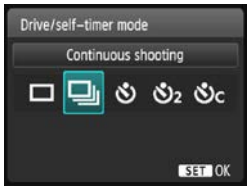
I actually looked here thinking it would make sense for that option to be here, however when I go to this screen it doesn't have that option, it looks like this:
Options
- Mark as New
- Bookmark
- Subscribe
- Mute
- Subscribe to RSS Feed
- Permalink
- Report Inappropriate Content
10-08-2014 03:50 PM
Use the 3rd option, self timer
--------------------------------------------------------------------------------------------------
Weekend Travelers Blog | Eastern Sierra Fall Color Guide
Weekend Travelers Blog | Eastern Sierra Fall Color Guide
Options
- Mark as New
- Bookmark
- Subscribe
- Mute
- Subscribe to RSS Feed
- Permalink
- Report Inappropriate Content
10-08-2014 03:51 PM
Ok I will try it, I was posting before I saw your reply. Thank you both for your help, I'll come back and let you know if it worked 🙂


Options
- Mark as New
- Bookmark
- Subscribe
- Mute
- Subscribe to RSS Feed
- Permalink
- Report Inappropriate Content
10-09-2014 09:15 AM
One thing to remember, IR is mostly line of sight and the distance is not too great.
Not all cameras support IR triggering.
EB
EOS 1DX and many lenses.
EOS 1DX and many lenses.
Options
- Mark as New
- Bookmark
- Subscribe
- Mute
- Subscribe to RSS Feed
- Permalink
- Report Inappropriate Content
10-09-2014 10:28 AM
I'm beginning to wonder if the T5 does support it or not. I assumed it does because the IR remote came in the kit with the camera as a bundle. However I tried for an hour last night using the setting recommended here (and some more) at various distances and I could not get it to work.
I haven't seen anything in the documentation saying that it does or does not support IR triggering. Does anyone know of a way I can find out for sure?
Options
- Mark as New
- Bookmark
- Subscribe
- Mute
- Subscribe to RSS Feed
- Permalink
- Report Inappropriate Content
10-09-2014 10:35 AM
Ah, sorry, I didn't read closely. Didn't realize it was a T5, not a T5i. Now that you mention it, I vaguely remember one of the administrators pointing out that the T5 doesn't have IR in a discussion we had awhile back. Now, why they would sell a remote in a kit with a camera that doesn't have that capabilities is odd. I assume this was some small company bundle?
Options
- Mark as New
- Bookmark
- Subscribe
- Mute
- Subscribe to RSS Feed
- Permalink
- Report Inappropriate Content
10-09-2014 10:36 AM

Announcements
07/22/2026: New firmware updates are available.
EOS R6 Mark III - Version 1.1.0
05/13/2026: New firmware updates are available.
EOS R5 Mark II - Version 1.3.0
EOS R6 Mark II - Version 1.7.0
04/28/2026: Service Notice: Caution Concerning use of Lithium Batteries
03/17/2026: New firmware updates are available.
SELPHY CP1500 - Version 1.0.7.0
02/23/2026: New firmware update is available for EOS C50- Version 1.0.3.1
01/23/2026: New firmware update is available for RF 24-105mm F4 IS USM- Version 2.0.7
01/20/2026: New firmware updates are available.
10/21/2025: Service Notice: To Users of the Compact Digital Camera PowerShot V1
10/15/2025: New firmware updates are available.
Speedlite EL-5 - Version 1.2.0
Speedlite EL-1 - Version 1.1.0
Speedlite Transmitter ST-E10 - Version 1.2.0
07/28/2025: Notice of Free Repair Service for the Mirrorless Camera EOS R50 (Black)
05/21/2025: New firmware update available for EOS C500 Mark II - Version 1.1.5.1
Related Content
- R3 Trigger the Shutter Remotely in EOS DSLR & Mirrorless Cameras
- Waterproof remote shutter release for EOS-1D X Mark ll in Camera Accessories
- Wireless Remote Triggers for both EOS R3 & R5 in Camera Accessories
- Canon BR-E1 Wireless Remote Trigger compatibility with EOS R5 Mark II in Camera Accessories
- T7i Bluetooth Wont Pair with remote in EOS DSLR & Mirrorless Cameras

Ⓒ 2026
Canon U.S.A Inc. All Rights Reserved. Reproduction in whole or part without permission is prohibited.
