Turn on suggestions
Auto-suggest helps you quickly narrow down your search results by suggesting possible matches as you type.
- Canon Community
- Discussions & Help
- Camera
- EOS DSLR & Mirrorless Cameras
- Re: How can I wirelessly connect EOS 2000D with Ma...
Options
- Subscribe to RSS Feed
- Mark Topic as New
- Mark Topic as Read
- Float this Topic for Current User
- Bookmark
- Subscribe
- Mute
- Printer Friendly Page
How can I wirelessly connect EOS 2000D with MacBook Pro? Must I have a cable?

Options
- Mark as New
- Bookmark
- Subscribe
- Mute
- Subscribe to RSS Feed
- Permalink
- Report Inappropriate Content
06-11-2020 05:14 AM
I have a macbook pro running macOS Catalina 10.15.5 (latest Version)
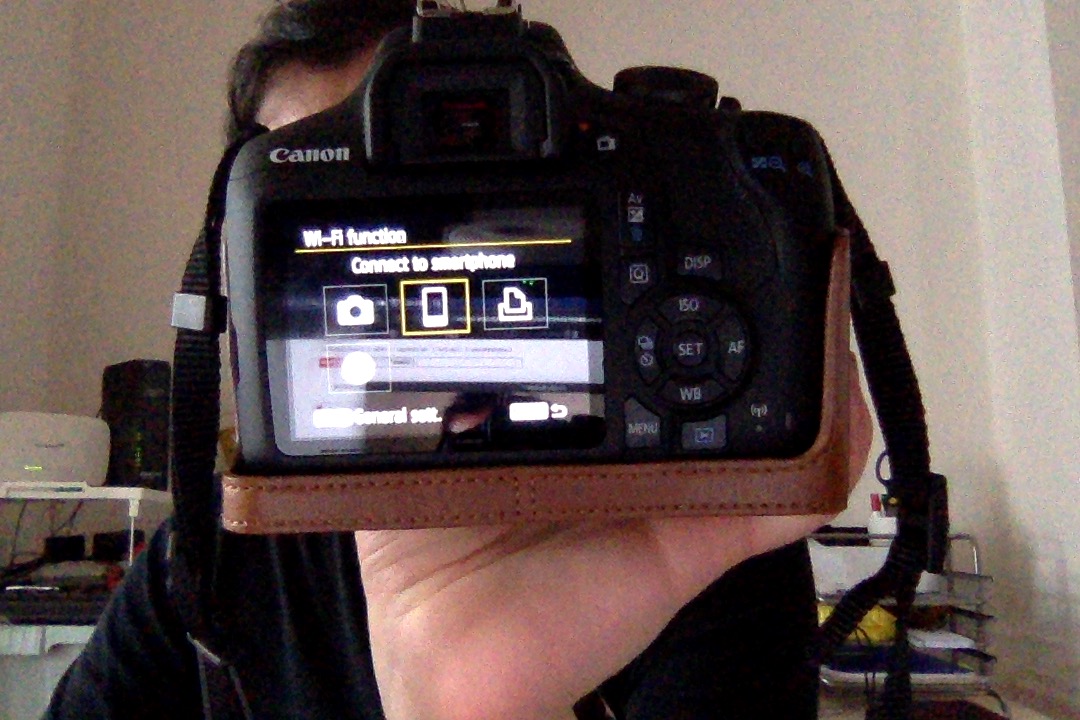
I downloaded the Canon Utility 2 and Utility 3 and the network utilty app. I can't figure out how to connect my macbook wirelessly to the camera so i can import the pictures directly onto my macbook. The camera does not list a computer as an option. Is this camera model capable of connecting with computer on wifi? I can use wifi with the Canon Connect app just fine.
5 REPLIES 5


Options
- Mark as New
- Bookmark
- Subscribe
- Mute
- Subscribe to RSS Feed
- Permalink
- Report Inappropriate Content
06-11-2020 06:52 AM
I believe the wireless connectivity in that model is only for connecting to mobile devices. Use a USB cable to connect to laptop or computer, which is a MUCH fasater connection, anyway.
--------------------------------------------------------
"Enjoying photography since 1972."
"Enjoying photography since 1972."

Options
- Mark as New
- Bookmark
- Subscribe
- Mute
- Subscribe to RSS Feed
- Permalink
- Report Inappropriate Content
06-11-2020 09:35 AM - edited 06-11-2020 10:19 PM
@Waddizzle wrote:I believe the wireless connectivity in that model is only for connecting to mobile devices. Use a USB cable to connect to laptop or computer, which is a MUCH fasater connection, anyway.
Let me try to put what Waddizzle is saying in somewhat more technical terms. Some Canon cameras can be configured as a WiFi access point, but yours apparently cannot; it can function only as a client. Which means that for it to communicate with a computer, the computer must be an access point. Most WiFi-equipped laptop computers prefer to be a client, but some can be configured as an access point. Whether your Macbook is one of them, I don't know; but a bit of research should tell you. If it isn't, then you're probably out of luck and should take Waddizzle's advice to use a USB cable instead.
Personally, I think you should take Waddizzle's advice anyway, and use a USB cable or even a card reader. WiFi is slow and cumbersome for the purpose. There may well be circumstances where WiFi is the best way to go, but uploading images from a camera to a computer isn't one of them.
Bob
Philadelphia, Pennsylvania USA
Philadelphia, Pennsylvania USA

Options
- Mark as New
- Bookmark
- Subscribe
- Mute
- Subscribe to RSS Feed
- Permalink
- Report Inappropriate Content
06-11-2020 10:04 AM
Options
- Mark as New
- Bookmark
- Subscribe
- Mute
- Subscribe to RSS Feed
- Permalink
- Report Inappropriate Content
06-19-2020 08:42 AM
Thank you so much ... I think you may be correct.
Thank you for the reply
Options
- Mark as New
- Bookmark
- Subscribe
- Mute
- Subscribe to RSS Feed
- Permalink
- Report Inappropriate Content
06-19-2020 08:44 AM
I have the canon app on my phone (Samsung) but that requires that I download the files onto my mac and then into photos mac app. It's fine, it works and takes a bit of time but for now, its' fine.
Thank you for the advice

Announcements
07/22/2026: New firmware updates are available.
EOS R6 Mark III - Version 1.1.0
05/13/2026: New firmware updates are available.
EOS R5 Mark II - Version 1.3.0
EOS R6 Mark II - Version 1.7.0
04/28/2026: Service Notice: Caution Concerning use of Lithium Batteries
03/17/2026: New firmware updates are available.
SELPHY CP1500 - Version 1.0.7.0
02/23/2026: New firmware update is available for EOS C50- Version 1.0.3.1
01/23/2026: New firmware update is available for RF 24-105mm F4 IS USM- Version 2.0.7
01/20/2026: New firmware updates are available.
10/21/2025: Service Notice: To Users of the Compact Digital Camera PowerShot V1
10/15/2025: New firmware updates are available.
Speedlite EL-5 - Version 1.2.0
Speedlite EL-1 - Version 1.1.0
Speedlite Transmitter ST-E10 - Version 1.2.0
07/28/2025: Notice of Free Repair Service for the Mirrorless Camera EOS R50 (Black)
05/21/2025: New firmware update available for EOS C500 Mark II - Version 1.1.5.1
Related Content
- EOS R7 getting ERR 12 when trying to connect to MacBook Pro (macOS Tahoe 26.5.2). EOS Utility 3 in Camera Software
- EOS R6 Mark II – Firmware 1.7.0 – Bug: 5GHz hotspot invisible on Samsung Android (DFS channel issue) in EOS DSLR & Mirrorless Cameras
- Difficulty connecting EOS Rebel T7 to MacBook to upload photos in EOS DSLR & Mirrorless Cameras
- R3 cannot wirelessly connect to EOS Utilty in Camera Software
- Unable to download Images from EOS R6 and R6 Mark II to Mac Book Pro in EOS DSLR & Mirrorless Cameras

Ⓒ 2026
Canon U.S.A Inc. All Rights Reserved. Reproduction in whole or part without permission is prohibited.
